

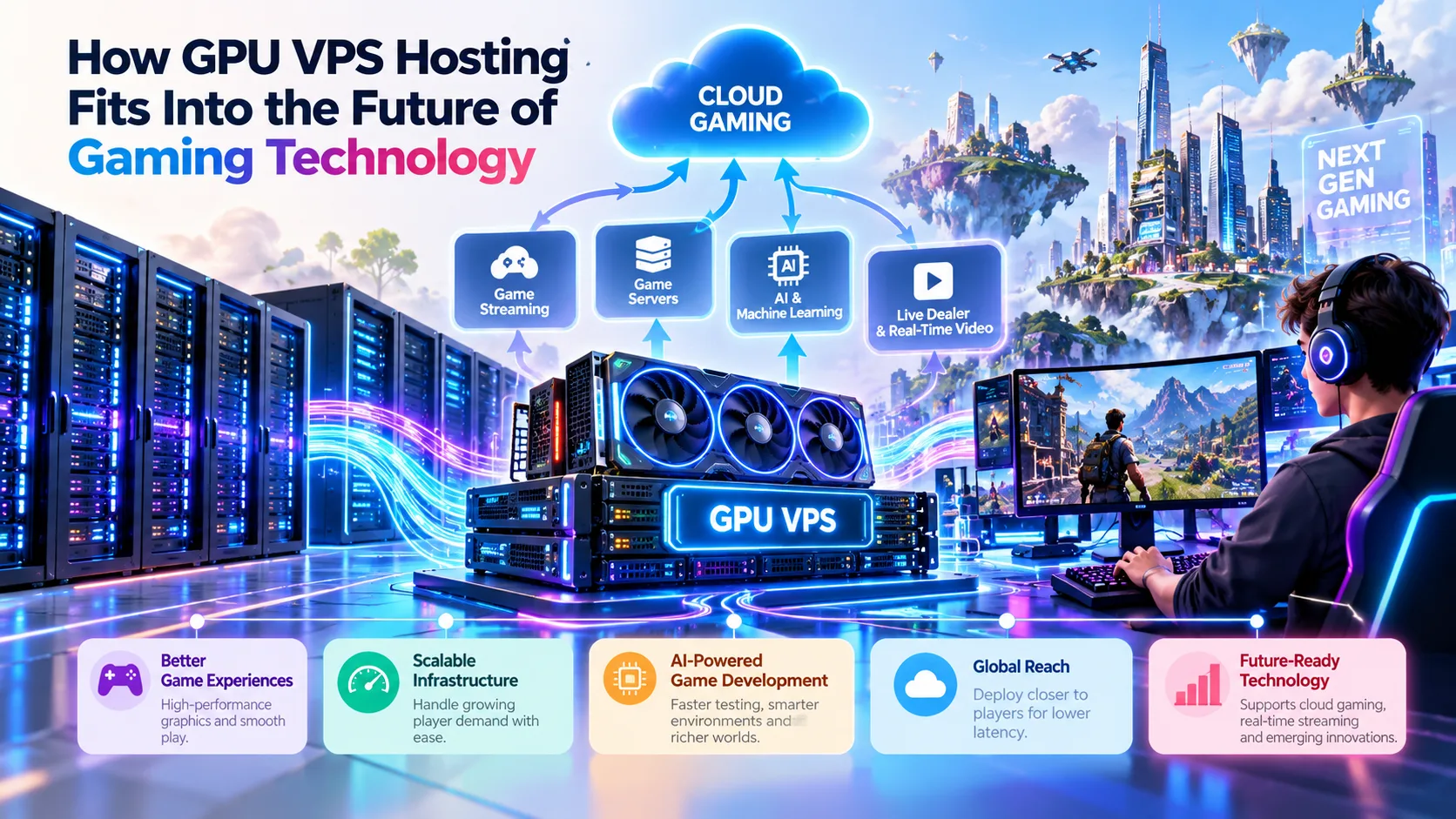
A slot reel spins, a card flips, a leaderboard refreshes, and somewhere a player decides the game feels quick. Very little of that impression comes from the artwork. It comes from a chain of servers, networks and software components answering each other in milliseconds, usually without anyone noticing they exist.
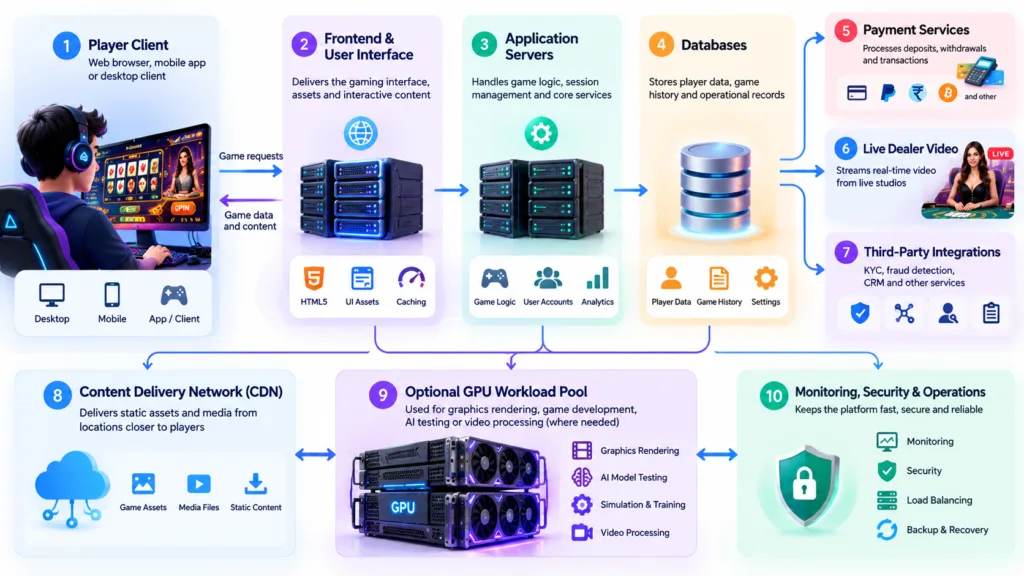
When people talk about online gaming technology, the conversation tends to start with design, bonuses or the latest release. The less glamorous question is where the work actually happens. A modern iGaming platform is not one machine running one program. It is a collection of services: a website or app that draws the interface, application servers that decide what happens next, databases that remember who you are, payment systems that move money, video services that stream a live dealer table, and monitoring tools that watch for fraud or failure.
Most of those jobs run perfectly well on ordinary central processing units, the general-purpose chips that have powered web infrastructure for decades. But a smaller set of tasks, particularly ones involving real-time graphics, video processing, simulation or machine learning, can benefit from a different kind of processor. That is where GPU VPS hosting enters the conversation, not as a replacement for everything else, but as a specialised option for workloads that genuinely need parallel computing.
This article looks at how graphics processing units fit into gaming infrastructure, where they help, where they are unnecessary, and how to judge whether accelerated hosting is worth the money.

What Is GPU VPS Hosting?
Start with the virtual private server. A VPS is a slice of a physical machine. A hypervisor divides the host’s processors, memory, storage and network capacity into isolated virtual machines, and each one behaves like its own server with its own operating system. You get more control than on shared hosting and less cost than renting an entire physical box.
A graphics processing unit is a chip built around a large number of relatively simple cores. Where a CPU excels at running a handful of complex instruction streams very quickly, a GPU excels at running the same operation across thousands of data points at once. That design was originally aimed at rendering pixels, and it turned out to be unusually well suited to other parallel problems, including neural network training and inference.
GPU VPS hosting combines the two ideas. The virtual machine still has its own CPU allocation, memory, storage and network interface, but it also gets access to one or more physical GPUs. That access is usually delivered in one of two ways. Hardware passthrough gives the virtual machine direct control of an entire GPU, which offers predictable performance but limits how many machines can share the card. Virtual GPU technology, sometimes combined with partitioning features on modern data centre cards, splits a single physical GPU into smaller instances so several tenants can each use a portion.
Dedicated and shared GPU resources
The distinction matters more than most marketing pages admit. A dedicated GPU attached to your virtual machine behaves consistently, because nothing else is competing for it. A shared or partitioned GPU can be cheaper, but its behaviour depends on how the provider schedules access and how busy the neighbours are. Two plans can advertise the same chip and deliver noticeably different results.
Inside a GPU-Enabled Virtual Server
Six essential components, what they do and why they matter when running demanding gaming, graphics and AI workloads.
GPU Model
Handles parallel graphics, video processing and machine learning operations.
Why it mattersArchitecture, processing capability and supported features determine which applications and frameworks can run effectively.
GPU Memory
Stores graphics textures, video frames, model weights and temporary computing data.
Why it mattersInsufficient video memory can cause out-of-memory errors or require smaller batches, simpler scenes and lower resolutions.
vCPU Allocation
Runs the operating system, application logic and data preparation tasks.
Why it mattersInsufficient CPU capacity can slow data delivery to the GPU, leaving valuable processing resources underused.
System RAM
Holds application state, datasets, operating system processes and caches.
Why it mattersLow system memory can trigger slow disk swapping and limit performance even when the GPU has spare capacity.
Storage
Stores the operating system, development builds, game assets, datasets and output files.
Why it mattersFast SSD or NVMe storage can shorten loading and data-access times for large builds and datasets.
Network
Carries assets, video streams, telemetry and application traffic between systems.
Why it mattersLimited bandwidth, high latency or unstable connections can become bottlenecks before GPU capacity is fully used.
The word GPU on a hosting plan tells you very little by itself. A card with more usable memory may suit a particular model or scene better than a newer card with insufficient memory. Before choosing a plan, check the exact GPU model, available GPU memory, virtualisation method, CPU and RAM allocation, and whether GPU resources are dedicated or shared. The best configuration depends on the workload you actually need to run.
How iGaming Platforms Actually Work
Before deciding whether a GPU belongs anywhere near a gaming platform, it helps to separate the platform into its parts. Most operators run some version of the following, though the details vary by game type, jurisdiction, scale and vendor.
The frontend and user interface
This is what a player sees: the lobby, the game client, the account pages and the cashier. Much of it runs in a browser or a mobile app, which means the rendering happens on the player’s device, not on the server. A traditional CPU-based web stack usually serves this layer perfectly well.
Application and game servers
These handle session state, game rounds, rules, wallet interactions and real-time events. The logic is typically lightweight and latency-sensitive, which makes fast single-core performance and efficient networking more important than parallel throughput. GPUs rarely help here.
Databases and account services
Player accounts, balances, transaction histories and audit trails live in databases. These systems are built around consistency, indexing and durability. Their performance depends on storage, memory and query design rather than graphics hardware.
Random number generation
Where a game relies on random outcomes, a certified random number generator produces them. These components are designed for statistical quality, auditability and regulatory approval. Adding a GPU does not make a random number generator more random, more fair or more predictable, and no responsible operator would suggest otherwise.
Payments and transaction processing
Deposits, withdrawals, anti-fraud checks and reconciliation run through integrations with payment providers. Security, compliance and reliability dominate the requirements. This is conventional transactional computing.
Live dealer video delivery
Live dealer products involve cameras, encoding, packaging and content delivery networks. Video encoding can be accelerated by hardware, but it is often handled by dedicated encoding appliances or media services rather than by the same servers that run game logic.
Analytics, monitoring and fraud detection
These systems ingest large volumes of events. Some parts are ordinary database and streaming work. Others, particularly anomaly detection or behavioural modelling, may lean on machine learning, which is one area where GPU acceleration can be relevant.
The precise architecture varies by platform, game type, jurisdiction and operator. Treating an iGaming platform as a single system with a single hardware requirement is a simplification that rarely survives contact with a real deployment.
Where GPUs Can Make a Practical Difference
GPU acceleration is useful when a workload involves many similar calculations running at the same time. In gaming technology, that shows up in a handful of places, and it is worth being precise about each one.
Graphics-intensive game development and rendering
Building a modern game involves asset creation, lighting calculations, shader compilation and offline rendering. Rendering farms and build pipelines benefit from parallel hardware because each frame or tile can be processed independently. A GPU VPS can serve as a remote workstation or a small render node. That said, a development team still needs fast storage, adequate system memory and a reliable network to move large assets around. For small projects with modest assets, a well-specified CPU server may be entirely sufficient.
Testing graphical game clients
Automated tests that capture and compare rendered frames need hardware capable of producing those frames. A virtual machine with GPU access can run a graphical client headlessly, capture screenshots and compare them against reference images. This is most valuable when the visual layer is complex enough that small rendering changes matter. For text-heavy interfaces or simple layouts, CPU-based browser testing frameworks are usually enough.
AI-assisted quality assurance
Machine learning models can help identify visual glitches, unusual layouts or unexpected states in automated test runs. Inference workloads of this kind often run faster on GPUs, particularly when many images are processed in batches. Even so, the model still needs good training data, the tests still need human review, and the results are probabilistic rather than definitive.
Computer vision and selected media processing
Tasks such as object detection in video feeds, frame-level analysis or bulk image transformation can be accelerated by GPUs. This is established technology rather than speculation. It is also worth noting that video encoding and transcoding often run on dedicated hardware encoders, which may be separate from the general-purpose GPU compute path.
Simulation and parallel computation
Physics simulations, Monte Carlo style modelling used for research, and other numerical workloads can exploit parallel hardware. These are common in game development and academic work. They are rarely part of the day-to-day operation of a live casino platform.
Development environments
Developers working with machine learning frameworks, shader tooling or GPU-accelerated libraries often want a consistent environment that matches production. A GPU-enabled virtual server can provide that without requiring every engineer to own a high-end workstation.
Worth remembering: a GPU accelerates a specific part of a pipeline. It does not accelerate the database, the payment integration, the content delivery network or the regulatory reporting. Those components still need sensible design.
GPU VPS Hosting Versus Traditional VPS Hosting
The two options are not rivals in a straight contest. They are tools for different jobs, and the useful question is which one matches the workload you can actually measure. A conventional VPS is usually cheaper, simpler to manage and perfectly adequate for web applications, APIs, databases and game logic. A GPU VPS costs more but unlocks parallel processing that a CPU cannot match at the same price point.
One practical point often gets lost. A GPU plan with a slow CPU, limited memory or a congested network can underperform a cheaper CPU plan for general web work. Acceleration only helps the portion of the workload that can actually use it.
Latency, Reliability and the Player Experience
Players judge a platform on how it feels, and feeling is a network problem as much as a hardware one. Latency is the time it takes for a request to travel to a server and for a response to come back. Jitter is the variation in that time. Packet loss is data that never arrives. All three can ruin an otherwise well-built experience.
Several layers contribute to responsiveness. Server location matters, because physics sets a floor on round-trip time. Load balancing spreads traffic so no single machine becomes a bottleneck. Caching reduces repeated work. Content delivery networks push static assets closer to players. Monitoring catches degradation before players complain.
It is important to separate two very different things. A game’s rendering performance depends on the device in front of the player. The response time of a remote backend depends on network paths, server capacity and application efficiency. A GPU virtual server can improve the second only where GPU processing is actually part of the request path, which for most browser-based casino games it is not.
Equally, no hosting plan can promise zero lag or guaranteed uptime. Redundancy, failover design, monitoring and clear incident processes do more for reliability than any single hardware upgrade. A GPU VPS is one component in that picture, not a substitute for it.
AI, Automation and Modern Game Testing
Machine learning has become a normal part of software development, and game studios use it in ways that range from well established to genuinely experimental. GPU acceleration is relevant to the established end of that spectrum.
Visual regression testing is a good example. Automated runs capture screenshots of a game or interface, and comparison tools flag differences. When those comparisons involve learned models rather than pixel-by-pixel diffs, inference can be accelerated on a GPU, especially across large batches of captures.
Computer vision can also help with automated playtesting, where a system interacts with a build and checks whether the interface responds as expected. Model training for such systems is GPU-heavy, while day-to-day inference may run acceptably on a CPU depending on the model size.
Development pipelines benefit too. Continuous integration jobs that compile shaders, train small models or generate assets can be distributed across GPU-enabled runners.
What this does not mean is that AI can guarantee bug-free software. Test coverage, reproducibility, data quality and human review remain essential. Models can miss defects, produce false positives and drift as the product changes. Nor can machine learning predict random game outcomes or identify winning bets. Claims of that kind should be treated with scepticism.
Security, Privacy and Regulatory Responsibilities
Buying a GPU VPS does not make a platform secure, and it certainly does not make it compliant. Those outcomes come from process, configuration and governance, not from a product label.
Basic controls matter everywhere. Access should be restricted to people who need it, with multi-factor authentication for administrative accounts. Operating systems, drivers and applications need regular patching, and GPU drivers deserve particular attention because they are part of the attack surface. Network segmentation and firewall rules should limit what each service can reach. Encryption should protect data in transit and, where appropriate, at rest.
Backups and disaster recovery plans need testing, not just documentation. Monitoring and incident response processes should be able to detect unusual activity and escalate it. Data minimisation and privacy principles should shape what is collected and how long it is kept.
Gaming operators also face sector-specific obligations that vary widely by jurisdiction, covering licensing, player protection, responsible gambling tools, anti-money laundering checks and reporting. Privacy and data protection law adds further requirements. None of this is solved by hardware choice. Where legal obligations apply, qualified local advice is the sensible route rather than general guidance from an article.
When Does GPU Acceleration Make Sense?
Different computing tasks benefit from different hardware. This illustrative chart shows where GPU acceleration may be useful, rather than reporting benchmark results.
Before paying for accelerated infrastructure, work through the following: the exact GPU model and how much memory you can actually use; the CPU and RAM allocation that will feed it; storage performance, since large datasets and builds are unforgiving of slow disks; network quality and bandwidth; the pricing model and whether resources are guaranteed or best effort; how much of the day the GPU would sit idle; how the workload scales if demand doubles; and what support, monitoring and recovery options come with the plan.
Does Your Workload Actually Need a GPU?
Choose infrastructure based on the work your application performs, not simply on the newest hardware available.
Conventional Web Application
Usually not required. Requests, database queries and API operations are generally handled by the CPU and supporting services.
Why it mattersAdding a GPU may increase infrastructure costs without improving the application’s main bottleneck.
Graphics-Heavy Development
Often beneficial. Rendering, shader workloads and certain asset-processing pipelines can use parallel GPU hardware.
Why it mattersPerformance depends on the software, scene complexity, GPU memory and the CPU feeding data to the GPU.
AI-Assisted Testing
Sometimes needed. Larger models and batched inference may benefit from acceleration, while smaller models can run adequately on a CPU.
Why it mattersModel size, inference framework, throughput requirements and memory usage determine whether acceleration is worthwhile.
Live Video Workflow
It depends. Video encoding may benefit from dedicated hardware, but ordinary streaming delivery often relies on separate media services and CDNs.
Why it mattersCodec support, concurrent streams, resolution, latency and delivery architecture influence the best solution.
Evaluating a GPU VPS Provider Without the Marketing Hype
Provider pages tend to lead with the most impressive chip name in the range and leave the details to a footnote. A neutral comparison looks at the specification sheet and the terms of service rather than the headline.
12 Things to Check Before Choosing a GPU VPS
Look beyond headline specifications. These details help you understand what you are actually paying for and whether the server fits your workload.
-
Exact GPU specification Check the model, generation, memory capacity and memory type, rather than relying on a GPU family name alone.
-
Virtualisation method Establish whether the setup uses passthrough, partitioning or a virtual GPU, and understand the practical implications.
-
GPU sharing model Find out whether the GPU is exclusively allocated to your instance or shared with other tenants.
-
CPU and memory pairing Check the available CPU resources and system RAM that support data preparation and GPU workloads.
-
Storage type and throughput Compare NVMe, SSD or network storage options and review any performance or capacity limits.
-
Network limits Review bandwidth allowances, data transfer charges and latency to your intended users or services.
-
Data centre locations Consider proximity to players, development teams and connected services when choosing a region.
-
Operating system and driver support Verify available operating system images, compatible GPU drivers and the provider’s update process.
-
Benchmark transparency Look for reproducible tests with clear hardware details, workloads and testing methods rather than isolated performance claims.
-
Support terms Check support hours, response targets, escalation procedures and whether GPU-specific problems are covered.
-
Billing model Compare hourly, monthly and committed-use pricing, including charges when scaling down or stopping an instance.
-
Recovery options Check snapshots, backup arrangements and how easily a failed instance can be rebuilt or restored.
💡 A useful final check
Specification sheets are a starting point, not proof of real-world performance. A provider’s GPU VPS hosting information can help you review the advertised configuration. Confirm the actual allocation, resource limits, pricing and support terms before making a decision.
Specification sheets are a reasonable starting point, and a provider’s published GPU VPS hosting information can help readers see which GPU models, memory allocations and virtualisation methods are on offer before they compare anything else. That is useful context even for people who never intend to buy, because it shows what the market currently treats as standard.
What no comparison table can tell you is how a provider behaves under pressure. Reading the terms carefully, checking whether resources are guaranteed, and testing a small workload before committing are more informative than any promotional claim.
The Next Phase of Gaming Infrastructure
The direction of travel in gaming infrastructure is not towards a single dominant technology. It is towards workload-specific computing, where each part of a platform runs on hardware matched to its job.
Ordinary CPU servers will keep doing the heavy lifting. Account systems, payment flows, databases, regulatory reporting and the majority of browser-based game logic are well served by them, and that is unlikely to change. GPU acceleration will continue to matter where parallel processing genuinely helps: development pipelines, rendering, machine learning inference and selected media tasks.
Cloud-based development environments will make accelerated hardware more accessible to smaller studios, since a team no longer needs to buy a workstation for every engineer who occasionally needs GPU time. AI-assisted testing will mature, but it will mature as a supplement to human review rather than a replacement. Observability will improve, and teams will increasingly be judged on how well they measure their own workloads rather than on which chip they rented.
The practical takeaway is straightforward. Understand what your platform actually does, measure where time and money are being spent, and choose infrastructure that matches the bottleneck you can demonstrate. GPU VPS hosting is a genuinely useful option for specific computational problems. It is not a general upgrade, and treating it as one is how budgets get wasted on hardware that sits idle while the real constraint goes unaddressed.
Disclaimer: This article is intended for general informational and educational purposes only. The technical examples are illustrative and do not constitute a guarantee of performance, security, regulatory compliance or business results. Infrastructure requirements vary according to the application, configuration and operating environment. Readers should independently verify provider specifications, applicable laws and security requirements before making technical or commercial decisions. Any reference to a third-party service is provided for contextual information and does not constitute an endorsement. Online gambling involves financial risk and is subject to local laws and age restrictions. Readers should only access gambling services where legally permitted and should make informed, responsible decisions.