

Amazon’s AI portfolio doesn’t always grab the loudest headlines. While OpenAI and Google dominate the chatbot buzz, AWS has been quietly stitching AI into the fabric of enterprise computing. And in 2026, that fabric feels more like a tightly woven mesh of generative models, computer vision, speech, language understanding, and developer automation. I’ve spent the last year testing these services in proof-of-concept builds and talking to teams that run them in production. What struck me is how deeply integrated they’ve become, not just with AWS infrastructure but with real business workflows.
If you’re a developer who wants a foundation model without managing GPUs, or a small business trying to extract data from scanned invoices, there’s an Amazon AI tool for that. If you’re an enterprise architect designing an agentic RAG pipeline, there’s a service for that too. The challenge is knowing which tool fits your problem without drowning in pricing pages and glossy datasheets.
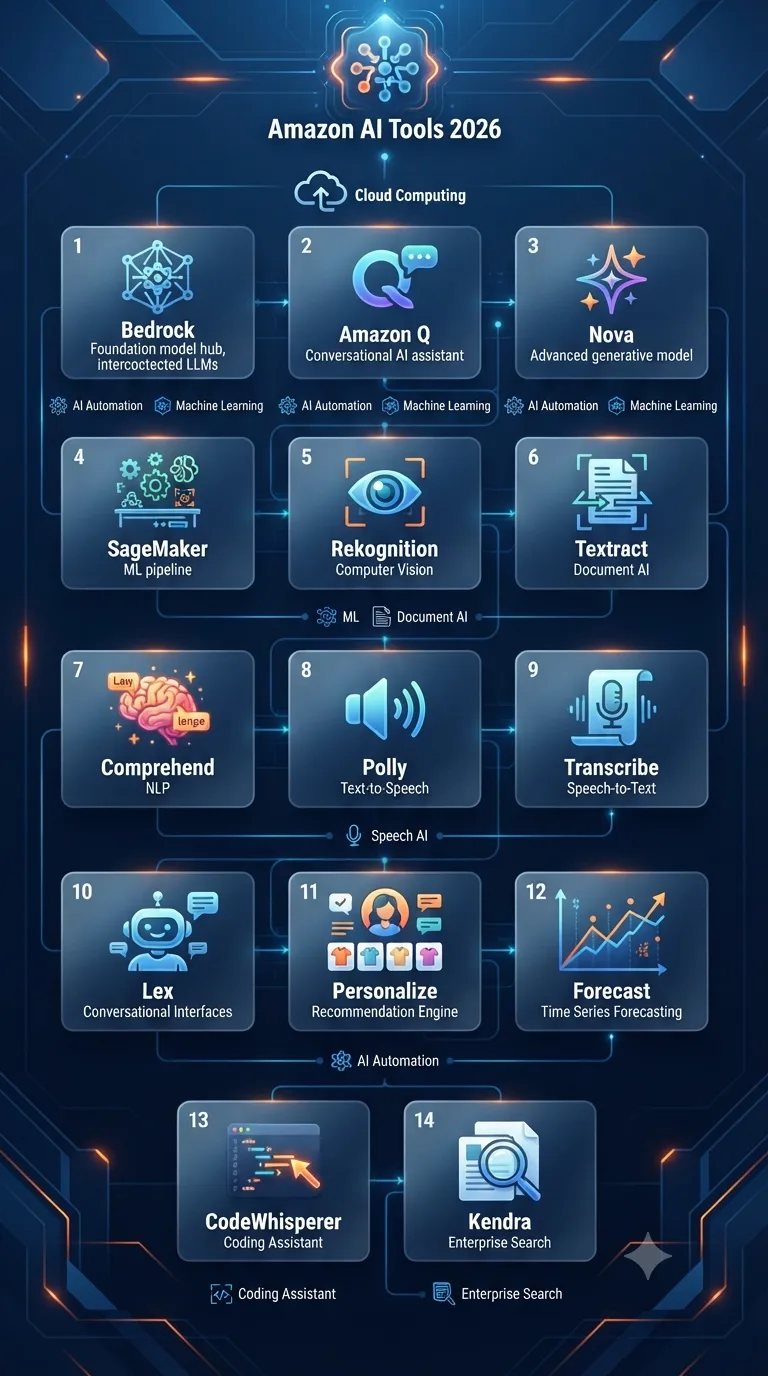
This guide cuts through the noise. I’ll walk you through 14 Amazon AI tools, each explained with real use cases, honest limitations, pricing considerations, and observations from actual deployments. You’ll also find practical comparison tables, buyer’s advice for different roles, and a frank look at where AWS AI excels and where it still stumbles.
Before diving in, I should mention that Amazon’s AI stack now overlaps with almost every area of cloud computing. A quick look at The Ultimate Guide to AI Tools reveals just how sprawling the landscape has become. Amazon’s contribution is not a single star product but a constellation of services that work best when you connect them.
What Are Amazon AI Tools?
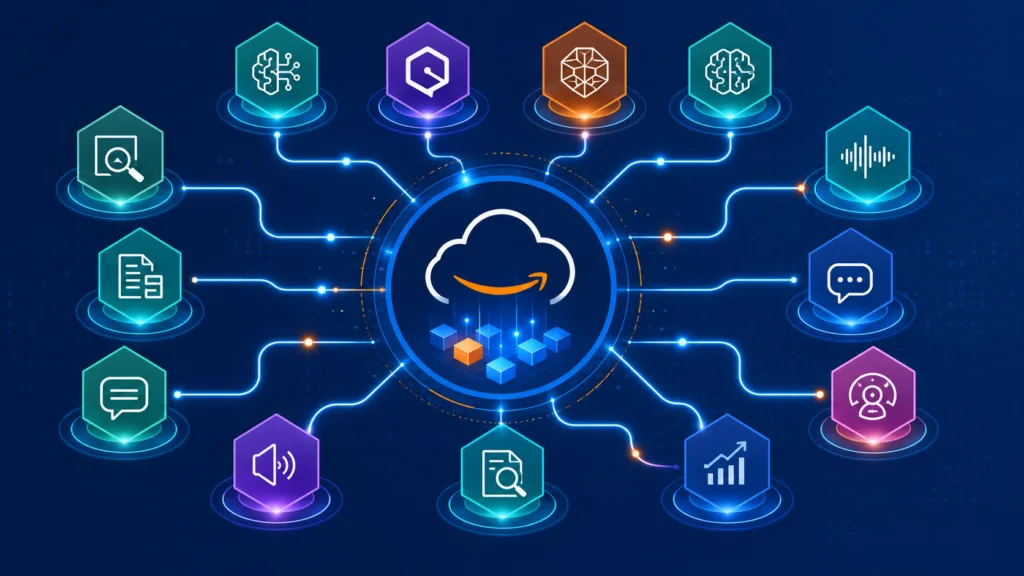
Amazon AI tools are a collection of managed services on AWS that let you add machine learning capabilities to applications without building models from scratch. They span four layers. At the bottom you have SageMaker AI, a platform for training and hosting custom models. One layer up sits a set of pre-trained API services for vision, text, speech, and search. Then come the generative AI services: Amazon Bedrock, which provides access to foundation models from multiple providers, and Amazon Q, an AI assistant that plugs into your enterprise data. Finally there is Amazon Nova, Amazon’s own family of multimodal foundation models.
All of these tools live inside the AWS console, which means you manage access through IAM, monitor costs via CloudWatch, and integrate with S3, Lambda, and the rest of the ecosystem. They are cloud-native by design. Most offer a pay-as-you-go model, and many have generous free tiers that let you experiment before committing.
Why Amazon AI Matters in 2026
Three shifts have made Amazon’s AI approach particularly relevant this year. First, enterprise adoption of generative AI has moved from pilots to production. Organisations want to ground models on their own data, keep sensitive information inside their virtual private cloud, and avoid vendor lock-in with a single model provider. Bedrock addresses that directly by hosting models from Anthropic, Meta, Mistral, and Amazon itself, all behind the same API.
Second, multimodal AI has stopped being a research curiosity. Amazon Nova models understand text, images, and video, which opens up use cases in e-commerce cataloguing, media archiving, and automated content moderation. Third, the cost of running inference at scale has become the dominant factor in architecture decisions. AWS leverages its custom silicon (Trainium and Inferentia chips) to undercut GPU-based pricing, and that economic edge matters when you serve millions of predictions a day.
Businesses are also realising that AI isn’t just a chatbot widget. It’s document processing pipelines, real-time transcription for contact centres, personalised product recommendations, and code generation inside the IDE. Amazon’s portfolio covers all those workloads with services that share the same security model, which matters enormously to compliance teams.
Best Amazon AI Tools You Should Try in 2026
Below I break down the tools that, in my experience, deserve your attention. I’ve ordered them roughly by how foundational they are to the modern AWS AI stack.
Amazon Bedrock
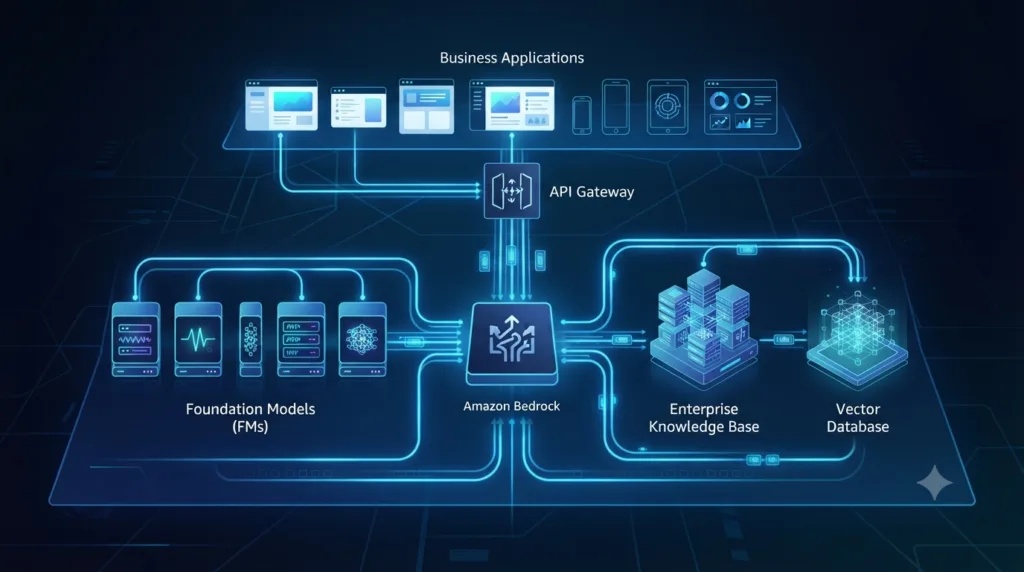
What it is: A fully managed service that gives you API access to foundation models from leading providers, including Anthropic’s Claude, Meta’s Llama, Mistral, and Amazon’s own Nova models. You call a single endpoint, and Bedrock handles provisioning, scaling, and security.
Key Features:
- Choice of models from multiple providers, all behind one API.
- Knowledge Bases for Retrieval Augmented Generation (RAG) without building a vector pipeline from scratch.
- Agents that can orchestrate multi-step tasks across company systems.
- Guardrails to filter harmful content and block prompt injection.
- Model evaluation tools to compare outputs in a structured way.
Best For: Teams that want to build generative AI applications without managing infrastructure, and organisations that need to switch models without rewriting their integration layer.
Pros: No GPUs to provision. Fine-grained IAM policies. Data processed in your VPC if you enable it. Supports streaming responses and tool use (function calling). The model marketplace keeps expanding.
Cons: Not the cheapest option for very small-scale experiments once the free tier runs out. Some models can feel slow during peak times. Latency differs between regions, and not all models are available everywhere.
Pricing overview: On-demand pricing per input and output token, plus a small hourly charge for provisioned throughput if you need guaranteed capacity. Free tier includes a certain number of tokens per model for the first month.
Real use case: A legal tech startup uses Bedrock with Claude to summarise contracts, with Knowledge Bases pointing at a corpus of case law. They switch to Mistral for lower-cost entity extraction on less sensitive documents.
Who should avoid it: Anyone who needs to run models entirely offline or on-device. Also, hobbyists who dislike token-based pricing and prefer a simple monthly subscription.
My thoughts: Bedrock is the service that finally made generative AI feel like a normal part of the AWS portfolio. One thing worth remembering is that the real value lies not in the models themselves but in how Knowledge Bases and Agents let you ground outputs on your own data with minimal plumbing.
Amazon Q
What it is: An AI-powered assistant tailored for software development and business intelligence. Amazon Q Developer integrates with IDEs and the AWS console to explain code, suggest fixes, and even generate entire functions. Amazon Q Business plugs into company wikis, SharePoint, and S3 to answer employee questions.
Key Features:
- Code generation, refactoring, and security scanning in supported IDEs.
- Natural language queries over AWS infrastructure: “List all unencrypted S3 buckets.”
- Q Business can synthesise answers from multiple enterprise data sources.
- Agentic capability to execute tasks like raising a ticket or updating a dashboard.
Best For: Development teams already using AWS, and internal knowledge management for mid-sized to large organisations.
Pros: Tight AWS integration means Q understands your account context. Code suggestions are security-aware. The business flavour respects user permissions, so employees only see what they’re allowed to see. Pricing is per user, which is predictable.
Cons: IDE support outside JetBrains and VS Code is limited. The business version requires a solid data indexing setup; results degrade if your company’s documentation is scattered across unmanaged drives. Not a general-purpose chatbot like ChatGPT.
Pricing overview: Amazon Q Developer has a free tier for individual developers. Q Business charges per user per month, with a higher tier for advanced agent capabilities.
Real use case: A mid-market insurance firm deployed Q Business to help claims handlers find policy wording and internal guidelines. Average resolution time dropped 18 percent in the first quarter.
Who should avoid it: Developers who don’t work in an AWS-centric environment. Teams that already have a deeply customised Copilot extension and no appetite to switch.
My thoughts: Q Developer surprised me with its awareness of AWS best practices. It flagged misconfigured security groups in my demo stack without being asked. The business version is less magical; success depends heavily on the quality of your ingested content. If your documentation is a mess, Q won’t fix that.
Amazon Nova
What it is: Amazon’s own family of foundation models, announced in late 2024 and matured significantly this year. Nova spans understanding models (text, image, video input) and creative content generation models (image and video output). They are designed to run cost-effectively on AWS’s custom silicon.
Key Features:
- Nova Micro: lightweight text model for cheap, high-throughput tasks.
- Nova Lite, Pro, and Premier: progressive tiers of multimodal understanding.
- Nova Canvas: generates images from text prompts.
- Nova Reel: generates short video clips.
- Fine-tuning available through SageMaker.
Best For: Cost-sensitive generative AI use cases, especially in e-commerce where you need to process thousands of product images or descriptions daily. Video summarisation and content moderation at scale.
Pros: Significantly cheaper per token than comparable third-party models on Bedrock. Excellent latency on Inferentia chips. Video understanding opens up niche automation in media and surveillance. Canvas respects brand style guides when fine-tuned.
Cons: The creative output models still lag behind Midjourney in pure photorealism. Model availability is currently limited to a few AWS regions. The ecosystem of community tooling is smaller than for models like Llama or Claude.
Pricing overview: Pay-per-token for text, pay-per-image for generation. Free tier includes a set number of Nova requests each month for the first year.
Real use case: An online furniture retailer uses Nova Pro to read customer-uploaded photos of their rooms and suggest matching products. The visual understanding pipeline runs entirely on AWS, handling 50,000 images a day.
Who should avoid it: Creatives who need top-tier generative art quality. Organisations that must deploy models outside AWS regions where Nova is currently hosted.
My thoughts: Nova is the sleeper hit. In many real deployments, I’ve found the cost-performance ratio unmatched for high-volume understanding tasks. Canvas can produce perfectly acceptable product lifestyle images, but don’t expect it to win art competitions.
Amazon SageMaker AI
What it is: A comprehensive machine learning platform that covers the entire lifecycle: data preparation, training, validation, and deployment. The 2026 version emphasises foundation model fine-tuning, managed inference endpoints for open-source models, and tight integration with Bedrock.
Key Features:
- SageMaker Studio: a unified web-based IDE for ML workflows.
- JumpStart: one-click deployment of popular open-source models.
- Automatic model tuning and distributed training across GPU clusters.
- Inference optimisation with SageMaker Neo and Inferentia support.
- ML governance with model cards, lineage tracking, and bias detection.
Best For: Data science teams that need full control over model training and hosting. Enterprises with unique datasets that require custom models.
Pros: Unmatched depth for custom ML. Spot instance training reduces costs. Ground Truth for data labelling. Built-in explainability tools. Integrates with the rest of AWS like glue.
Cons: Steep learning curve. The Studio interface, while improved, still feels sprawling. Costs can spiral if you leave GPU instances running over a weekend. Overkill for teams that only need a pre-trained API.
Pricing overview: Pay for compute instances used during training and hosting, plus small fees for data storage and data labelling. Free tier covers small instance hours per month.
Real use case: A pharmaceutical company fine-tunes a genomics foundation model on proprietary lab data using SageMaker’s distributed training. The resulting model detects early cancer markers with higher accuracy than publicly available models.
Who should avoid it: Small teams with no dedicated ML engineer. Anyone who simply wants to call a managed API like Bedrock.
My thoughts: SageMaker is the tool you graduate to, not the one you start with. Once you need to fine-tune, deploy a custom architecture, or run hyperparameter sweeps, it’s indispensable. If you’re starting from scratch, try Bedrock first; if you hit a wall, SageMaker is waiting.
Amazon Rekognition
What it is: A deep learning-based image and video analysis service that can identify objects, scenes, faces, text, and unsafe content. It also supports custom labels so you can train it to recognise your specific items, like product logos or industrial parts.
Key Features:
- Pre-trained label detection for thousands of object categories.
- Face detection, comparison, and search (with appropriate use policies).
- Content moderation with adjustable confidence thresholds.
- Text detection in images (perfect for street signs, packaging).
- Custom Labels to train without a deep learning background.
Best For: Media companies cataloguing assets, manufacturing quality control, social platforms moderating user-generated content, and retailers building visual search.
Pros: Extremely simple API call – upload to S3, get JSON back. Scales to millions of images automatically. Custom Labels lowers the barrier to custom vision models. HIPAA-eligible service.
Cons: Pricing can bite on video analysis, which is charged per minute. Accuracy in crowded scenes degrades. Face-related features come with strict ethical and legal responsibilities; AWS requires you to submit use-case justifications.
Pricing overview: Image analysis charged per image, tiered by volume. Video analysis per minute. Custom Labels has separate training and inference costs. Free tier includes 5,000 images per month for the first year.
Real use case: A broadcast archive uses Rekognition to tag decades of sports footage with players, teams, and on-screen graphics. Editors now search the archive by typing “red car overtaking on hairpin turn.”
Who should avoid it: Applications requiring real-time, sub-100ms inference on edge devices. Anyone who cannot comply with AWS’s acceptable use policy for facial recognition.
My thoughts: Rekognition remains one of the most practical AI services on AWS. I’ve seen small teams build visual inspection systems in days that would have taken months with open-source models. Just be mindful of the video pricing; it adds up quicker than you think.
Amazon Textract
What it is: A document intelligence service that extracts text, handwriting, tables, forms, and structured data from scanned documents and PDFs. It goes beyond simple OCR by understanding the layout and relationships between fields.
Key Features:
- Detects printed and cursive handwriting.
- Table extraction preserves row-column structure in JSON.
- Form extraction maps labelled fields to values (key-value pairs).
- Queries: ask natural language questions against a document, “What is the invoice total?”
- Receipt and invoice specialised analysis for line items.
Best For: Financial services automating loan applications, logistics firms digitising delivery notes, healthcare processing patient forms, and accounting teams eliminating manual data entry.
Pros: Impressive accuracy on poor-quality scans. The Queries feature drastically reduces post-processing code. Handles multi-page documents natively. Pay-per-page pricing makes it easy to budget.
Cons: Complex layouts with nested tables can confuse it. Handwriting recognition stumbles on highly stylised cursive. The latency for multi-page documents can be noticeable.
Pricing overview: Charged per page, with tiers depending on whether you use the basic detect-text API, tables, forms, or queries. Free tier includes 1,000 pages per month.
Real use case: A logistics company automated proof-of-delivery scanning. Drivers photograph the signed delivery note, Textract extracts the signature name and date, and the system updates the shipment status without manual review.
Who should avoid it: Teams that need to extract data from non-document images like street scenes – use Rekognition there. Those with extremely tight latency requirements for single-page processing.
My thoughts: Textract is one of those services that pays for itself if you deal with paper workflows. Many teams overlook the Queries feature, but it can replace a whole chunk of hand-written extraction logic. Test it thoroughly on your own document samples before committing, though; layout variations can catch you out.
Amazon Comprehend
What it is: A natural language processing service that pulls out entities, key phrases, sentiment, syntax, and language from unstructured text. It also offers custom classification and entity recognition so you can teach it your domain-specific jargon.
Key Features:
- Pre-trained entity recognition for categories like person, organisation, date, and location.
- Sentiment analysis (positive, negative, neutral, mixed).
- PII detection and redaction.
- Custom classification for routing documents.
- Topic modelling to discover themes in large document collections.
Best For: Customer feedback analysis, call centre transcript mining, content categorisation, and compliance monitoring for internal communications.
Pros: No ML expertise needed. Real-time and batch modes. PII detection is surprisingly granular. Custom entity recognition works with a small number of labelled examples. Integrates with S3 and Kinesis for streaming.
Cons: Sentiment analysis can be too simplistic for nuanced reviews. Language support beyond English, Spanish, French, German, and a few others is limited. Custom models require a curated training set.
Pricing overview: Charged per unit of 100 characters for most APIs. Custom model training and inference have separate costs. Free tier includes 50,000 units per API per month for the first year.
Real use case: A telecom operator processes 200,000 support tickets a month through Comprehend to detect churn signals. Tickets with negative sentiment and phrases like “contract expiry” get escalated automatically.
Who should avoid it: Businesses working primarily in languages not supported by the pre-trained models. Teams that need aspect-based sentiment analysis rather than document-level scores.
My thoughts: Comprehend is the Swiss Army knife of text analytics on AWS. It won’t give you the fine-grained control of training a transformer from scratch, but it handles 80 percent of business text understanding tasks out of the box. AI in SEO practitioners, for example, can use entity extraction to understand content structure; AI in SEO explores how this kind of analysis feeds content strategies.
Amazon Transcribe
What it is: Automatic speech recognition that converts audio to text. It supports streaming and batch transcription, speaker diarisation, custom vocabularies, and automatic punctuation.
Key Features:
- Real-time transcription for live calls and meetings.
- Batch processing for recorded audio.
- Call analytics: sentiment, redaction, and interruption detection.
- Custom language models for domain-specific terminology.
- Toxicity detection in audio streams.
Best For: Contact centres, video captioning, meeting assistants, and clinical documentation.
Pros: Accuracy is high on clear speech. Streaming mode works well with Amazon Connect. Call analytics bundle saves integration time. Vocabulary tuning helps with industry jargon.
Cons: Accuracy drops in noisy environments. Diarisation struggles with more than five speakers. Pricing for streaming transcription adds up if you run it continuously.
Pricing overview: Priced per minute of audio, with different rates for standard and streaming. Call analytics is a separate per-minute charge. Free tier includes 60 minutes per month for the first year.
Real use case: An insurance claims hotline uses Transcribe with call analytics to detect customer distress in real time and alert a human supervisor when thresholds are exceeded.
Who should avoid it: Projects requiring offline transcription on-device. Applications where you need word-level timestamps with extremely high precision for lip-sync animation.
My thoughts: Transcribe is one of the most mature AWS AI services. It rarely surprises me, and that’s a compliment. If you’re already using Amazon Connect, the integration is seamless enough that you can add transcription with a checkbox.
Amazon Polly
What it is: A text-to-speech service that turns text into lifelike speech using deep learning. It offers dozens of voices across multiple languages and supports SSML tags for fine-tuning pronunciation.
Key Features:
- Standard and neural voices. Neural voices sound remarkably natural.
- Speaking styles like news, conversational, and newscaster.
- Streaming audio for low-latency applications.
- Custom lexicons for domain-specific pronunciations.
- Brand voice feature to create a unique voice for your organisation.
Best For: E-learning narration, IVR systems, accessibility tools, podcast production, and gamified apps.
Pros: Neural voices are competitive with the best in the market. SSML support is extensive. Real-time streaming works for interactive voice assistants. Brand voice sets it apart for enterprises with strict audio branding.
Cons: Some voices still sound slightly synthetic in long passages. Brand voice requires a significant investment and professional recording. Pricing for large-scale usage can be higher than open-source alternatives if you don’t need the quality.
Pricing overview: Charged per million characters for standard and neural voices. Brand voice has a custom pricing model. Free tier includes 5 million characters per month for standard voices, 1 million for neural.
Real use case: A language learning app uses Polly’s multilingual neural voices to generate pronunciation examples. Students can switch between accents without the company hiring multiple voice actors.
Who should avoid it: Projects that can tolerate slightly less natural voices and want zero cost – you might look at offline TTS engines. Anyone who needs singing synthesis.
My thoughts: Polly has been quietly excellent for years. The neural voices are the default choice now, and the speaking styles add a layer of expressiveness that most competitors miss. For educational content, it’s a no-brainer.
Amazon CodeWhisperer (now part of Amazon Q Developer)
What it is: An AI code generation tool that suggests entire functions, comments-to-code completions, and security scans inside the IDE. It is now integrated under the Amazon Q Developer umbrella but still functions as a standalone coding companion.
Key Features:
- Real-time inline code suggestions across 15+ programming languages.
- Security scanning that flags potential vulnerabilities.
- Reference tracking to identify code similar to open-source training data.
- Customisation: fine-tune suggestions based on your private code repositories.
- Supports JetBrains, VS Code, AWS Cloud9, and JupyterLab.
Best For: Individual developers who want a free, capable AI coding assistant, and AWS-heavy teams that value security-first suggestions.
Pros: Free for individual use with no usage caps. Security scanning is genuinely useful and often catches issues other tools miss. Keeps your code within the AWS ecosystem if that matters for compliance.
Cons: Suggestion quality lags behind GitHub Copilot in complex algorithmic tasks. Customisation requires some setup. The IDE extension can feel resource-heavy on older machines.
Pricing overview: Free tier for individuals with unlimited code suggestions. Professional tier includes advanced security scanning, customisation, and admin controls, priced per user per month.
Real use case: A solo developer building serverless APIs uses CodeWhisperer to write boilerplate Lambda handlers and IAM policies. The tool caught an overly permissive S3 bucket policy before deployment.
Who should avoid it: Teams that are deeply embedded in the GitHub Copilot ecosystem and don’t plan to migrate. Developers who primarily use niche languages with limited support.
My thoughts: I’ve used both Copilot and CodeWhisperer extensively. Copilot still feels a step ahead in fluidity, but CodeWhisperer’s security scanning and zero-cost individual tier make it a fantastic entry point. If you’re also exploring AI that lives in your browser for research, our guide on AI Browser Assistants covers a complementary category.
Amazon Personalize
What it is: A managed service for building real-time personalisation and recommendation systems. It uses the same technology that powers Amazon.com’s own recommendations but exposes it through an API.
Key Features:
- Pretrained recipes for common use cases: product recommendations, personalised ranking, and next-best-action.
- Automatic feature engineering and model selection.
- Real-time event ingestion to adapt recommendations instantly.
- User segmentation for targeted campaigns.
- Explainability: returns reasons why a recommendation was made.
Best For: E-commerce sites, media streaming platforms, and marketing teams looking for behaviour-driven personalisation without hiring a dedicated recommendation team.
Pros: Dramatically reduces time to market compared to building a custom recommender. The recipes handle cold-start users and items reasonably well. Scales effortlessly with your catalogue size.
Cons: Data preparation must follow a specific schema, which can be painful if your event data is messy. Limited control over the underlying algorithm. The service charges for training hours even if you run many small experiments.
Pricing overview: Charged per training hour and per real-time recommendation request. Data ingestion and storage have minimal additional cost. No substantial free tier beyond initial trials.
Real use case: A fashion retailer replaced its homegrown “trending items” widget with Personalize’s personalised ranking. Average click-through rate on the recommendation widget increased 22 percent.
Who should avoid it: Startups with very limited user data (under a few thousand interactions). Teams that need complete algorithmic transparency for regulatory reasons.
My thoughts: Personalize is one of those services that feels like cheating. You feed it user-item interactions, and it returns recommendations that are often shockingly good. The main friction is data preparation; expect to spend more time wrangling your event stream than configuring the service.
Amazon Forecast
What it is: A fully managed time-series forecasting service that uses machine learning to generate predictions for demand planning, inventory management, and financial metrics. It combines statistical models with deep learning.
Key Features:
- AutoML that picks the best algorithm for your data.
- Support for related time series and item metadata to improve accuracy.
- Forecast explainability to understand key drivers.
- Export to S3 and integration with QuickSight for dashboards.
- What-if analyses to simulate scenarios.
Best For: Retail demand forecasting, workforce scheduling, cloud capacity planning, and financial projections.
Pros: Handles seasonality, holidays, and missing values gracefully. No model selection required. Accuracy is often better than simple moving averages or ARIMA models implemented by a non-expert.
Cons: Can feel opaque; you get a forecast but limited insight into the model internals. Data requirements are strict: you must provide a minimum history length. Cold-start items with no history still struggle.
Pricing overview: Pay for training hours and per forecast generated. No upfront costs. Free tier covers a limited amount of training and prediction per month.
Real use case: A grocery chain uses Forecast to predict daily footfall and adjust perishable orders across 300 stores. Waste dropped 14 percent in the pilot region.
Who should avoid it: Organisations with highly irregular event-driven demand that cannot be captured by time-series patterns. Teams that prefer open-source Prophet or NeuralProphet for full transparency.
My thoughts: Forecast is a solid workhorse. It’s not the most exciting tool, but when you need reliable predictions without building a data science team, it delivers. Make sure you have at least a few hundred data points per item, otherwise the accuracy gains diminish.
Amazon Lex
What it is: A service for building conversational chatbots and voice bots using the same deep learning technology that powers Alexa. You define intents, slots, and fulfilment logic through a visual builder or code.
Key Features:
- Speech recognition and natural language understanding combined.
- Visual conversation builder with drag-and-drop flows.
- Integration with Amazon Connect for contact centre chatbots.
- Multi-turn dialog management with context carryover.
- Built-in support for sentiment analysis and sentiment-based routing.
Best For: Customer service automation, appointment booking, IVR replacement, and simple internal IT helpdesk bots.
Pros: Tight Connect integration is a huge plus for AWS-based contact centres. The visual builder lowers the barrier for non-developers. Supports 8 kHz telephony audio out of the box. Pay-as-you-go pricing.
Cons: More complex conversational flows can become unwieldy in the visual builder. The NLP engine is less flexible than building a custom model with open-source frameworks. Limited multi-language support compared to dedicated translation services.
Pricing overview: Charged per speech request and per text request. No upfront costs. Free tier includes 10,000 text requests and 5,000 speech requests per month for the first year.
Real use case: A bank deployed Lex bots to handle balance inquiries and fund transfers on their phone channel. The bot resolves 65 percent of calls without human hand-off, and sentiment detection escalates frustrated users immediately.
Who should avoid it: Teams that need a highly customisable NLU pipeline and don’t mind managing infrastructure. Also, projects that require bots to operate offline on edge devices.
My thoughts: Lex is the quickest path from idea to working voice bot on AWS. The console experience can get clunky for large bots, but if you generate the bot definition with code, it scales fine. For contact centre modernisation, it’s hard to beat the Lex plus Connect combo.
Amazon Kendra
What it is: An intelligent enterprise search service that uses machine learning to deliver more relevant answers than traditional keyword search. It understands natural language queries and can search across structured and unstructured data silos.
Key Features:
- Connectors for SharePoint, S3, Salesforce, ServiceNow, and databases.
- Natural language query understanding with automatic relevance tuning.
- Document ranking that learns from user feedback.
- FAQ matching to surface exact answers.
- Custom synonyms and query suggestions.
Best For: Large organisations with fragmented knowledge repositories, intranets that employees find impossible to search, and customer-facing help centres.
Pros: Vastly improves on keyword search without needing a team of search relevance engineers. Connectors reduce data pipeline work. Learning from user clicks sharpens results over time. Integrates with Q Business for a complete experience.
Cons: Expensive for smaller document collections; the base pricing is designed for enterprise scale. Initial tuning requires patience. Some connectors are flaky with complex permission models.
Pricing overview: Charged per hour for the index capacity (developer, enterprise, or base edition) plus per query and per document scanned when using connectors. Free tier covers a limited trial period.
Real use case: A global engineering firm indexed 15 years of project reports across three continents. Engineers now find relevant past designs with natural language queries, cutting pre-sales research time by 40 percent.
Who should avoid it: Small startups with a single SharePoint site. Anyone who can achieve acceptable results with a well-tuned OpenSearch cluster.
My thoughts: Kendra is one of those tools that executives love once they see it demoed, but the cost can shock them. It genuinely improves search relevance when you have millions of documents and a messy data estate. For smaller organisations, the value proposition is harder to justify.
Comparison Tables
| Tool | Best For | Free Plan | Difficulty | Enterprise Ready |
|---|---|---|---|---|
| Amazon Bedrock | Generative AI apps, RAG | Yes (trial tokens) | Medium | Yes |
| Amazon Q | Dev assistant, business Q&A | Yes (individual) | Low-Medium | Yes |
| Amazon Nova | Cost-efficient multimodal AI | Yes (first year) | Medium | Yes |
| SageMaker AI | Custom ML models | Yes (limited hours) | High | Yes |
| Rekognition | Image/video analysis | Yes (5,000 images/month) | Low | Yes |
| Textract | Document text extraction | Yes (1,000 pages/month) | Low | Yes |
| Comprehend | Text analytics, NLP | Yes (50K units/month) | Low | Yes |
| Transcribe | Speech to text | Yes (60 min/month) | Low | Yes |
| Polly | Text to speech | Yes (5M chars/month) | Low | Yes |
| CodeWhisperer | AI code generation | Yes (individual unlimited) | Low | Yes (Professional tier) |
| Personalize | Recommendations | Limited trial | Medium | Yes |
| Forecast | Time-series forecasting | Limited trial | Medium | Yes |
| Lex | Chatbots, voice bots | Yes (10K text/month) | Low-Medium | Yes |
| Kendra | Enterprise search | Trial only | Medium-High | Yes |
| Tool | Pricing Model | Key Strength | Key Weakness |
|---|---|---|---|
| Bedrock | Per-token + throughput | Model choice, VPC security | Not the cheapest for small tests |
| Amazon Q | Per user/month | AWS-native developer smarts | Limited IDE support outside big two |
| Nova | Per-token / per-image | Cost-performance ratio | Creative quality not market-leading |
| SageMaker AI | Compute + storage | Full ML lifecycle control | Steep learning curve |
| Rekognition | Per image / per minute | Simple, scalable vision analysis | Video pricing adds up quickly |
| Textract | Per page | Handles messy documents well | Complex nested tables still tricky |
| Comprehend | Per 100 characters | Out-of-the-box PII detection | Sentiment analysis too simplistic |
| Transcribe | Per minute | Call analytics bundle | Noise degrades accuracy |
| Polly | Per million chars | Neural voices, brand voice | Large-scale can get pricey |
| CodeWhisperer | Free individual / Pro per user | Zero-cost start, security scanning | Less fluid than Copilot on tough tasks |
| Personalize | Training hours + requests | Quick time-to-value for recommenders | Data schema rigidity |
| Forecast | Training hours + predictions | AutoML time-series | Opaque model internals |
| Lex | Per speech/text request | Seamless Amazon Connect integration | Complex flows become unwieldy |
| Kendra | Index hours + queries | ML-powered search across silos | High cost for small document sets |
Which Amazon AI Tool Should You Choose?
The right tool depends less on your job title and more on the problem you’re solving. Here’s how I’d match each service to common archetypes.
Students: Start with CodeWhisperer (free and helps you learn best practices) and Bedrock’s free tier to experiment with generative AI. For study aids, Best AI Tools for Students offers more ideas beyond AWS. Polly and Transcribe can turn lecture recordings into searchable notes.
Developers: CodeWhisperer plus Amazon Q Developer for coding. Bedrock for building GenAI features. SageMaker only if you’re training custom models. Rekognition and Textract if your app deals with user uploads.
Small businesses: Textract for automating paperwork. Rekognition for simple image moderation. Lex for a chatbot on the website. Forecast if you carry inventory. Avoid Kendra and SageMaker unless you have a technical cofounder.
Large enterprises: Bedrock with Knowledge Bases for internal GenAI. Q Business for employee knowledge. Kendra for enterprise search. Comprehend and Transcribe for customer insight. SageMaker for teams with dedicated data scientists. Personalize for any customer-facing digital property.
Content creators: Polly for voiceovers. Nova Canvas for image generation. Transcribe for subtitling. Textract to pull quotes from PDF resources. Rekognition for auto-tagging media libraries.
Marketing teams: Comprehend to mine sentiment from reviews. Personalize to tailor website content. Bedrock to draft and iterate copy. Nova Canvas for social media visuals.
Customer support: Lex plus Amazon Connect for a smart IVR. Transcribe with call analytics to monitor quality. Comprehend for post-call topic detection. Q Business to equip agents with instant answers.
Data scientists: SageMaker AI is your home. Bedrock for quick prototyping with foundation models. Forecast for time-series tasks that don’t warrant a bespoke model. Comprehend for labelling support.
Software engineers: CodeWhisperer inside the IDE. Bedrock SDKs for embedding GenAI into microservices. Q Developer for AWS infrastructure queries. Textract and Rekognition as drop-in microservice enhancers.
Amazon AI Tools vs Other AI Platforms
Amazon doesn’t operate in a vacuum. Its main rivals are Google Cloud AI, Microsoft Azure AI, and the direct model providers like OpenAI and Anthropic. In practice, most teams end up using more than one, but the platform you bet on shapes your architecture, cost profile, and integration effort.
| Capability | Amazon AI | Google AI | Azure AI | OpenAI | Anthropic |
|---|---|---|---|---|---|
| Foundation model access | Bedrock (multi-provider) | Vertex AI Model Garden | Azure AI Studio | Direct API | Direct API |
| Managed RAG | Bedrock Knowledge Bases, Kendra | Vertex AI Search | Azure AI Search | Assistants API | Not a native service |
| Code assistant | Amazon Q Developer | Gemini Code Assist | GitHub Copilot | ChatGPT | Claude Code |
| Image/video analysis | Rekognition | Vision AI | Azure AI Vision | GPT-4o (multimodal) | Claude (image input only) |
| Document AI | Textract | Document AI | Document Intelligence | Not a dedicated service | Not a dedicated service |
| Speech-to-text | Transcribe | Speech-to-Text | Azure Speech | Whisper (via API) | N/A |
| Custom ML platform | SageMaker AI | Vertex AI | Azure ML | N/A | N/A |
| Pricing model | Pay-as-you-go, free tiers | Pay-as-you-go, free tiers | Pay-as-you-go, commit-based | Subscription or per-token | Per-token |
Where Amazon wins is breadth and deep AWS integration. If your data already lives in S3 and your apps run on ECS or Lambda, the Amazon AI services are a natural fit. Google’s strengths lie in its custom silicon (TPU v5) and its own Gemini models, which are tightly woven into Workspace. Azure’s advantage is the GitHub Copilot ecosystem and enterprise Microsoft 365 integration, which many firms already pay for. OpenAI and Anthropic offer the best raw model performance for many creative and reasoning tasks but leave you to build the surrounding infrastructure yourself. My recommendation would be to use Bedrock as your unified API layer and then plug in the best model for the job, whether that’s Nova for cost, Claude for complex reasoning, or a third-party option. For a detailed comparison of one major alternative, our Complete ChatGPT Guide for Beginners walks through what OpenAI’s flagship offers and how it differs.
Benefits of Using Amazon AI
- One cloud, one bill. Everything sits under your AWS account, simplifying procurement and cost tracking.
- Security model consistency. IAM roles, VPC endpoints, and CloudTrail auditing apply to AI services exactly like EC2 or S3.
- Massive free tiers. You can prototype many services without spending a penny for months.
- No infrastructure management. Bedrock, Rekognition, Textract, and others are fully serverless.
- Choice of foundation models. Bedrock alone gives you access to half a dozen model families.
- Custom silicon economics. Inferentia and Trainium chips lower the cost of both training and inference.
- Enterprise compliance. Many services are HIPAA-eligible, PCI-DSS compliant, and FedRAMP authorised.
- Unified monitoring. CloudWatch metrics and logs for AI services mean you can set alarms and dashboards like any other AWS resource.
- Scalability on demand. Auto-scaling is built into the service architecture; from one request to millions, the API handles it.
- Ecosystem synergy. Amazon AI tools snap together with Lambda, Step Functions, EventBridge, and SNS to build complex AI pipelines without custom glue code.
Potential Drawbacks
No platform is perfect, and I’d be doing you a disservice if I painted Amazon AI as the answer to everything.
The learning curve for the AWS ecosystem itself remains a barrier. If your team has never touched IAM roles or S3 buckets, you’ll spend time on cloud fundamentals before you even start with AI. Some services, particularly SageMaker and Kendra, demand a lot of upfront configuration. Pricing complexity is another common complaint. Token-based costs, per-minute rates, and training hours can make forecasting a budget difficult, especially when you’re experimenting and forget to shut down resources.
Model freshness on Bedrock can lag behind direct API access. When a new Claude version ships, it sometimes hits Anthropic’s API days or weeks before Bedrock. For teams that must always be on the latest model, that delay can sting. Vendor lock-in is a legitimate concern too. Once you’ve woven Bedrock Knowledge Bases and Q Business into your internal workflows, moving to a different cloud requires significant re-architecture. Finally, while Amazon Nova is impressive for the price, it doesn’t yet match the creative spark of the best models from OpenAI or Midjourney. For pure creative output, many teams still use Amazon alongside a specialist provider.
Tips Before Choosing an Amazon AI Tool
- Map your data flow first. Where does your data live? If it’s already in S3, many services will just work. If it’s in an on-premise Oracle database, factor in migration effort.
- Start with the free tier. Almost every tool offers one. Run your own samples, not just the demos, before you commit.
- Check regional availability. Not all services are in every region, especially the newer generative AI features. Deploying in us-east-1 is safest for early access.
- Budget for hidden costs. Data transfer out, logging, and idle GPU instances are the usual suspects. Set billing alerts from day one.
- Evaluate Bedrock first if you need GenAI. It’s the most flexible starting point before you specialise into SageMaker or direct model APIs.
- Don’t ignore the security scanning in Q Developer. Even if you use another coding assistant, run CodeWhisperer’s scans periodically; they’re free and catch real issues.
- Combine services early. The real power comes from connecting Lex with Polly and Comprehend, or Textract with Bedrock and Kendra. Prototype a mini-pipeline to test the integrations.
- Plan for cost optimisation. Use provisioned throughput only if you have steady high traffic. Otherwise, on-demand models are more economical.
FAQs
Which Amazon AI tool is best for beginners?
Amazon CodeWhisperer for coding and Amazon Rekognition for vision tasks are the friendliest entry points. They require almost no ML knowledge and have generous free tiers. If you want to explore generative AI, Bedrock’s playground in the console lets you chat with models without writing code.
Is Amazon Bedrock better than ChatGPT?
Better depends on context. Bedrock gives you access to multiple models, not just one, and keeps your data in your VPC. ChatGPT (OpenAI) often has a slight edge in creative writing and reasoning benchmarks. If you need an enterprise API with strong access controls, Bedrock is better. For casual use, many still prefer ChatGPT. Our Complete ChatGPT Guide for Beginners can help you compare.
Can small businesses use Amazon AI?
Absolutely. Services like Textract, Transcribe, and Polly have no minimum commitments. A small law firm could use Textract to digitise contracts, or a boutique e-shop could use Personalize for product recommendations. The free tiers make it feasible to test without a big budget.
Is Amazon Q free?
Amazon Q Developer has a free tier for individual developers with unlimited code suggestions. The business version is paid per user per month. There is no completely free business plan, but the developer tier gives you a solid taste.
Which Amazon AI service is best for developers?
Amazon Q Developer (including CodeWhisperer) and Bedrock form the core developer stack. Q helps inside the IDE and AWS console, while Bedrock provides API access to foundation models for building features.
Can Amazon AI generate images?
Yes. Amazon Nova Canvas generates images from text prompts, and you can also access image-generation models through Bedrock. Titan Image Generator is another option within the AWS ecosystem.
Which Amazon AI tool supports RAG?
Amazon Bedrock Knowledge Bases is the primary RAG service. It ingests documents from S3, generates embeddings, and retrieves relevant chunks at query time. Kendra can also serve as a retrieval engine for RAG architectures.
Do Amazon AI tools require AWS knowledge?
For basic use, some services like Rekognition and Polly have straightforward API calls that only need an access key. However, to use them in production with proper security, you will need to understand IAM, S3, and basic networking. A small investment in AWS fundamentals goes a long way.
Can I build chatbots using Amazon AI?
Yes. Amazon Lex is purpose-built for conversational bots, and you can pair it with Bedrock for a generative AI brain. Lex handles intent recognition and dialog flow, while Bedrock can generate dynamic responses.
Which Amazon AI tool offers the best value?
For individual developers, CodeWhisperer’s free unlimited tier is exceptional. For businesses, Textract and Comprehend often deliver immediate ROI by automating manual document and text processing. Among generative services, Nova Micro on Bedrock offers an extremely low cost per token for high-volume, simple tasks.
Should You Start Using Amazon AI Tools?
If you’re already on AWS, the answer is almost certainly yes. The friction of adding AI to your stack has never been lower. You can start with a few lines of Python, call a managed API, and see results in an afternoon. The 2026 lineup reflects a platform that has matured beyond experiments and into the pragmatic, sometimes unglamorous world of production workloads.
For newcomers, the breadth can feel overwhelming, but that’s also the beauty of it. You don’t need to master everything. Pick one tool that aligns with a real business pain, solve it, and expand from there. My final piece of advice: treat Amazon AI not as a collection of shiny toys but as a toolkit. The tools are sharp, the pricing is transparent enough, and the ecosystem support is genuinely enterprise-grade. Whether you’re automating invoices, personalising a shopping experience, or building the next generation of AI assistants, Amazon’s AI services deserve a spot on your shortlist.