


You have probably noticed that artificial intelligence is no longer just a buzzword tossed around in research labs. In 2026, AI tools have woven themselves into the fabric of how we work, create, code, and learn. Our editorial team has spent months testing the most talked-about platforms, chatting with product teams, and breaking things to figure out what actually works. This guide is built from that hands-on experience. It is meant for anyone who wants to cut through the noise: beginners exploring their first AI writing assistant, developers evaluating coding copilots, and business leaders searching for tools that justify the subscription cost. Every recommendation here is based on practical use, not marketing claims.
Editorial Note: This guide reflects extensive hands-on evaluation conducted throughout early 2026. Our team tested these tools in real workflows: writing, coding, image generation, research, and enterprise automation. We combined practical testing with official documentation, release notes, user community feedback, and privacy policy analysis. No tool maker paid for inclusion, and all observations stem from direct product experience.
Best AI Tools At a Glance
| Tool | Best For | Free Plan | Starting Price | Platform | API | Our Rating |
|---|---|---|---|---|---|---|
| ChatGPT | General writing, coding, creativity | Yes | $20/mo | Web, mobile, desktop | Yes | 4.5/5 |
| Claude | Long documents, safe enterprise use | Yes | $20/mo | Web, iOS, Android | Yes | 4.5/5 |
| Gemini | Google integration, real-time data | Yes | $20/mo | Web, mobile, Workspace | Yes | 4.3/5 |
| Microsoft Copilot | Microsoft 365 enterprise grounding | Yes (consumer) | $30/user/mo | Windows, Edge, 365 | Yes | 4.2/5 |
| Perplexity | Research with citations | Yes | $20/mo | Web, mobile | Yes | 4.4/5 |
| Cursor | AI-first coding, agentic dev | Limited | $20/mo | Desktop (IDE) | BYO key | 4.6/5 |
| GitHub Copilot | Boilerplate, IDE integration | Yes (students/OSS) | $10/mo | VS Code, JetBrains | No | 4.3/5 |
| Replit AI | Browser-based app prototyping | Yes | $25/mo | Web | Limited | 4.0/5 |
| Midjourney | Artistic image generation | No | $10/mo | Web | No | 4.7/5 |
| Flux | Photorealistic images, text in images | Yes (schnell) | Pay-as-you-go API | Web, local | Yes | 4.5/5 |
| Runway | AI video creation and editing | Limited | $15/mo | Web | Yes | 4.3/5 |
| Canva AI | Design for non-designers | Yes | $13/mo | Web, mobile | No | 4.2/5 |
| Synthesia | AI avatar videos, corporate training | No | $22/mo | Web | Yes | 4.1/5 |
| Notion AI | Integrated workspace assistant | Limited | $10/member/mo | Web, desktop | No | 4.0/5 |
| Jasper | Marketing content at scale | Trial | $49/mo | Web | Yes | 4.2/5 |
| ElevenLabs | Text-to-speech, voice cloning | Yes (10k chars) | $5/mo | Web, API | Yes | 4.4/5 |
| Zapier AI | No-code AI workflow automation | Limited tasks | $20/mo | Web | Yes | 4.1/5 |
| n8n | Self-hosted, code-friendly automation | Yes (self-hosted) | €20/mo cloud | Web, local | Yes | 4.3/5 |
How We Tested AI Tools
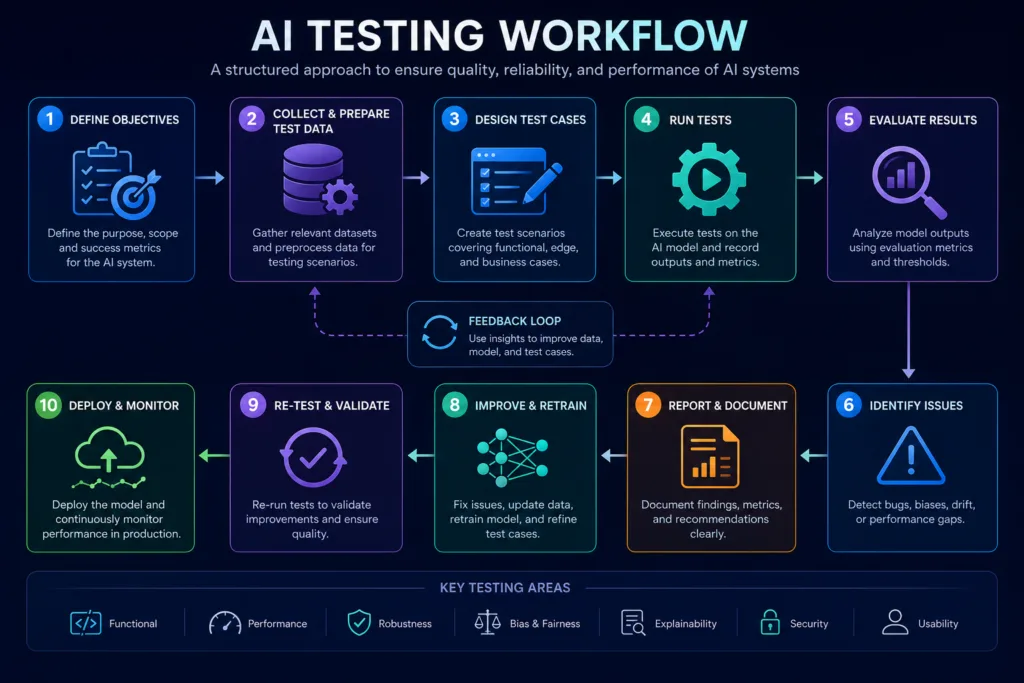
We assessed each tool across a consistent set of criteria that matter most in daily use. The evaluation dimensions included ease of use and onboarding speed, factual accuracy and hallucination rate during real tasks, output quality on creative and technical work, and the robustness of privacy and security settings. We also considered pricing transparency, API availability and developer experience, integration depth, enterprise readiness (single sign-on, admin controls, data processing agreements), support responsiveness, learning curve, and overall value for money.
During our writing tests, we prompted tools with identical briefs: a product launch email, a technical blog outline, and a creative short story. We measured structural coherence, tone adaptability, and the number of factual or grammatical corrections needed. For coding, we used real-world tasks such as building a REST endpoint, refactoring legacy code, and fixing security flaws. We noted how often suggestions compiled correctly and whether the generated code introduced vulnerabilities. Image generation was tested across stylistic and photorealistic prompts, with a focus on anatomy consistency, text rendering, and adherence to detailed instructions. In research and automation scenarios, we fed tools the same document sets and observed citation accuracy, summarization quality, and workflow stability over multi-step processes. Speed, hallucination frequency, and the overall “editability” of the output played a central role in our final ratings. Each product was re-evaluated when significant model updates shipped.
What Are AI Tools?
AI tools are software applications that use machine learning, large language models, computer vision, or other artificial intelligence techniques to automate, enhance, or generate content and decisions. They range from a simple grammar checker that runs in your browser to a complex enterprise platform that predicts supply chain disruptions. Under the hood, these tools rely on models trained on enormous datasets. The user interacts with them through a chat interface, an API, or a built-in feature inside familiar software like a design canvas or a spreadsheet.
How AI Tools Work
The current wave of AI tools is dominated by large language models (LLMs), but the landscape is much broader. When you type a prompt into ChatGPT, the model predicts the most probable sequence of tokens based on patterns it learned during training. It does not “understand” the way a human does, but its outputs can mimic reasoning remarkably well. Behind the scenes, many tools combine an LLM with retrieval-augmented generation (RAG) to ground answers in your own documents, or they use agents that can decide to call external functions like a web search or a database query.
Core AI Concepts
Machine Learning and Generative AI
Machine learning is the broader discipline. Generative AI is the subset that creates new content: text, images, code, music, and video. Not all AI tools are generative. Some tools, like fraud detection systems, make predictions or classify data without producing anything creative. In this guide, we focus mostly on generative AI tools and their close cousins because they are the ones individuals and teams interact with daily.
Large Language Models
LLMs such as GPT-4o, Claude 4, Gemini 2.5, Llama 4, and Mistral Large are the engines under the hood. You rarely need to care which model runs behind a tool, but understanding the difference helps when you choose between a fast, affordable option and a more capable but slower one. Some tools let you pick the model per request, a feature we found useful during our evaluation when we needed high creativity for one task and factual precision for another. A common misconception is that bigger always means better; smaller, specialized models often outperform generalist giants on niche tasks like contract clause extraction or specific programming languages.
AI Agents
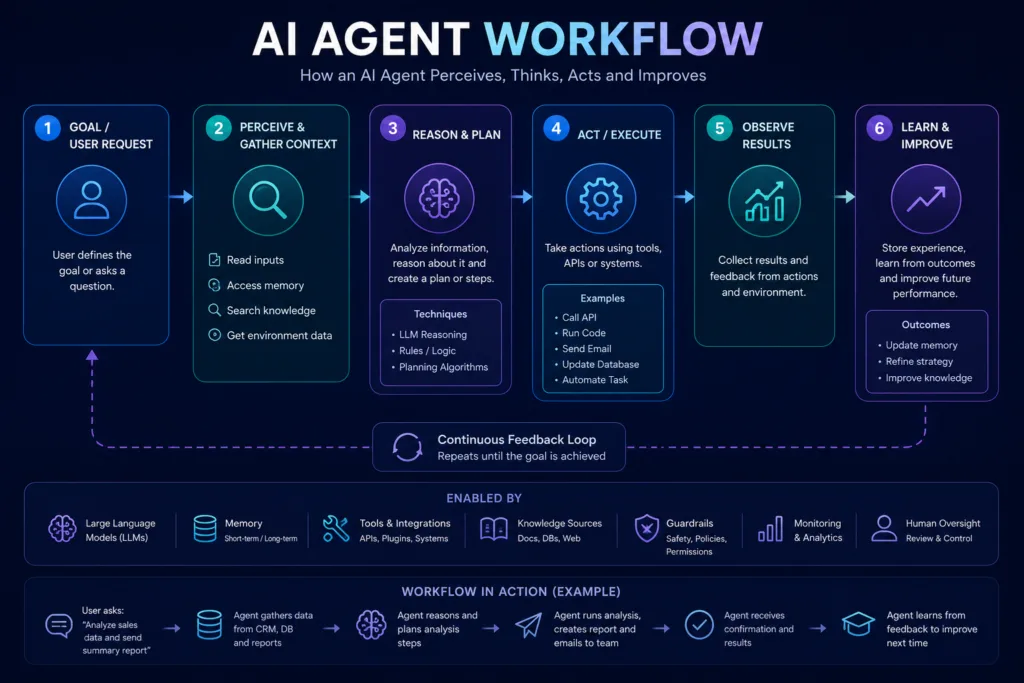
An agent is a system that can plan, use tools, and execute multi-step tasks. In 2026, agents are moving from experimental demos into real workflows. For example, a coding agent in Cursor can read your entire codebase, run terminal commands, and fix a bug across multiple files without you copying and pasting. We recently configured an agent that monitors customer support tickets, extracts entities, drafts a response, and only escalates when confidence is low. Agents are powerful but can get stuck in loops or make incorrect assumptions. We always recommend reviewing agent output before it reaches production, and implementing guardrails like human approval for high-stakes actions.
Prompt Engineering
Prompt engineering is the skill of writing clear, structured instructions to get better outputs. It remains important even as models improve. Based on practical usage, simple techniques like providing examples in the prompt or asking the model to think step by step still yield dramatically better results. Many tools now include prompt templates or an “improve prompt” button to help beginners. For business users, adopting prompt libraries and version-controlling them can turn inconsistent outputs into reliable workflows. [Internal Link: Prompt Engineering]
Retrieval-Augmented Generation (RAG)
RAG lets a model pull in relevant information from a knowledge base before generating a response. This is how Perplexity answers questions with citations, and how enterprise Copilot answers from your company’s SharePoint. RAG reduces hallucinations significantly but depends on the quality of the source documents. During our evaluation of several RAG pipelines, the difference between a well-chunked, metadata-enriched document store and a raw dump of PDFs was night and day. Investing in data preparation is the unsung hero of RAG success. [Internal Link: RAG]
Model Context Protocol (MCP)
MCP is an open standard that allows AI applications to connect to various data sources and tools through a unified interface. Think of it as a USB-C for AI integrations. Several tools we tested, including Claude and development environments, now support MCP servers, meaning you can plug in a database, a calendar, or a project management tool without writing custom middleware each time. In one test, we linked Claude to a live PostgreSQL instance via MCP; the model queried sales data directly and produced a formatted report. The protocol is still maturing, but it eliminates a great deal of integration friction. [Internal Link: MCP]
Automation, Multimodal AI, and APIs
Automation tools like Zapier AI and n8n use AI to decide workflows on the fly. Multimodal AI processes text, images, audio, and video together, so you can upload a photo of a whiteboard and ask the model to turn it into a structured meeting summary. APIs let developers embed these capabilities into custom applications, and cloud AI platforms from AWS, Google Cloud, and Azure provide the infrastructure. Amazon has also expanded its AI ecosystem significantly with services for developers, enterprises, image generation, coding, and foundation models. If you work within AWS, don’t miss our guide to the best Amazon AI tools available in 2026.
Open-source models like Llama and Qwen run on your own hardware, offering complete privacy. The trend in 2026 is not just single-mode models, but deeply integrated systems where a chat interface can simultaneously reason over a code file, a video clip, and a spreadsheet.
Responsible AI, Security, and Privacy
We cannot talk about AI tools without talking about safety. Data privacy is the first question every business should ask. Many tools offer enterprise plans where your data is not used for training. Open-source models allow local execution, but require security hardening. Jailbreaking, prompt injection, and biased outputs are real risks. In our tests, we saw improvements in refusal mechanisms across all major platforms compared to a year ago, but no tool is perfect. Always check the data processing terms, enable available privacy controls, and educate your team on what not to share with public models. We have also observed that the largest companies now require AI-specific Data Protection Impact Assessments before deployment, which is a practice worth adopting even in smaller organizations.
Main AI Tool Categories
Writing AI
These tools generate, edit, and improve text. Use them for emails, articles, social posts, and reports. Students and professionals benefit the most. The main benefit is speed, but outputs often need human polish. A content creator we worked with used Claude to draft five blog post variations from a single outline; after editing, the final version kept the structure but gained a much sharper voice. Typical mistake: using AI to write entire pieces without fact-checking. Privacy concern: some free writing tools may retain prompts for training, so avoid pasting confidential customer data. For business: marketing teams can produce 30 product descriptions in an hour rather than a day. Developers can use AI to draft documentation. Alternatives: Google Docs smart compose, Hemingway Editor. [Internal Link: AI Writing Tools]
Image AI
Image generators create visuals from text descriptions. Designers, marketers, and content creators use them for concept art, social media graphics, and mockups. Benefits include rapid ideation and cost savings on stock photography. Limitations are inconsistent anatomy, text rendering errors, and copyright gray areas. In a real business scenario, a small e‑commerce brand replaced 70% of its product photography with AI-generated lifestyle images, cutting costs dramatically while still needing a human to fix hands and product text. Students can generate illustrations for presentations without licensing fees. Privacy: avoid generating images that could resemble real individuals without consent. Alternatives: DALL·E, Adobe Firefly.
As AI image generators become increasingly realistic, discussions around ethics, consent, copyright, and responsible AI are becoming just as important as technical innovation. We explore these challenges in greater depth in our article on AI art generators and the ethical challenges surrounding the Undressher phenomenon.
Video AI
Video tools generate clips from prompts, edit footage automatically, or create avatar-based presentations. Runway and Synthesia are prominent. Marketers and educators use them to scale video production. Quality is improving fast but still requires careful oversight. A training department we work with now produces monthly compliance videos in Synthesia; a process that previously took two weeks now takes two days, though every script still passes through legal review. Free plans often include watermarks or time limits. Typical mistake: expecting cinema-grade output without post-production. [Internal Link: AI Video Tools]
Voice AI
Voice AI clones voices, generates natural speech, and transcribes audio. ElevenLabs dominates voice synthesis. Podcasters, audiobook publishers, and customer support teams use it. Ethical concerns around deepfake voice cloning are serious; reputable tools require voice owner consent. We witnessed a support team cut average handle time by 20% using AI-generated voice prompts for repetitive verifications, while keeping sensitive conversations human-only. Alternatives: Play.ht, Murf.
Coding AI
AI coding assistants autocomplete code, refactor, and debug. Developers of all levels benefit. Tools like Cursor, GitHub Copilot, and Replit AI can significantly speed up development. Limitations: they can suggest insecure code or hallucinate library functions. We always recommend code review. A junior developer we observed shipped a feature in three hours that would have taken a day, but only after a senior engineer caught a subtle SQL injection pattern in the AI-generated code. Free options include limited GitHub Copilot plans and open-source alternatives like Continue with local models. [Internal Link: AI Coding Assistants]
Research AI
Research tools like Perplexity and Elicit find and synthesize information with citations. Ideal for students, analysts, and journalists. They reduce time on literature review but can surface outdated or low-quality sources. Our editorial team uses Perplexity daily for initial fact-gathering on breaking news, but we always verify citations against primary documents before publishing. Typical mistake: treating AI citations as authoritative without cross-checking.
Business AI
Broad category covering tools that analyze data, automate reports, and assist with strategic planning. Microsoft Copilot for Microsoft 365 and Notion AI are examples. They boost productivity but can be expensive for large teams. A mid-size consulting firm told us that Copilot helped junior analysts produce first drafts of market reports 40% faster; however, the firm still spent heavily on senior review to ensure strategic nuance. Privacy: ensure the AI only accesses data the user has permission to see. Alternatives: Google Duet AI for Workspace.
Marketing AI
These tools generate ad copy, email sequences, and content calendars. Jasper and Writesonic specialize here. One e‑commerce team we talked to saved 15 hours per week on product descriptions, but had to build a custom tone-of-voice guide for the AI to stop it from overusing adjectives. Typical mistake: running AI-generated ads without A/B testing because the copy sometimes underperforms human-written variants.
Beyond content generation, artificial intelligence is helping businesses scale customer acquisition, automate campaigns, and personalise marketing at a level that was previously impossible for smaller teams. Our article on AI-powered marketing for scalable startups explores how growing companies are using AI to accelerate business growth.
SEO AI
SEO tools use AI to suggest keywords, outline content briefs, and optimize existing pages. SurferSEO and Clearscope are leaders. They help content rank better but can encourage formulaic writing if overused. We learned that relying solely on AI content briefs led to pages that ranked initially but failed to engage readers; the winning formula combined AI‑suggested topics with human editorial judgment.
AI is no longer limited to keyword research or content briefs. It now plays an important role in topical authority, internal linking, search intent analysis, and content optimisation. Our complete guide on AI in SEO explains how modern websites are using artificial intelligence throughout their content strategy.
Sales AI
Sales tools automate prospect research, email personalization, and follow-ups. Gong and Outreach incorporate AI. The advantage is consistent outreach at scale. The risk is that poorly trained models send irrelevant messages that damage sender reputation. A B2B company we consulted pulled back on fully automated sequences after seeing reply rates drop because the AI missed industry-specific context.
Customer Support AI
AI chatbots handle tier-one support and route tickets. Intercom’s Fin and Zendesk AI are common. They improve response time and lower costs but can frustrate customers with complex issues. Our tests showed that bot deflection rates jumped after fine-tuning answers on the company’s actual support tickets, but only when the bot honestly admitted “I don’t know” instead of guessing. Privacy: ensure chatbots don’t retain customer PII in logs unless necessary and encrypted.
Education AI
Tools like Khanmigo and Quizlet’s AI tutor personalize learning. Students can get instant explanations, but over-reliance can hinder deep understanding. Teachers we interviewed use AI to generate differentiated lesson plans, yet several noted that students who used AI to answer homework without going through the explanation steps performed worse on tests. Typical mistake: copying AI answers without understanding the underlying concept.
Healthcare AI
Clinical decision support, medical imaging analysis, and patient triage tools are growing. We do not review unregulated health apps here. Always look for FDA or CE clearance. A hospital IT leader shared that their AI triage tool reduced initial screening time by 30%, but all decisions were still confirmed by a physician.
One of the fastest-growing healthcare applications is AI-powered medical documentation. Intelligent medical scribes can automatically generate clinical notes, reduce administrative work, and allow healthcare professionals to spend more time with patients. Learn more in our detailed guide to AI medical scribes and how they are transforming modern healthcare workflows.
Finance AI
AI analyzes market trends, automates bookkeeping, and detects fraud. Free tools rarely cover serious financial use. An accounting firm using AI for expense categorization found that while accuracy was 92%, the 8% error rate on ambiguous transactions still needed human review to avoid tax reporting mistakes.
Legal AI
Legal tools draft contracts, review documents, and conduct case law research. Harvey and CoCounsel are well-known. A law firm pilot we observed set strict data isolation: no client data touched public models; everything ran in a private cloud instance.
Presentation AI
Gamma and Tome create decks from prompts. We used Gamma for a last-minute board update and got a passable deck; however, a designer still spent an hour aligning elements and inserting custom charts. Alternatives: Beautiful.ai.
Productivity AI
Notion AI, Mem, and Taskade fold AI into task management. After six months of heavy use, we noticed Notion AI sometimes summarized outdated pages instead of the latest version until we manually cleaned up the workspace structure.
Developer AI (Platforms)
Platforms like Lovable, Bolt, and Replit AI let you build full applications from natural language. A startup founder with no coding experience built a fully functional waitlist page and CRM in a weekend with Lovable, but brought in a developer before launch to secure the database and optimize performance.
Automation AI
Zapier AI, n8n, and Make connect thousands of apps and inject AI decision nodes. We built a multi-branch social media monitoring flow that worked flawlessly for a week and then started misfiring when a dependent API changed its response format. Monitoring and maintenance still matter.
Translation AI
DeepL and Google Translate handle nuance better than ever. A localization team uses DeepL to produce first-pass translations of marketing copy, then a native linguist refines the tone and cultural references.
Spreadsheet AI
When we asked Excel to create a dynamic array formula for a financial model, the suggested formula looked correct but was off by one column reference, reminding us to always check logic.
Meeting AI
Fireflies, Otter, and the AI recap in Microsoft Teams record, transcribe, and summarize meetings. A marketing agency disabled AI note-taking for sensitive client strategy sessions and only activated it for internal standups.
Design AI
After generating 20 Instagram post variants with Canva AI, a social media manager found that adding a custom brand kit and manually adjusting spacing made a noticeable difference in audience engagement.
Detailed Tool Evaluations
ChatGPT (OpenAI)
ChatGPT remains the most recognised AI tool. If you are completely new to conversational AI, our Complete ChatGPT Guide for Beginners explains how to use ChatGPT effectively, write better prompts, and avoid common mistakes before choosing advanced AI tools.
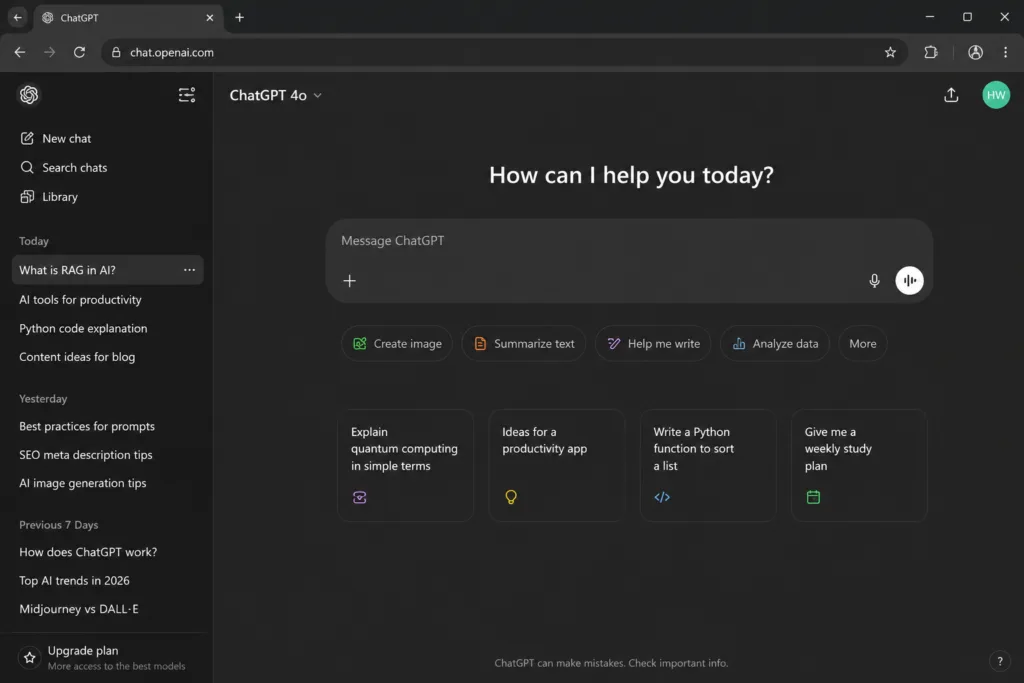
We used the latest GPT-4o model extensively across writing, coding, and brainstorming. Multimodal capabilities work smoothly: you can share your screen, upload files, or point the camera. Custom GPTs let you tailor the assistant with instructions and knowledge files. ChatGPT Plus ($20/month) lifts usage caps and unlocks advanced voice mode. The enterprise plan offers data controls that prevent training on your conversations. The API is robust and widely adopted. In side-by-side comparisons, ChatGPT excelled at creative writing and open-ended problem solving, but occasionally produced confident but incorrect code for niche libraries. Free users can still access a capable model, though with limits during peak times.
Rating: 4.5/5
Pros
- Vast ecosystem and plugin support
- Excellent multimodal features
- Strong creative and technical balance
Cons
- Occasional hallucination of library functions
- Enterprise admin controls still maturing
Best For: Individuals, content creators, developers needing a generalist.
Our Verdict: Still the most versatile all-rounder. Best for those who want broad capabilities without deep specialization.
Who Should Use It: Content creators, general business users, developers prototyping ideas.
Who Should Avoid It: Enterprises needing fine-grained admin controls and data residency guarantees may need the enterprise tier; privacy-critical use cases might prefer self-hosted models.
Claude (Anthropic)
Claude 4 emphasizes safety, honesty, and long context. During evaluation, Claude produced more nuanced summaries of complex documents than many peers and tends to ask clarifying questions rather than guess. The Projects feature helps organize workflows. Pricing includes a free tier, Pro at $20/month, and a Team plan. The API supports MCP, which we used to connect Claude to a local SQLite database; the setup was straightforward. Weaknesses include slower image generation and occasional over-refusal on harmless prompts, something we noticed when it misunderstood satirical content.
Rating: 4.5/5
Pros
- 200k context window
- Low hallucination rate on factual tasks
- MCP integration
Cons
- Over-refusal on safe prompts
- Slower image generation
Best For: Long-document analysis, enterprise safety.
Our Verdict: The go-to for long-document work and safety-conscious environments. Its honesty and refusal to hallucinate make it excellent for research.
Who Should Use It: Legal teams, analysts, developers refactoring large codebases, any team that values grounded answers.
Who Should Avoid It: Users who need the fastest image generation or those who find its cautious tone occasionally frustrating for purely creative play.
Google Gemini
Gemini Advanced impresses with factual retrieval and reasoning over large datasets like Google Drive and Gmail. We used it to analyze a messy spreadsheet and produce a clean pivot table summary faster than manually writing formulas. Its strength is real-time data from Google Search with grounding. The free tier is generous. Weaknesses include a somewhat clunky web interface and the fact that its creative writing can feel more sterile compared to Claude or ChatGPT.
Rating: 4.3/5
Pros
- Deep Google ecosystem integration
- Real-time grounding via search
Cons
- Creative prose less vibrant
- Interface could be smoother
Best For: Google Workspace users, real-time information retrieval.
Who Should Use It: Heavy Google Workspace users, researchers needing real-time information, students already in the Google ecosystem.
Who Should Avoid It: Teams that rely on non-Google tools for deep integration, and users who prioritize creative writing tone.
Microsoft Copilot
Copilot is woven into Windows, Edge, Microsoft 365, and GitHub. The enterprise version answers questions grounded in your own documents, emails, and meetings. In testing, the meeting recap feature saved genuine time, although its summarization sometimes omitted subtle disagreements. The free Copilot available in Bing and Edge is adequate for quick questions. The full Microsoft 365 Copilot costs $30 per user per month on top of existing subscriptions, making it a serious investment. We found the strongest ROI for teams deeply entrenched in SharePoint and Teams.
Rating: 4.2/5
Pros
- Organizational data grounding
- Tight integration with Microsoft 365
Cons
- High per-user cost
- Can feel slow for complex queries
Best For: Microsoft 365 enterprise.
Who Should Use It: Large organizations using Microsoft 365, businesses that need AI grounded in internal documents.
Who Should Avoid It: Small teams on a tight budget, or those not yet using SharePoint/Teams heavily.
Perplexity
Perplexity Pro provided well-sourced answers for market research questions, often reducing a two-hour Google session to 15 minutes. Collections and the Focus feature help narrow searches. Weaknesses: it sometimes pulls from low-authority sources and can miss important context behind paywalls.
Rating: 4.4/5
Best For: Research with citations.
Who Should Use It: Journalists, market analysts, students writing papers, consultants doing quick competitive intel.
Who Should Avoid It: Users unwilling to double-check sources, or those who need very recent breaking news that may not be indexed.
Grok
Grok provides real-time knowledge of X posts and a distinct, less filtered tone. Useful for tracking breaking news sentiment. Its image generation is tied to Flux. The biggest limitation is hallucination rate on obscure historical facts. Data privacy is less transparent than enterprise-focused tools.
Rating: 3.8/5
Best For: Social trend analysis.
Who Should Use It: Social media managers, journalists tracking Twitter/X narratives.
Who Should Avoid It: Enterprises with strict data compliance, or users seeking consistently reliable factual recall.
DeepSeek
DeepSeek offers strong reasoning at remarkably low API cost. It runs well on consumer hardware when quantized. Privacy concerns have been raised about data handling; many enterprises opt for the open-weight model running on their own infrastructure. It excels at mathematics and structured data tasks, but its creative writing can be overly clinical.
Rating: 4.1/5
Best For: Math, coding, low-cost deployment.
Who Should Use It: Developers, researchers in math-heavy fields, cost-conscious startups that can self-host.
Who Should Avoid It: Organizations handling sensitive personal data that cannot leave a Western jurisdiction, or those needing polished creative prose.
Qwen
Qwen models surprised us with multilingual performance and tool-calling accuracy. We ran the 72B instruct version locally and integrated it into a customer support prototype; it handled English and Mandarin queries smoothly. Drawback: smaller integration ecosystem.
Rating: 4.0/5
Best For: Multilingual, open-source tool calling.
Who Should Use It: Multilingual product teams, developers building tool-using agents.
Who Should Avoid It: Users who depend on a rich library of pre-built third-party plugins.
Llama (Meta)
Llama 4 models power many private AI deployments. We built an internal document Q&A system with Llama 3.3 and RAG, and latency was acceptable on a single GPU. Its strength is the vibrant community and fine-tuning tools. The base model requires careful prompting to match proprietary polish.
Rating: 4.3/5
Best For: Self-hosted, private deployment.
Who Should Use It: Enterprises with private data, academic researchers, mobile app developers using on-device AI.
Who Should Avoid It: Teams that need the simplest possible setup and zero maintenance.
Mistral
Mistral Large delivers excellent performance in European languages. Its API is competitively priced. The open-weight Mixtral models offer a great balance of speed and intelligence. The company has been transparent about training data and model cards.
Rating: 4.2/5
Best For: European languages, efficient models.
Who Should Use It: European enterprises, developers who value model efficiency and transparency.
Who Should Avoid It: Those who need the widest range of integrations.
| Tool | Best For | Pricing Model | Free Plan | API | Platform | Enterprise | Strengths | Weaknesses |
|---|---|---|---|---|---|---|---|---|
| ChatGPT | General writing, coding, creativity | Freemium, Plus $20/mo | Yes | Yes | Web, mobile, desktop | Yes | Huge ecosystem, multimodal | Occasional factual slip |
| Claude | Long document analysis, safe enterprise use | Freemium, Pro $20/mo | Yes | Yes (MCP) | Web, iOS, Android | Yes | Excellent 200k context, honesty | Over-refusal on safe prompts |
| Gemini | Google ecosystem, real-time data | Freemium, Advanced $20/mo | Yes | Yes | Web, mobile, Workspace | Yes | Deep Google integration | Creative text can be bland |
| Copilot (MS) | Microsoft 365 enterprise | Free (Bing), $30/user/mo | Yes (consumer) | Yes | Windows, Edge, 365 | Yes | Organizational grounding | High cost, slower at scale |
| Perplexity | Research with citations | Freemium, Pro $20/mo | Yes | Yes | Web, mobile | Yes | Citations, deep research | Source quality varies |
Coding Assistants
Cursor
Cursor’s agent mode can create files, run commands, and debug across your entire codebase. The $20/month Pro plan is worth it for professional developers. We caution that agent mode can make breaking changes if you do not review its diffs carefully. It supports OpenAI and Anthropic models; you can bring your own API key.
Rating: 4.6/5 · Best For: Agentic coding, large codebases.
Who Should Use It: Professional developers; who should avoid: beginners who might trust agent output too readily.
GitHub Copilot
Copilot is integrated into VS Code, JetBrains, and GitHub.com. Our evaluation showed it excels at boilerplate and unit test generation. Pricing for individuals is $10/month, with a limited free tier for verified students and open-source maintainers.
Rating: 4.3/5 · Best For: IDE integration, boilerplate code.
Who Should Use It: Developers already in GitHub ecosystem; who should avoid: power users wanting full agentic control.
Replit AI
Replit AI enables building and deploying apps directly from a browser using natural language. It is fantastic for prototyping and learning. The free plan includes limited compute; the Hacker plan at $25/month adds more power and private repls.
Rating: 4.0/5 · Best For: Rapid prototyping, education.
Who Should Use It: Students, hackathon participants, startup founders testing MVPs.
Lovable and Bolt
These “text to app” platforms generate full-stack applications from prompts. Lovable impressed us with its understanding of authentication and database design. Bolt generates complete codebases that you can immediately fork. Weaknesses: generated code can be messy, and AI compute tokens add up quickly.
Rating: Lovable 4.0/5, Bolt 3.9/5 · Best For: MVPs, non-technical founders.
Who Should Use It: Product managers, early-stage founders.
Image and Video Generation
Midjourney
Midjourney V7 remains the aesthetic leader. Subscription starts at $10/month. It struggles with precise text rendering and complex multi-character scenes, but style reference and character consistency features have improved. No official API.
Rating: 4.7/5 · Best For: Artistic imagery.
Who Should Use It: Artists, concept designers, marketing teams needing distinctive visuals.
Flux
Flux.1 Pro produces photorealistic images with remarkably accurate anatomy and text. The API is available, and open-source dev/schnell models run on capable consumer GPUs. Weakness: over-smoothing faces sometimes.
Rating: 4.5/5 · Best For: Photorealism, text-in-image.
Who Should Use It: E-commerce, ad creative teams, developers needing an API.
Runway
Runway Gen-4 pushes video generation to the point where short clips can be almost indistinguishable from real footage. Pro plans start at $15/month. Limitations include consistency across longer clips and the need for multiple attempts.
Rating: 4.3/5 · Best For: AI video creation and editing.
Who Should Use It: Video editors, social media managers, indie filmmakers.
Stable Diffusion
We ran SD3 Medium locally using ComfyUI. It is free, private, and highly customizable. The downside is the steep learning curve and hardware requirements. Stability AI also offers a paid API and a creator platform.
Rating: 4.4/5 · Best For: Customization, privacy.
Who Should Use It: Technical artists, enterprises needing on-premise image gen.
Canva AI
Canva Pro is about $13/month. AI features are intuitive for non-designers. Generated images sometimes have a “Canva look” that requires tweaking.
Rating: 4.2/5 · Best For: Quick social media graphics.
Who Should Use It: Small business owners, educators.
Synthesia
Starter plan at $22/month includes 10 minutes of video per month. Best for internal communications and e-learning.
Rating: 4.1/5 · Best For: Corporate training videos.
Who Should Use It: L&D teams, HR departments.
Writing and Productivity AI
Notion AI
Notion AI costs $10 per member per month on top of the Notion subscription. It can hallucinate data if you ask it to pull facts not present in your workspace.
Rating: 4.0/5 · Best For: Notion workspace augmentation.
Who Should Use It: Notion power users, project managers.
Grammarly
Premium ($12/month) adds full-sentence rewrites and plagiarism checks. In daily use, it improved email clarity significantly. Weakness: suggestions can flatten a unique writing voice.
Rating: 4.5/5 · Best For: Polishing business communication.
Who Should Use It: Anyone who writes business communication, students, non-native English speakers.
Jasper
Pricing starts at $49/month per seat. It is overkill for individuals but can replace multiple freelance drafters for a content team.
Rating: 4.2/5 · Best For: Marketing teams producing high content volumes.
Who Should Use It: Mid-size to large marketing departments.
Writesonic
Competes with Jasper on price, offering a $16/month unlimited plan (fair usage). Factual accuracy decreases sharply on niche B2B topics.
Rating: 4.0/5 · Best For: Budget-conscious content teams.
Who Should Use It: Startups, small marketing departments.
Gamma
Plus is $10/month. Excellent for first drafts of presentations.
Rating: 4.1/5 · Best For: Quick internal decks.
Who Should Use It: Consultants, teachers, startup founders.
ElevenLabs
Starter at $5/month. Voice cloning (with consent verification) is spookily accurate. Limitations: slight intonation drift in very long narrations.
Rating: 4.4/5 · Best For: Natural text-to-speech.
Who Should Use It: Podcasters, audiobook producers, accessibility teams.
Automation Tools
Zapier AI
Plans start at $20/month. Complex logic trees can become hard to debug, and AI steps consume extra credits.
Rating: 4.1/5 · Best For: No-code AI workflow automation.
Who Should Use It: Non-technical ops teams, marketers.
n8n
Self-hosted version gives unlimited workflows. Cloud plans start at €20/month. Weakness is the steeper initial learning curve.
Rating: 4.3/5 · Best For: Self-hosted, code-friendly automation.
Who Should Use It: DevOps engineers, technical consultants.
Make
Pricing starts at $9/month. AI module mapping requires careful setup.
Rating: 4.2/5 · Best For: Visual automation with advanced logic.
Who Should Use It: Operations managers, finance teams.
How to Choose the Right AI Tool
Start by defining the problem, not the technology. A marketing team that needs 30 social posts a week may benefit from Jasper; a developer refactoring legacy code should look at Cursor or GitHub Copilot. Test with real data, not toy prompts. We always run an evaluation on three dimensions: output quality on actual tasks, integration with existing workflows, and total cost including team onboarding. Prioritize tools that provide clear data handling policies and offer a free trial. Check the API availability if you plan to automate at scale. The best tool is the one your team will actually use consistently.
How Different Users Should Choose AI Tools
- Students: Perplexity for research, Grammarly for writing, and Gamma for presentations are excellent starting points. We have also compiled a detailed list of the best AI tools for students covering note-taking, studying, research, and productivity.
- Freelancers: ChatGPT/Claude for drafting and admin, Canva AI for design, Zapier for automation. Keep subscription costs low.
- Developers: Cursor or GitHub Copilot for coding, n8n for automation, open-source LLMs for privacy-sensitive projects.
- Researchers: Perplexity Pro, Elicit, and Claude for long-document synthesis.
- Marketing Teams: Jasper/Writesonic for content, Canva AI/Midjourney for visuals, Zapier for workflows.
- Agencies: Enterprise ChatGPT or Claude Team, Runway for video, ElevenLabs for voice-overs.
- Content Creators: Midjourney, ElevenLabs, Runway, and Descript for a complete multimedia stack.
- Small Businesses: Microsoft Copilot if using Microsoft 365, otherwise Notion AI + Writesonic + Zapier AI.
Common AI Myths
- “AI will replace all jobs.” AI automates tasks, not roles. Human judgment, empathy, and strategic thinking remain irreplaceable.
- “AI is always objective.” Models inherit biases from training data and can reflect societal prejudices.
- “AI tools are only for techies.” No-code platforms and intuitive interfaces have made AI accessible to almost anyone.
- “Free AI tools are bad.” Many free tiers are remarkably capable, especially for learning and light tasks.
- “AI understands context like a human.” It predicts patterns; it doesn’t truly understand meaning, which is why hallucinations happen.
Mistakes Businesses Make When Adopting AI
- Deploying AI without a clear use case, leading to low adoption.
- Ignoring data governance and accidentally exposing sensitive information.
- Over-automating and removing necessary human review.
- Choosing a tool based on hype rather than a trial with real workflows.
- Failing to train employees on prompt engineering and AI limitations.
- Not budgeting for the total cost: subscription, integration, and ongoing monitoring.
AI Tool Buying Checklist
- Define the specific problem or workflow you want to improve.
- List must-have integrations (email, CRM, code editor, etc.).
- Check the tool’s data privacy policy and training data usage.
- Test with a representative real-world task, not just a demo prompt.
- Compare the free tier’s limitations; does it let you evaluate fairly?
- Assess the API and extensibility if you plan to scale.
- Look at community and support: active forums or just a chatbot?
- Calculate total cost per user per month including add-ons.
- Ensure the tool can be administered centrally if used by a team.
- Read recent user reviews to catch any reliability issues.
Free vs Paid AI Tools
Free tiers are great for experimentation, light workloads, and learning. They often impose usage caps, lack advanced features, and may use your data for model training. Paid plans remove limits, offer higher quality models, include privacy protections, and provide priority support. For business-critical tasks, the paid tier is almost always worth it. For personal productivity, the free version of many tools is surprisingly capable.
Open Source vs Closed Source AI
Open-source models (Llama, Mistral, Qwen, DeepSeek) give you full control over data, customization, and deployment. They can run on your hardware, ensuring no data ever leaves your environment. The trade-off is that you need technical expertise to set up, fine-tune, and maintain them. Closed-source tools (ChatGPT, Claude, Gemini) offer polished experiences, constant updates, and managed infrastructure but come with usage restrictions and privacy considerations. Many organizations adopt a hybrid model: open-source for sensitive internal data, closed-source for less critical tasks.
Common Mistakes Beginners Make
Many newcomers treat AI like a search engine and get frustrated. Specific prompts yield better results than vague ones. Another mistake is trusting AI output without verification: an AI-generated summary can sound authoritative but contain fabricated facts. Beginners also tend to buy too many subscriptions at once. We suggest mastering one tool before adding another. Finally, ignoring data privacy settings is a common oversight. If you paste confidential business information into a free consumer chat, you may be training the next public model on your trade secrets.
AI Safety Tips
- Never share personally identifiable information (PII) or credentials with public AI tools.
- Use enterprise plans that contractually guarantee no training on your data.
- Turn on available privacy controls like chat history off in ChatGPT.
- Run sensitive data through self-hosted open-source models where possible.
- Educate your team on social engineering risks such as AI-powered voice cloning.
- Review generated code for security vulnerabilities; don’t deploy blindly.
- Enable multi-factor authentication on AI tool accounts.
How Businesses Can Adopt AI
Begin with a small pilot in a department that is enthusiastic and data-rich, such as marketing or customer support. Measure time saved and output quality, not just adoption numbers. Build internal guidelines on what data can be used. Many companies start by deploying a RAG system on their internal knowledge base using Microsoft Copilot or a custom n8n + open-source model setup. Appoint AI champions who test tools and share best practices. Budget for both subscription costs and training. The biggest failure mode we see is IT-led rollouts without end-user input; the tools end up unused.
How Students Can Benefit
Students can use research AI like Perplexity to gather sources for essays (while still verifying and citing them properly). Coding students can use Replit AI or Copilot to understand errors, not to generate entire assignments without learning. Presentation AI like Gamma helps create project slides. The key is to use AI as a tutor and productivity booster, not a shortcut that undermines skill building. Always check your institution’s academic integrity policy; many now permit AI use with disclosure.
How Developers Can Benefit
Developers can shift from writing boilerplate to architecting systems. Coding assistants and agentic tools handle repetitive tasks. AI code review tools catch bugs early. Automation platforms like n8n let you prototype backends fast. The greatest benefit is reducing context-switching: using AI integrated in the IDE to pull answers without leaving the editor. We recommend pairing open-source models for sensitive code with commercial tools for maximum productivity. Always use version control and review AI-generated diffs.
How Content Creators Use AI
YouTubers use Runway for B-roll and ElevenLabs for voiceovers. Writers use Claude or ChatGPT for outlines and overcoming writer’s block. Designers lean on Midjourney and Canva AI for thumbnails. The unifying workflow is “draft with AI, edit with human taste.” Creators we interviewed emphasized that AI speeds up the 80% of work that is repetitive, allowing them to spend more time on the creative 20%. The risk is over-relying on AI and losing the unique voice that built their audience. Always run final content through plagiarism and fact-checking.
Frequently Overlooked AI Features
- Prompt history and versioning: Many tools let you save and reuse prompt templates.
- Custom instructions/persona: Setting global style preferences can drastically improve consistency.
- API rate limits and cost tracking: Essential for production usage.
- Collaboration spaces: Shared workspaces in Claude, ChatGPT Team, and Notion AI.
- Offline/local inference: Some tools like LM Studio allow running models without internet.
Best AI Stack Recommendations
| User Profile | Recommended Stack | Why |
|---|---|---|
| Student | Perplexity (free) + Grammarly (free) + Canva AI (free) + Notion (free) | Research, writing, design, organization without spending money. |
| Content Creator | Midjourney ($10/mo) + ElevenLabs ($5/mo) + CapCut/Descript + Claude Pro | Best-in-class image, voice, and text generation for content production. |
| Developer | Cursor ($20/mo) + GitHub Copilot (free tier) + n8n (self-hosted) + Ollama with Llama | Agentic coding, automation, and local LLM for sensitive work. |
| Small Business | Microsoft 365 Copilot or Notion AI + Writesonic + Zapier AI | Integrated AI for docs, marketing content, and workflow automation. |
| Enterprise | ChatGPT Enterprise or Claude Team + custom RAG + internal open-source model | Maximum control, data privacy, and scalable automation. |
Future of AI Tools Beyond 2026
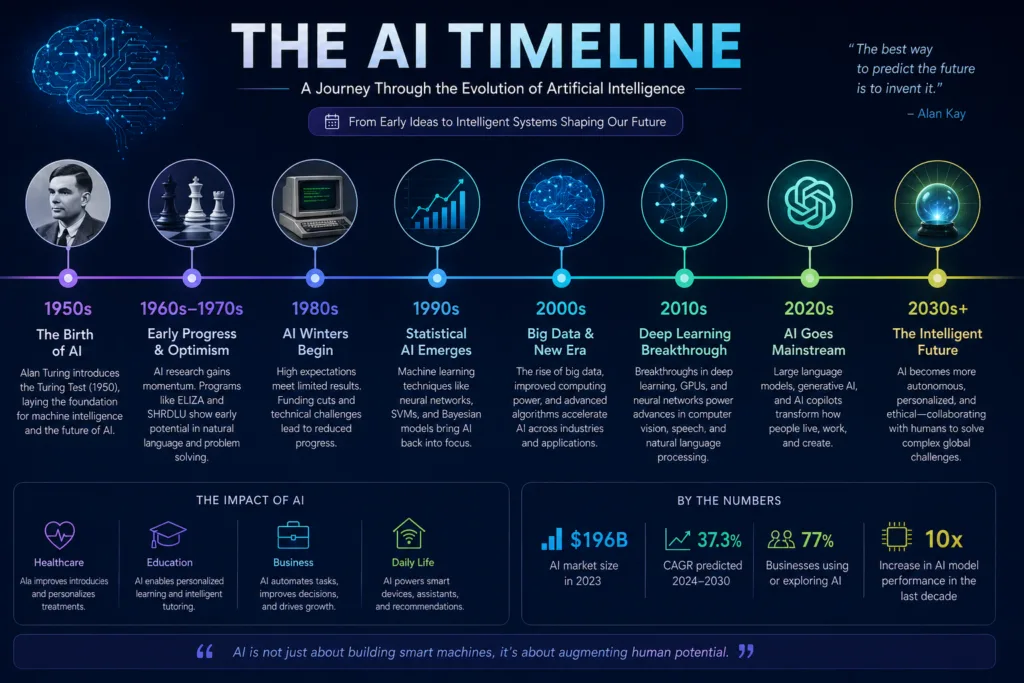
Agentic AI will become mainstream in enterprise workflows, with tools autonomously completing multi-step tasks like travel booking or customer onboarding. Multimodal capabilities will deepen, enabling seamless interactions across voice, video, and code in the same conversation. On-device AI will accelerate, with laptops and phones running capable models locally for privacy. Open-source models will continue closing the gap with proprietary ones, giving organizations more deployment choices. Regulations around AI transparency and copyright will likely crystallize, affecting tool design. We are also seeing the rise of “bring your own model” platforms where you plug in any open-source model into an existing tool’s UI. The ecosystem is shifting from model-centric to workflow-centric.
Browser-based AI assistants are also evolving rapidly, bringing AI directly into everyday web browsing. If you’re curious about where this trend is heading, read our guide to AI browser assistants and how they are changing the way people interact with the web.
As AI models become larger and more capable, the demand for powerful computing infrastructure continues to grow. High-performance GPUs, scalable cloud environments, and modern colocation facilities now play a major role in training and deploying enterprise AI systems. If you’re interested in the infrastructure behind today’s AI revolution, our guide on how high-density colocation is powering the future of AI and machine learning explains why advanced data centres are becoming essential for modern AI workloads.
The next stage of AI adoption extends well beyond workplaces. Connected homes, intelligent appliances, predictive energy management, and voice-first assistants are making everyday living increasingly automated. Discover how these technologies are evolving in our guide to the future of smart living.
Frequently Asked Questions
Software that uses artificial intelligence to perform tasks typically requiring human intelligence.
Yes, many provide free tiers with limitations.
Cursor for agentic coding, GitHub Copilot for simple autocomplete, Replit AI for prototyping.
They automate parts of jobs, not entire roles. They lack judgment, empathy, and deep domain expertise.
It depends on the provider. Read the data processing agreement. Enterprise plans offer stronger protections.
The practice of crafting clear instructions to get better AI outputs.
Use RAG to ground answers in trusted documents, verify outputs with primary sources, and choose models with low hallucination rates.
Midjourney for artistic quality, Flux for photorealism and text, Stable Diffusion for control.
No. Zapier and Make allow visual automation; n8n offers more code flexibility.
A system that can independently plan and execute multi-step tasks using tools.
Yes, open-source models like Llama, Mistral, and Qwen can run on your hardware.
Models that process text, images, audio, and video together.
Test each on your most frequent tasks. ChatGPT is a strong all-rounder; Claude shines with long documents; Gemini integrates best with Google apps.
For short clips and B-roll, yes. Full-length films still need human editing.
Yes, tools can generate keyword-optimized outlines, suggest content gaps, and draft meta descriptions. Human strategy remains essential.
An open standard that lets AI tools connect to data sources and services through a consistent interface.
Yes, Otter, Fireflies, and built-in Copilot/Teams features. Check your organization’s privacy policy.
Ranges from free to $30+ per user per month. Professional plans typically $10-$30/month.
Bias, privacy, job displacement, deepfakes, and copyright infringement.
Perplexity for research, Grammarly for writing, Gamma for presentations.
Yes, Lovable, Bolt, and Replit AI can generate apps from text. Complex apps still need developer involvement.
More autonomous agents, tighter OS integration, on-device models, and customizable private AI.
Conclusion
The AI tool landscape in 2026 is rich, fast-moving, and genuinely useful when you match the right tool to the right job. We have seen teams transform their productivity by weaving these tools into daily routines, not by chasing every new launch. Start with a clear problem, test tools with your own data, and always keep a human in the loop for review and creativity. The best AI tool is not the one with the most features; it is the one that quietly removes friction from your work and helps you focus on what matters.
If you are a student, begin with Perplexity for research and Grammarly for writing. Developers will gain the most from Cursor or GitHub Copilot, supplemented by an open-source model for sensitive code. Business leaders should evaluate Microsoft Copilot if they live in the Microsoft ecosystem, otherwise start with ChatGPT Enterprise or Claude Team. Content creators will find Midjourney and Canva AI indispensable for visuals, and ElevenLabs for audio. Marketers, invest in Jasper or Writesonic but never publish without a human edit. Researchers can trust Perplexity Pro for everyday deep dives. The common thread is thoughtful adoption: pick one tool, learn its quirks, integrate it into a real workflow, and only then expand your toolkit. Keep learning, stay skeptical of hype, and never stop verifying.
References
The information in this guide has been compiled through hands-on testing, official product documentation, developer resources, security guidance, and publicly available technical documentation from leading AI companies and industry organizations.
- OpenAI – Official Website
- Anthropic – Claude AI
- Google Gemini
- Microsoft Copilot
- Perplexity AI
- Cursor AI
- GitHub Copilot
- Replit AI
- Midjourney
- Black Forest Labs (FLUX)
- Runway
- Canva AI
- Synthesia
- Notion AI
- Jasper AI
- ElevenLabs
- Zapier AI
- n8n
- Meta Llama
- Mistral AI
- Qwen AI
- DeepSeek
- Model Context Protocol (MCP)
- NIST AI Risk Management Framework
- OWASP Top 10 for LLM Applications