

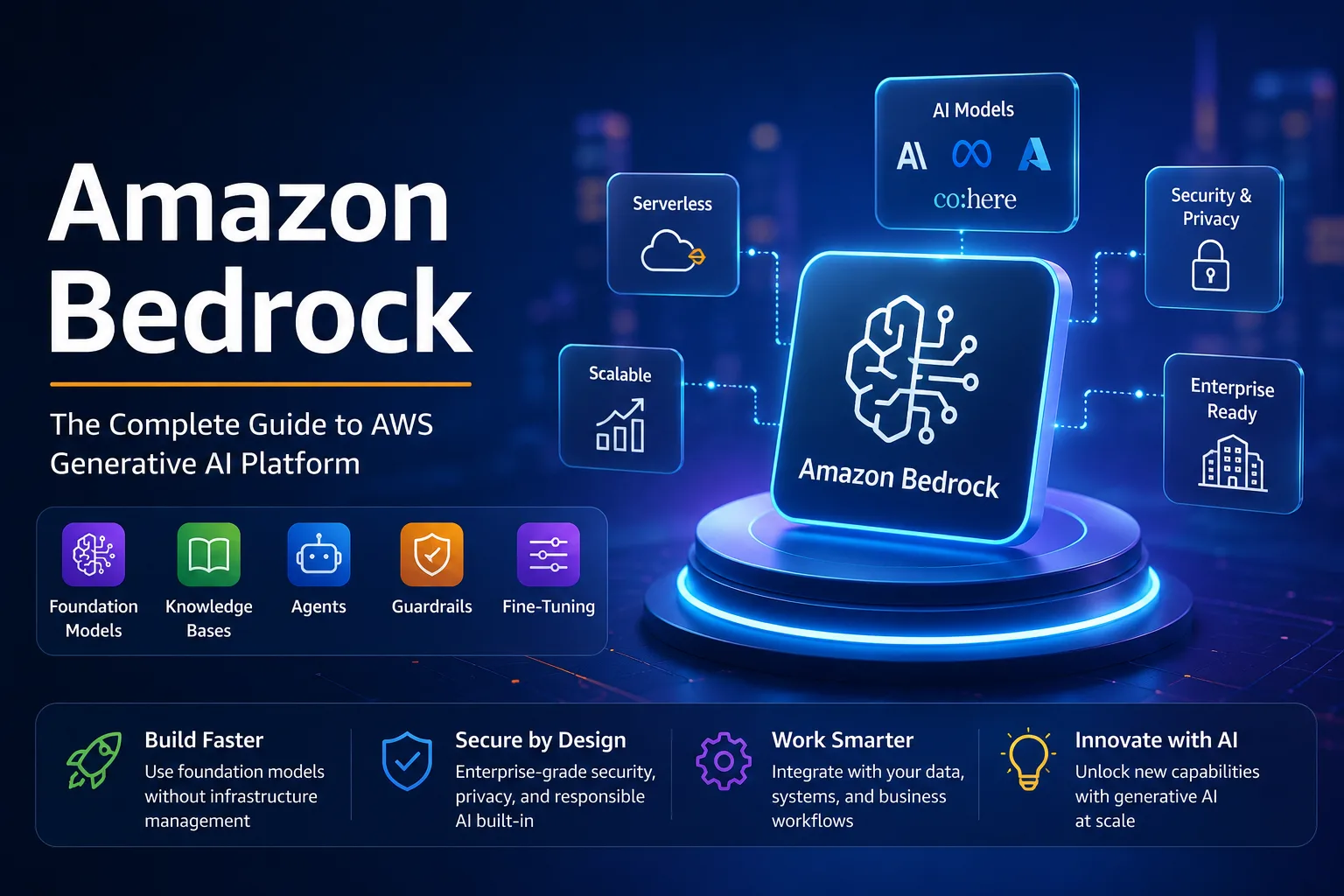
Most enterprise conversations about generative AI start with excitement and end with anxiety about data security. I have sat through enough boardroom discussions to recognise the pattern. Teams want the capabilities they see in consumer AI tools, but compliance teams need everything locked down inside their own cloud environment. Amazon Bedrock exists precisely at this intersection, and after spending considerable time evaluating it across multiple enterprise deployments, I can tell you it solves real problems while introducing a few of its own.
This guide walks through everything you need to know about Amazon Bedrock in 2026. Whether you are a developer building your first AI application, a cloud architect comparing platforms, or a business owner trying to understand what this service actually does, you will find practical answers here. No marketing fluff. Just honest observations from someone who has worked with the platform.
In brief: Amazon Bedrock is a fully managed AWS service that gives you access to foundation models from Anthropic, Meta, Cohere, Mistral, Stability AI, and Amazon itself, all through a single API, without needing to provision or manage any infrastructure.
What Is Amazon Bedrock?
Amazon Bedrock is a serverless generative AI service that sits inside your AWS account and provides API access to large language models and other foundation models. Instead of signing up for separate APIs from Anthropic, Meta, Cohere, and others, you get them all through one AWS-native interface. The key distinction is that everything runs within your own AWS environment. Your data never leaves your account, and AWS does not use your inputs or outputs to train the underlying models.
Think of Bedrock as a curated marketplace of AI models wrapped in enterprise-grade infrastructure. You pick a model, send prompts through the API or the AWS console playground, and receive responses. Behind the scenes, AWS handles provisioning, scaling, encryption, and monitoring. You never touch a GPU instance or configure a model endpoint manually.
This architecture appeals strongly to regulated industries. I have seen financial services firms and healthcare organisations adopt Bedrock specifically because it keeps everything inside their existing AWS compliance boundary. For a broader look at how AWS fits into the AI landscape, check out our guide to the best Amazon AI tools you should try in 2026.
How Amazon Bedrock Works
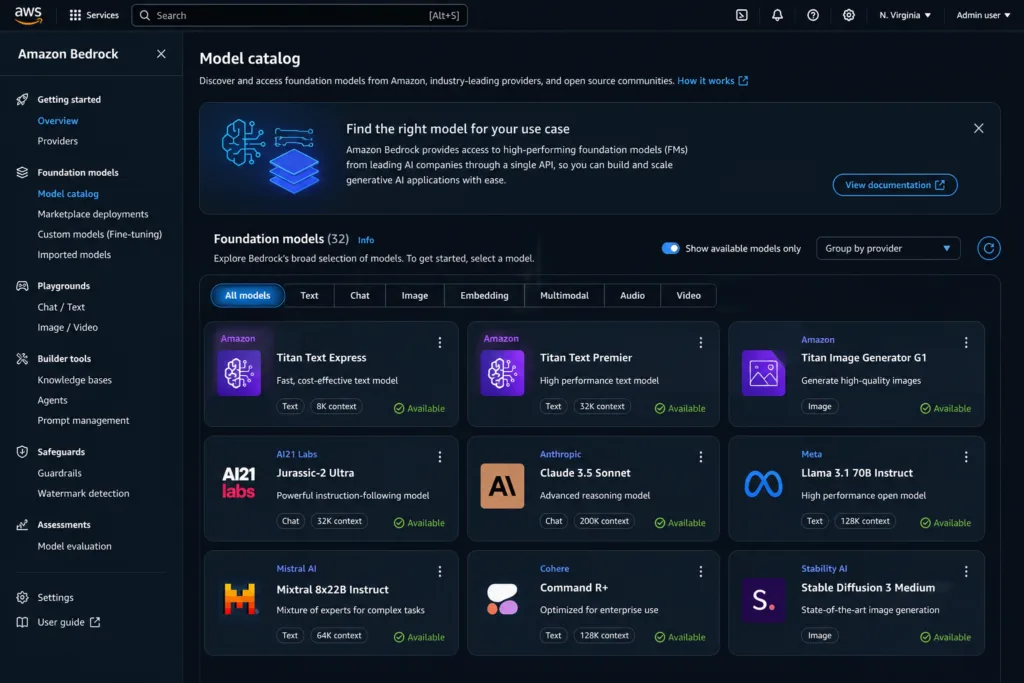
At a high level, Bedrock operates through a straightforward request-response pattern. You submit a prompt to the Bedrock API, specifying which foundation model you want to use. The service routes your request to that model, processes it on AWS-managed infrastructure, and returns the generated output. All of this happens over encrypted connections within the AWS network.
Under the hood, Bedrock uses a combination of AWS services. The models themselves run on AWS’s own silicon (Trainium and Inferentia chips) alongside traditional GPU instances. Your prompts flow through IAM authentication, optional VPC endpoints, and any guardrails you have configured before reaching the model. Responses follow the same path in reverse, with content filtering applied if enabled.
What makes this different from simply calling the Anthropic or Cohere API directly is the integration layer. Bedrock ties into Amazon S3 for data storage, AWS Lambda for serverless orchestration, Amazon Kendra or OpenSearch for retrieval, and CloudWatch for monitoring. You are not just getting model access; you are getting a platform designed to build complete AI applications.
Foundation Models on Amazon Bedrock
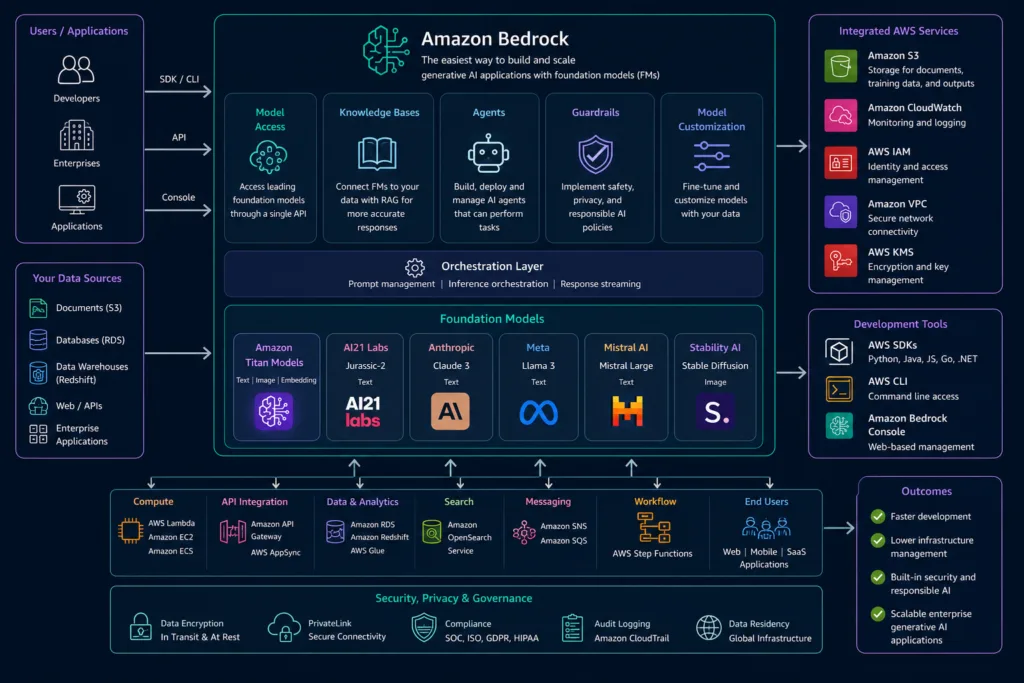
The model catalogue has expanded considerably since Bedrock’s initial launch. As of mid-2026, here is what you can access:
| Provider | Notable Models | Strengths |
|---|---|---|
| Anthropic | Claude 3.5 Sonnet, Claude 3 Opus, Claude 3 Haiku | Long context, nuanced reasoning, strong safety alignment |
| Meta | Llama 3.1, Llama 3.2 | Open-weight flexibility, multilingual support |
| Cohere | Command R+, Command R | Retrieval-optimised generation, enterprise text processing |
| Mistral AI | Mistral Large, Mixtral | Efficient performance, strong European language support |
| Stability AI | Stable Diffusion XL, Stable Image Ultra | Image generation, image editing |
| Amazon | Titan Text, Titan Embeddings, Titan Image Generator | Cost-effective, deeply integrated with AWS |
One thing worth noting is that OpenAI models are notably absent from this list. If your workflows depend specifically on GPT-4 or GPT-4o, Bedrock is not your platform. For those use cases, you might want to explore our complete ChatGPT guide for beginners to understand the OpenAI ecosystem better.
Key Features Deep Dive
Knowledge Bases and RAG
Amazon Bedrock Knowledge Bases let you connect foundation models to your organisation’s documents. You point the service at an S3 bucket containing PDFs, text files, or structured data, and Bedrock handles chunking, embedding, and vector storage automatically. When a user asks a question, the system retrieves the most relevant document segments and includes them in the prompt context before generating an answer. This is Retrieval Augmented Generation, or RAG, and it is the most practical way to ground AI responses in your actual business data.
I have implemented RAG pipelines using Bedrock Knowledge Bases for several clients. The setup is genuinely simpler than building your own retrieval pipeline from scratch. That said, the chunking strategies are somewhat rigid. If you need highly customised document processing, you might find yourself reaching for a more flexible alternative. For those interested in how AI is reshaping content and search strategies, our piece on AI in SEO and modern content strategy provides useful context.
Best Practice: Start with the default chunking settings, test retrieval quality on a representative set of queries, and only then consider custom chunking. Most teams over-engineer this step before understanding their actual retrieval patterns.
Amazon Bedrock Agents
Bedrock Agents represent a significant step beyond simple question-answering. An agent can autonomously break down complex requests into steps, call external APIs, query databases, and execute actions across multiple systems. You define an agent with a natural language instruction, attach it to a knowledge base or Lambda function, and it figures out the execution path.
In practice, I have seen agents used for IT ticket automation, customer service triage, and internal data analysis workflows. The technology is impressive but not magic. Agents occasionally hallucinate action plans or get stuck in loops. Proper guardrails and human-in-the-loop checkpoints remain essential for production deployments. This concept of AI taking autonomous action in software interfaces ties closely to the emerging trend of AI browser assistants, which extend similar capabilities to web-based tasks.
Guardrails
Amazon Bedrock Guardrails provide configurable content filtering and topic restrictions. You can block harmful content categories, deny specific topics, and filter personally identifiable information from both inputs and outputs. Guardrails work across all supported models, giving you a consistent safety layer regardless of which foundation model you choose.
This is one of Bedrock’s strongest enterprise features. Instead of relying on each model provider’s built-in safety mechanisms (which vary widely in quality), you get a uniform filtering system. I recommend configuring guardrails before deploying anything to production, even for internal tools. Employees will test boundaries, and having guardrails prevents awkward incidents.
Warning: Guardrails are not foolproof. Determined users can find ways around content filters through creative prompting. Treat guardrails as a safety net, not your primary defence. Combine them with proper access controls and monitoring.
Prompt Management and Model Evaluation
Bedrock now includes a prompt management system that lets you version, test, and deploy prompts across different models. You can compare how Claude, Llama, and Titan respond to the same prompt, then route traffic to the best-performing model. The model evaluation feature provides quantitative metrics on response quality, latency, and cost, helping you make data-driven decisions about model selection.
Fine-Tuning
Select models on Bedrock support fine-tuning with your own labelled data. You provide training examples in a specific format, and Bedrock creates a customised version of the model within your account. Fine-tuning works best when you need consistent output formatting or domain-specific terminology that the base model does not handle well. However, with the improving quality of base models and RAG approaches, I find fewer teams actually need fine-tuning than initially expect.
Amazon Bedrock Pricing Explained
Bedrock uses two pricing models: on-demand and provisioned throughput. On-demand charges per token for both input and output, with rates varying by model. Provisioned throughput lets you reserve dedicated capacity for predictable workloads at an hourly rate, which can reduce costs for high-volume applications.
| Pricing Model | How It Works | Best For |
|---|---|---|
| On-Demand | Pay per 1,000 input tokens and per 1,000 output tokens | Prototyping, variable workloads, low-volume production |
| Provisioned Throughput | Hourly charge for reserved model capacity | Steady high-volume production, latency-sensitive applications |
Costs add up quickly if you are not careful. A single customer support chatbot handling thousands of conversations daily can generate substantial token usage. I always recommend setting CloudWatch billing alarms before launching anything to production. The serverless nature of Bedrock makes it easy to underestimate costs until the monthly bill arrives.
Security and Compliance
Security is where Bedrock earns its enterprise credentials. The service operates entirely within your AWS account. Data in transit uses TLS encryption. Data at rest can be encrypted with AWS KMS keys. You control access through IAM policies, and you can deploy Bedrock behind VPC endpoints to keep traffic off the public internet. AWS CloudTrail logs all API calls for audit purposes.
On the compliance front, Bedrock aligns with major frameworks including SOC 1, SOC 2, SOC 3, HIPAA eligibility, and FedRAMP. AWS commits that your prompts and completions are not used to train or improve the base models. This data isolation is the primary reason enterprises choose Bedrock over directly calling third-party AI APIs.
Amazon Bedrock vs Competitors
Amazon Bedrock vs SageMaker
| Criterion | Amazon Bedrock | Amazon SageMaker |
|---|---|---|
| Primary Use | Consuming pre-trained foundation models via API | Building, training, and deploying custom ML models |
| Infrastructure | Fully serverless, no instance management | You manage or partially manage compute instances |
| Skill Level | Accessible to developers without ML backgrounds | Requires data science and ML engineering skills |
| Flexibility | Limited to hosted models and configurations | Complete control over models, training, and deployment |
Bedrock and SageMaker serve different purposes. Bedrock is for teams that want to use AI without becoming AI experts. SageMaker is for data scientists who need full control over the machine learning lifecycle. Many organisations use both: SageMaker for custom model development and Bedrock for quickly deploying generative AI features.
Amazon Bedrock vs OpenAI API
| Criterion | Amazon Bedrock | OpenAI API |
|---|---|---|
| Models | Claude, Llama, Cohere, Mistral, Titan, Stable Diffusion | GPT-4o, GPT-4, GPT-3.5, DALL-E |
| Data Privacy | Data stays in your AWS account | Data processed on OpenAI infrastructure |
| Ecosystem | Deep AWS service integration | Standalone API with plugins ecosystem |
| Security Features | IAM, VPC, KMS, CloudTrail, Guardrails | API keys, organisational accounts |
The choice between Bedrock and OpenAI often comes down to data residency requirements. If your compliance team insists that data never leaves your cloud environment, Bedrock wins by default. If you prioritise access to the most advanced models and do not have strict data location requirements, OpenAI’s API remains compelling.
Amazon Bedrock vs Google Vertex AI
| Criterion | Amazon Bedrock | Google Vertex AI |
|---|---|---|
| Hosted Models | Claude, Llama, Cohere, Mistral, Titan, Stable Diffusion | Gemini, PaLM, Claude, Llama, open-source models |
| Model Garden | Curated selection of foundation models | Broader model garden with more open-source options |
| Integration | AWS services (Lambda, S3, CloudWatch) | Google Cloud services (BigQuery, Cloud Run) |
| Strength | Enterprise security, multi-model flexibility | Gemini model performance, data analytics integration |
Amazon Bedrock vs Azure AI Studio
| Criterion | Amazon Bedrock | Azure AI Studio |
|---|---|---|
| Hosted Models | Claude, Llama, Cohere, Mistral, Titan, Stable Diffusion | OpenAI models (GPT-4, GPT-4o), Meta Llama, Microsoft Phi |
| OpenAI Access | Not available | Native integration via Azure OpenAI Service |
| Ecosystem | AWS-native | Microsoft ecosystem (Teams, Copilot, Power Platform) |
| Best For | AWS shops wanting model choice | Microsoft-centric organisations wanting OpenAI access |
Building Your First Bedrock Application
Getting started with Bedrock is refreshingly simple compared to traditional ML infrastructure setup. Here is a practical walkthrough for building a basic chatbot:
- Request model access: Log into the AWS console, navigate to Bedrock, and request access to the models you want. Most requests are approved within minutes.
- Test in the playground: Use the Bedrock chat playground to experiment with different models and prompts before writing any code.
- Install the SDK: Add the AWS SDK to your project. For Python, that means
boto3with Bedrock runtime enabled. - Write your first call: Create a simple script that sends a prompt to the
invoke_modelAPI endpoint and prints the response. - Add error handling: Implement retries for throttling errors and handle model-specific response formats.
- Deploy behind an API: Wrap your Bedrock calls in a Lambda function behind API Gateway for a production-ready endpoint.
For students and learners new to AI development, this approachability makes Bedrock a solid starting point. If you are exploring AI tools for academic work, our roundup of the best AI tools for students includes several options that complement what you can build on Bedrock.
Expert Tip: Always use the invoke_model_with_response_stream API for chat applications. Streaming responses dramatically improves perceived performance. Users tolerate waiting much better when they see text appearing incrementally rather than staring at a loading spinner.
Enterprise RAG Implementation
Setting up a Bedrock Knowledge Base for enterprise document retrieval involves several practical decisions. First, organise your S3 source data carefully. Bedrock processes files recursively, so a clean folder structure helps with troubleshooting later. Second, choose your embedding model. Amazon Titan Embeddings work well for general English text, but Cohere Embed may perform better for multilingual content.
The retrieval quality depends heavily on your source document quality. I have seen teams blame Bedrock for poor answers when the real issue was messy, inconsistently formatted source documents. Clean your data before ingestion. Remove scanned documents with poor OCR quality. Standardise formatting across your document library.
For production deployments, plan for ongoing knowledge base maintenance. Documents go stale. Set up automated pipelines to refresh your knowledge base when source documents change. Budget time for periodic retrieval quality audits. RAG systems degrade silently if left unmonitored.
Expert Tips and Best Practices
- Model routing saves money: Route simple queries to cheaper, faster models like Claude Haiku or Titan Text. Reserve Claude Opus for complex reasoning tasks that actually need it.
- Cache frequent queries: Many enterprise chatbots receive repetitive questions. Implement a semantic cache to avoid redundant Bedrock calls for similar queries.
- Monitor token usage aggressively: Set up CloudWatch dashboards tracking tokens per request, per user, and per day. Cost overruns happen gradually and then suddenly.
- Test guardrails thoroughly: Before production deployment, run a red-teaming exercise where team members deliberately try to elicit problematic responses. Fix gaps before real users find them.
- Version your prompts: Treat prompts like code. Store them in version control, review changes, and test against standardised evaluation sets before promoting to production.
Common Implementation Mistakes
- Skipping the playground phase: Teams jump straight to coding without understanding model behaviour. Spend at least a few hours testing different models and prompt styles in the console playground.
- Over-relying on a single model: Each model has strengths and weaknesses. The best Bedrock implementations use multiple models for different tasks within the same application.
- Ignoring token limits: Every model has a context window limit. Exceeding it causes truncated responses or errors. Build input length validation into your application layer.
- Neglecting cost monitoring: Serverless pricing creates a false sense of economy. Without monitoring, a busy chatbot can generate surprising bills. Set budgets and alerts from day one.
- Treating RAG as plug-and-play: Knowledge Bases simplify RAG setup, but retrieval quality still requires tuning. Test retrieval accuracy independently before connecting it to your application.
When to Use Amazon Bedrock (and When Not To)
Use Bedrock when:
- Your organisation is already invested in the AWS ecosystem
- Data residency and privacy are non-negotiable requirements
- You need access to multiple model families through a single API
- Compliance frameworks like HIPAA or SOC 2 apply to your AI workloads
- You want serverless infrastructure without managing GPU instances
Consider alternatives when:
- You specifically need GPT-4 or GPT-4o (use Azure OpenAI or OpenAI API)
- Your team has deep ML expertise and needs full training pipeline control (use SageMaker)
- You operate primarily outside AWS and do not want cloud vendor lock-in
- You need models not available on Bedrock’s curated catalogue
- Your budget is extremely tight and you can manage open-source models yourself
For a broader perspective on the AI tooling landscape, our ultimate guide to AI tools for 2026 covers options across the entire spectrum, from managed services to self-hosted solutions.
Latest Capabilities in 2026
Amazon has continued investing heavily in Bedrock throughout 2025 and into 2026. Recent additions include improved agent orchestration with better multi-step reasoning, expanded model evaluation metrics that help teams objectively compare model performance, and enhanced guardrail capabilities that now include contextual policy enforcement. The prompt management system has matured significantly, supporting A/B testing across models and automated prompt optimisation suggestions.
AWS has also deepened the integration between Bedrock and other services. Amazon Q, the AI-powered assistant for AWS, now leverages Bedrock models under the hood. The partnership with Anthropic has strengthened, with Claude models receiving priority availability on Bedrock. Expect this trend of tighter AWS ecosystem integration to continue throughout 2026 and beyond.
Frequently Asked Questions
What is Amazon Bedrock?
Amazon Bedrock is a fully managed AWS service that provides API access to foundation models from multiple AI companies including Anthropic, Meta, Cohere, Mistral, and Stability AI. It handles infrastructure, scaling, and security, letting teams build generative AI applications without managing servers or GPUs.
How does Amazon Bedrock work?
You submit prompts to the Bedrock API endpoint within your AWS account. Bedrock authenticates your request, applies any configured guardrails, routes it to your chosen foundation model, processes it on AWS-managed infrastructure, and returns the generated response. Everything stays within your AWS environment.
Is Amazon Bedrock free?
Amazon Bedrock does not offer a permanent free tier. New AWS customers can access limited free trials on select models for a short evaluation period. After that, you pay for usage through on-demand token pricing or provisioned throughput hourly charges.
How much does Amazon Bedrock cost?
Costs vary by model and usage volume. On-demand pricing charges per thousand input and output tokens, with rates ranging from fractions of a cent for lightweight models to higher rates for advanced models like Claude Opus. Provisioned throughput offers reserved capacity at hourly rates for predictable workloads.
What foundation models are available on Amazon Bedrock?
Bedrock hosts models from Anthropic (Claude 3 family), Meta (Llama 3.1 and 3.2), Cohere (Command R series), Mistral AI (Mistral Large, Mixtral), Stability AI (Stable Diffusion), and Amazon’s own Titan family covering text generation, embeddings, and image generation.
Can Amazon Bedrock use OpenAI models?
No. OpenAI models, including GPT-4 and GPT-4o, are not available on Amazon Bedrock. If your use case requires OpenAI models specifically, you will need to use the OpenAI API directly or access them through Microsoft’s Azure OpenAI Service.
What are Amazon Bedrock Agents?
Bedrock Agents are autonomous AI entities that can plan and execute multi-step tasks. You configure them with natural language instructions, connect them to knowledge bases and API groups, and they independently determine how to fulfil user requests by orchestrating calls across different systems.
What are Amazon Bedrock Guardrails?
Guardrails are configurable content filtering policies that work across all Bedrock models. They can block harmful content categories, deny specific topics, redact personally identifiable information, and enforce organisation-specific content policies on both user inputs and model outputs.
Is Amazon Bedrock secure?
Yes. Bedrock operates entirely within your AWS account with IAM-based access control, VPC endpoint support, KMS encryption for data at rest, TLS encryption in transit, and comprehensive CloudTrail audit logging. AWS does not use customer data to train or improve the base models.
What is RAG on Amazon Bedrock?
Retrieval Augmented Generation on Bedrock combines foundation models with your proprietary data through Knowledge Bases. The system retrieves relevant information from your documents before generating responses, grounding answers in your actual business data rather than relying solely on the model’s training data.
Conclusion: Should You Choose Amazon Bedrock?
Amazon Bedrock represents a pragmatic approach to enterprise generative AI. It does not offer the most advanced models on the market (that distinction currently belongs to OpenAI and, arguably, Google’s Gemini). It does not provide the deepest customisation options (SageMaker handles that). What it does provide is a secure, managed, multi-model platform that fits naturally into existing AWS environments.
For organisations already running workloads on AWS, Bedrock is often the most sensible starting point for generative AI adoption. The security model aligns with enterprise expectations. The serverless architecture eliminates infrastructure headaches. The multi-model approach reduces vendor dependency. These are genuine advantages in production environments.
The limitations are real, though. The absence of OpenAI models is a gap that matters for some use cases. The curated model catalogue, while growing, will always lag behind what is available through direct API relationships. And the AWS integration depth, while powerful, creates a form of platform lock-in that architecture teams should acknowledge openly.
My recommendation is straightforward: if you are on AWS and care about data privacy, start with Bedrock. Experiment with the playground, build a small prototype, and evaluate whether the model selection meets your needs. If it does, you will have a production-grade AI platform with minimal operational overhead. If it does not, you will have learned exactly what capabilities you need before committing to a more complex setup elsewhere.
The generative AI landscape continues evolving rapidly, and Bedrock’s position within it will depend on how quickly AWS can onboard new models and how effectively it differentiates through its security and integration story. For now, it remains a solid, sensible choice for the enterprise AWS customer.