

I’ve been testing AI assistants since the early Bard days, and I’ll be honest: the jump from Bard to Gemini is one of the bigger shifts I’ve watched in consumer AI over the past two years. A hesitant, occasionally embarrassing chatbot has turned into a capable multimodal assistant that’s now sitting inside tools billions of people already use. Open Gmail, Google Docs, or Android lately, and Gemini is probably already there. At this point the real question isn’t whether Gemini deserves your attention. It’s whether you actually know how to use it.
Why Google Gemini Matters Right Now
AI assistants stopped being a novelty a while ago; they’re infrastructure now. Google is in an unusually strong position here because it already owns the places where most digital work happens. Google Workspace has over 3 billion users. Android runs on more than 3 billion active devices. Chrome holds roughly 65% of the browser market. Put Gemini across all of that at once and you get a scale almost nobody else can match.
The more interesting part of Gemini in 2026 isn’t raw model performance, though that has come a long way too. It’s the depth of integration. You can ask Gemini to summarise a 47-page PDF sitting in your Drive, draft a reply to an email thread in Gmail, pull numbers out of a spreadsheet in Sheets, then switch to a voice conversation on your phone, all without leaving the same system. A standalone chatbot just can’t do that.
What Is Google Gemini
Google Gemini is a family of multimodal AI models built by Google DeepMind, designed to work with text, images, audio, code, and video. It’s the successor to Bard and the foundation behind what Google now calls the Gemini ecosystem: the Gemini app, Gemini Advanced, Gemini for Workspace, and the Gemini API for developers.
Older models often bolted together separate systems for each type of data. Gemini was built to be natively multimodal instead, so it doesn’t convert an image into text before reasoning about it – it reads the image directly, alongside text, audio, or video, in one pass. That’s a bigger deal than it sounds. It leads to more natural understanding and fewer errors on tasks that mix formats.
From Bard to Gemini: A Brief History
Google launched Bard in March 2023 as a rushed answer to ChatGPT, and the reception was lukewarm. Bard ran on LaMDA, a model that felt clearly behind GPT-4 on reasoning and reliability. Google took the criticism seriously, and by December 2023 announced Gemini, a new model family from the newly merged Google DeepMind team under Demis Hassabis.
The Bard-to-Gemini rebrand happened in February 2024, but the more important change was underneath: the technology itself was new. Gemini Ultra, the flagship model at launch, matched or beat GPT-4 on several benchmarks. By 2026 the model family has grown considerably, with the Gemini 2.0 line bringing real gains in reasoning depth, context handling, and multimodal accuracy.
Google’s AI Ecosystem and Gemini Models
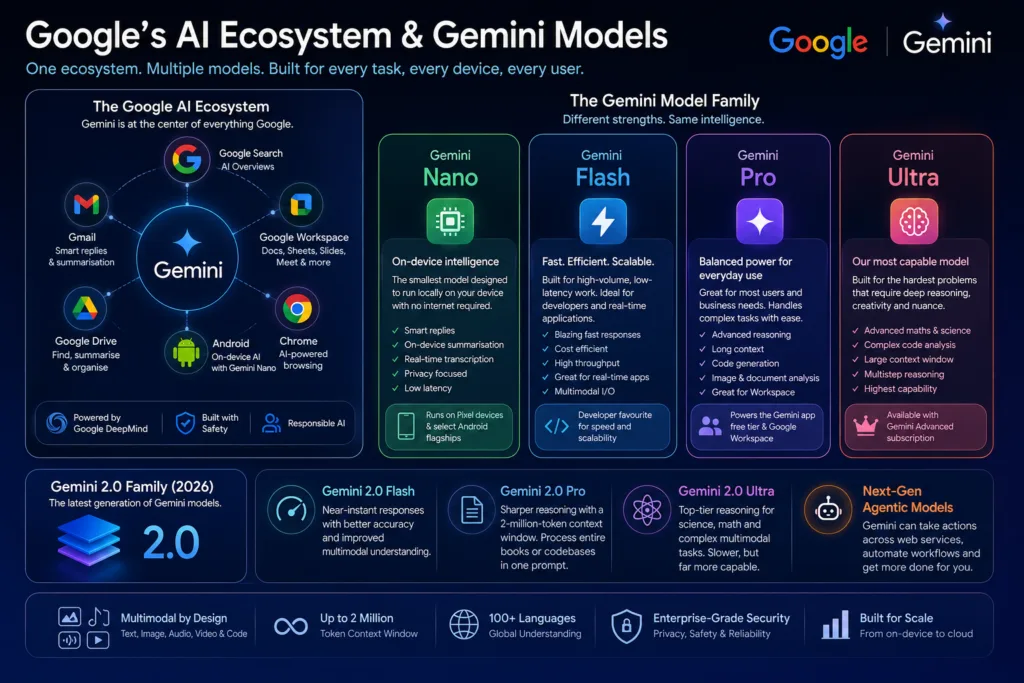
Gemini isn’t one model, it’s a family, and each member is tuned for a different task, device, or budget. Google is doing what most major AI labs now do: tiered models trading capability against cost and speed.
Gemini Nano
Nano is the smallest model, built to run entirely on-device with no internet connection required. It powers smart replies on Android, on-device summarisation, and real-time transcription, and it’s available on Pixel devices and select Android flagships. Its edge is privacy and latency: nothing leaves the device. For quick tasks like suggesting a reply or summarising a notification, it does a lot with very little.
Gemini Flash
Flash is the workhorse, tuned for speed and efficiency, sitting between Nano and Pro in capability but built for high-volume, low-latency work. Developers use it a lot for responsive applications where cost per query adds up fast. In 2026, Gemini Flash 2.0 handles most everyday tasks faster than Pro did two years ago, which tells you something about how quickly this is all moving.
Gemini Pro
Pro is the model most people actually encounter day to day. It runs the free tier of the Gemini app, Gemini for Workspace, and a lot of Google’s other services. It handles complex reasoning, long-form writing, code generation, image understanding, and document analysis without much trouble, and it holds context across long conversations. For most people, Pro is plenty.
Gemini Ultra
Ultra is Google’s most capable model, available only through Gemini Advanced, and it’s built for the hardest problems: advanced maths, dense codebase analysis, multi-step research, and creative work that needs more nuance. It has a large context window and reasons more deeply than Pro on tasks that need sustained logical chains. The cost is speed – Ultra is noticeably slower, but for a genuinely hard problem, that wait is often worth it.
Latest Gemini Models Available in 2026
As of mid-2026, the Gemini 2.0 family is the current generation. Gemini 2.0 Flash gives near-instant responses with better accuracy than its predecessor. Gemini 2.0 Pro brings sharper reasoning and a 2-million-token context window, enough to process entire books or codebases in one prompt. Gemini 2.0 Ultra, for Advanced subscribers, goes further still on scientific reasoning, advanced mathematics, and complex multimodal tasks. Google has also started rolling out experimental agentic models, letting Gemini take actions across web services rather than just handing back information.
How Google Gemini Works
If you’ve used any large language model before, the basic pattern will feel familiar: you type a prompt, Gemini answers. But the architecture underneath is worth understanding, because it shapes what the model can actually do.
Multimodal AI: Beyond Text
Gemini handles multiple data types natively. Show it a photo of a plant and ask for care instructions, and it reads the visual features, identifies the species, and gives advice in one step. Upload a screenshot of a spreadsheet and ask it to pull out specific figures, and it reads the image directly rather than running OCR first and processing text afterward. That native multimodality is where Gemini is strongest – tasks where visual and textual information are tangled together, like reading charts, diagnosing a UI bug from a screenshot, or describing a scene in detail.
Context Windows and Memory
The context window sets how much information Gemini can hold at once. With Gemini 2.0 Pro offering up to 2 million tokens, you can feed it an entire code repository, a full novel, or days of conversation history. This isn’t just a spec sheet number. It changes how you actually use the tool – you can upload a 200-page contract and ask about a clause buried on page 147, and Gemini keeps all of it in view.
Gemini also has persistent memory in the app, so it can recall information about you and your preferences across sessions. Tell it your preferred coding style, your dietary requirements, or the tone you want it to use, and it remembers for next time.
Reasoning and Problem-Solving
Gemini models, Ultra especially, work through chain-of-thought reasoning: faced with a complex problem, they break it into steps internally before answering. That makes them noticeably better at maths, logic puzzles, and multi-step planning than earlier models, which would sometimes guess confidently and get it wrong. You can often see this play out in how Gemini structures its answers to hard questions, laying out its reasoning before landing on a conclusion.
Image Understanding and Generation
Gemini reads images in some depth – handwriting, graphs, objects, context within a photograph. Image generation, powered by Imagen, is built directly into the interface: describe what you want, and Gemini makes it. By 2026 the quality holds up against dedicated image generation tools, though the real advantage is doing text and images in the same conversation without switching apps.
Coding Abilities
Gemini has become a serious coding assistant. It supports every major programming language, debugs existing code, explains functions, writes tests, and can architect an application if you guide it well. The 2-million-token context window means you can hand it an entire project and ask for changes that respect the existing structure. It isn’t always ahead of Claude or the latest GPT models on every benchmark, but its ties to Google’s developer ecosystem, Android Studio and Firebase included, give it real advantages for certain workflows.
Document Analysis
Upload a PDF, Word document, spreadsheet, or PowerPoint, and Gemini extracts, summarises, and analyses the contents. That alone saves real hours for anyone who deals with dense documents regularly. It can compare two documents, flag inconsistencies, suggest edits, or answer specific questions about the material, and accuracy on messy, heavily formatted documents has come a long way since the early versions.
Voice Capabilities
Gemini Live, on Android and in the Gemini app, allows natural voice conversation: you can interrupt, change topics, ask follow-ups, and have something closer to a real back-and-forth. The voice synthesis sounds natural, with reasonable pacing and intonation. For brainstorming, quick questions while driving, or accessibility needs, it changes how you’d otherwise interact with the assistant.
Gemini Integrations: Where You Actually Use It
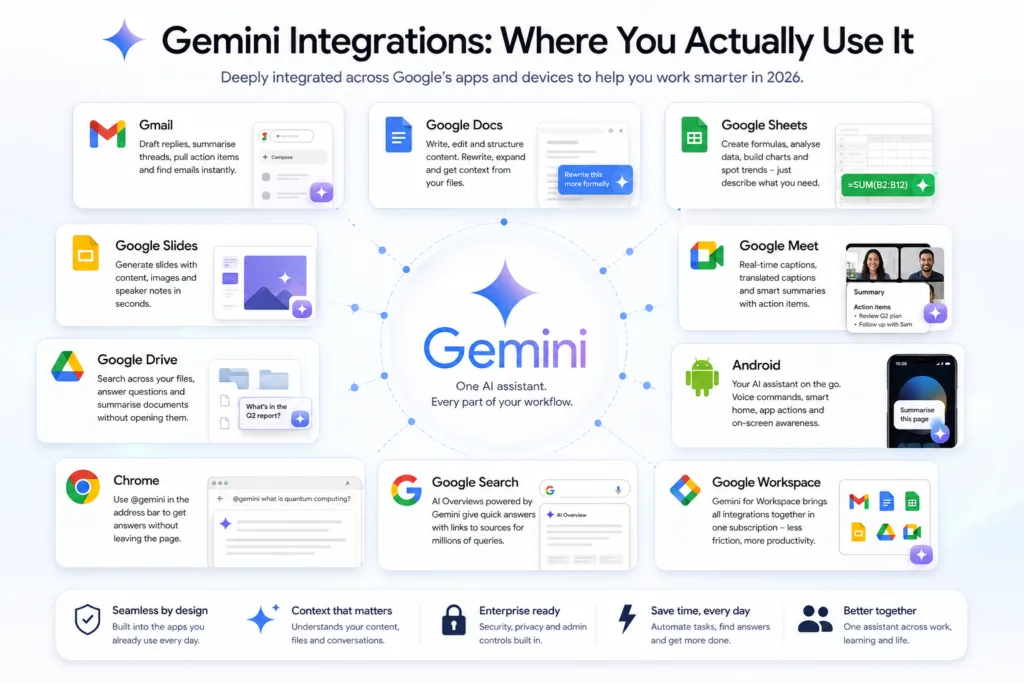
Integration depth is the single biggest thing Gemini has over its competitors. Here’s where it actually shows up in 2026.
Gmail
Gemini in Gmail drafts replies, summarises long threads, pulls out action items, and helps you write in your preferred tone. The side panel lets you ask questions about your inbox – find every email from a specific client about a particular project, for instance. It feels less like a bolted-on tool and more like a layer sitting over email itself.
Google Docs
In Docs, Gemini helps with writing, editing, and structuring. Ask it to rewrite a paragraph more formally, expand bullet points into prose, or draft an outline for a report. It understands your document’s context and can pull in references to other files in your Drive.
Google Sheets
Gemini in Sheets is a real help if you’re not a spreadsheet person. Describe what you want to calculate in plain English and it writes the formula. It can also analyse data, build charts, spot trends, and explain what it’s finding. For quick analysis, it cuts out a lot of tool-switching.
Google Slides
Building presentations is faster with Gemini. Describe the topic and it generates slides with content, images, and speaker notes, which you then refine one at a time. The design quality is functional rather than stunning, but the time saved on internal decks is real.
Google Meet
Gemini handles real-time captions, translated captions, and meeting summaries. Join a call late, and it’ll catch you up in a couple of lines. Afterward, it generates notes with action items. If you spend hours in meetings, this feature alone can justify the Workspace subscription.
Google Drive
Gemini can search across your Drive, answer questions about your files, and summarise documents without you opening each one. Being able to ask plain-language questions about your own files is genuinely useful once you’re buried in documents.
Android
On Android, Gemini can replace or sit alongside Google Assistant: voice commands, questions, smart home controls, app interactions. The deep integration means you can ask it to summarise a webpage you’re on, analyse a photo you just took, or draft a message based on what’s on your screen.
Chrome
Gemini is right there in the Chrome address bar. Type “@gemini” followed by your question, and you get an answer without leaving the page. It’s a small convenience, but it adds up if you’re using it dozens of times a day for quick questions.
Google Search
AI Overviews in Search run on Gemini models. The rollout hasn’t been without controversy, particularly around accuracy on niche queries, but the overall experience has improved. For plenty of common questions, the summaries give quick answers with links to sources. How AI-generated overviews sit alongside traditional search results is still shifting.
Google Workspace
For businesses, Gemini for Workspace bundles all of this under one subscription. The pitch is simple: if your organisation already runs on Workspace, adding Gemini removes friction rather than adding a new tool to juggle. For a broader look at how AI tools fit into modern workflows, our ultimate guide to AI tools covers the landscape in more detail.
Gemini Live, Deep Research, Canvas, and Gems
Beyond the core integrations, Google has added a handful of specialised features that widen what Gemini can do.
Gemini Live
Gemini Live is the conversational voice mode – interrupt mid-sentence, ask it to elaborate, or pivot to a completely different topic. It’s built for brainstorming, interview practice, language learning, and hands-free use. It feels less like giving a phone voice commands and more like talking to someone who knows the subject.
Deep Research
Deep Research is an agentic feature for Gemini Advanced subscribers. Give it a research question and it searches the web extensively, pulls the findings together, and produces a structured report with citations. It can take several minutes, but the result is often solid enough to serve as a real first draft. Students and analysts get a lot of use out of it.
Canvas
Canvas gives you a dedicated workspace for writing and coding inside Gemini, rather than going back and forth in a chat window. You work directly on a document or code file while Gemini assists alongside it – similar in concept to ChatGPT’s Canvas or Claude’s Artifacts, but built into Google’s ecosystem, with live iteration on content or code.
Gems
Gems are custom versions of Gemini you configure for a specific task: give it instructions, upload reference documents, set behavioural parameters. You might build a Gem that always writes in your brand’s voice, follows your style guide, and knows your product documentation. They can be shared across an organisation, which helps standardise how a team uses AI. It’s a similar idea to custom GPTs in ChatGPT; our complete ChatGPT guide for beginners covers that comparison in more depth.
API Access and Developer Capabilities
The Gemini API, available through Google AI Studio and Google Cloud Vertex AI, gives developers programmatic access to the models. Pricing is competitive, and the free tier is generous enough to experiment properly before you commit to paying for anything.
Developers can pick Gemini Flash for cost-sensitive, high-volume work, or Gemini Pro when deeper reasoning matters more. The API carries over all the multimodal features from the consumer app: text generation, image understanding, code execution, and function calling. Function calling lets Gemini interact with external APIs, which is how you build agentic applications that can take real actions rather than just respond.
Google AI Studio is a browser-based space for prototyping prompts, testing model behaviour, and generating code snippets, and it’s a good starting point before writing production code. Vertex AI adds the security, compliance, and governance layers enterprise deployments need. If you’re looking at the broader AI infrastructure landscape, our piece on Amazon Bedrock covers a different approach to accessing generative AI models.
Google Gemini Pricing
Google keeps pricing fairly simple. The free tier covers most casual use, and the paid tier unlocks the strongest models and the extra features.
Gemini Free
The free tier gets you Gemini 2.0 Flash and Gemini 2.0 Pro, with some limits on usage volume and context window size. You still get basic integrations with Google services, file uploads, image analysis, and voice input. For casual use or occasional AI tasks, it holds up better than you’d expect from a free plan.
Gemini Advanced
Gemini Advanced costs approximately £18.99 a month as part of the Google One AI Premium plan, and it unlocks Gemini 2.0 Ultra, the 2-million-token context window, Deep Research, priority access at peak times, and full Gemini for Workspace integration. The plan also includes 2TB of Google One storage, which makes the price look better once you factor in the bundle. If you use Gemini daily for work, Advanced tends to pay for itself in time saved fairly quickly.
| Feature | Gemini Free | Gemini Advanced |
|---|---|---|
| Price | Free | Approximately £18.99/month |
| Models Available | Gemini 2.0 Flash, Gemini 2.0 Pro | Gemini 2.0 Ultra, plus all others |
| Context Window | Up to 1 million tokens | Up to 2 million tokens |
| Image Generation | Limited | Full access |
| Deep Research | Not available | Included |
| Workspace Integration | Basic | Full (Gmail, Docs, Sheets, Slides, Meet, Drive) |
| File Uploads | Supported with limits | Larger files, more formats |
| Coding | Good | Excellent (deeper reasoning, longer context) |
| Best For | Casual users, students trying AI, light tasks | Professionals, researchers, developers, heavy users |
Google Gemini vs ChatGPT
The comparison everyone asks about. Having used both a lot, I’d say neither wins outright. They’re good at different things, and which one fits depends on what you’re actually trying to do.
| Criteria | Google Gemini | ChatGPT |
|---|---|---|
| Accuracy | Strong, benefits from Google Search grounding | Strong, GPT-4o is highly capable |
| Reasoning | Ultra model matches top-tier reasoning; Pro is slightly behind GPT-4o on complex logic | GPT-4o and o1 models excel at multi-step reasoning |
| Coding | Very good, excellent context window for large codebases | Slightly better on nuanced debugging and architecture design |
| Image Understanding | Excellent, native multimodality shines | Very good, comparable in practice |
| Research | Deep Research produces structured, cited reports | Comparable research capabilities, strong web browsing |
| Google Integration | Unmatched: Gmail, Docs, Drive, Sheets, Android, Chrome | Limited to plugins and external connections |
| Speed | Flash is extremely fast; Ultra can be slower | Generally fast across all tiers |
| Pricing | Free tier is strong; Advanced at ~£18.99/month with storage | Free tier available; Plus at ~£15.99/month; Pro at higher tier |
| For Students | Excellent: Workspace integration, Deep Research, free tier | Excellent: Strong writing and tutoring capabilities |
| For Business | Superior if using Google Workspace | Superior for standalone use, custom GPTs, enterprise API |
| For Developers | Strong API, generous free tier, AI Studio | Mature API, extensive documentation, larger community |
In practice, a lot of people just use both: Gemini for anything inside Google’s ecosystem, ChatGPT where its particular strengths matter more. The two are converging in capability, so increasingly the choice comes down to which ecosystem you’re already in rather than which model is “better.”
Real-World Use Cases
Gemini isn’t just something you chat with for fun, it solves real problems across a lot of roles. Here’s where I’ve found it most useful.
Writing and Editing
Gemini drafts blog posts, edits for clarity, suggests alternative phrasing, and adapts tone for different audiences. In Google Docs, you never have to leave the document to do any of it. Content teams can use it as a first-pass editor to keep voice consistent across multiple writers.
Coding and Software Development
Developers use it to generate boilerplate, debug errors, explain unfamiliar codebases, and write unit tests. The large context window helps a lot with understanding bigger projects, and Android developers get the added benefit of tight Android Studio integration.
Research and Analysis
Deep Research changes how thorough online research actually gets done. Instead of opening twenty tabs and piecing it together yourself, you describe the question and get a structured report back. Analysts use it for market research, competitive analysis, and literature reviews.
Learning and Studying
Students use Gemini as a tutor: it explains concepts at whatever difficulty level you need, builds practice questions, summarises textbook chapters, and helps plan essays. The trick is using it to build understanding rather than skip it. For more tools aimed at students, see our guide to the best AI tools for students.
Email Management
Gemini in Gmail drafts responses, summarises threads, and pulls out action items. If you’re drowning in email, these features get real time back, and being able to ask plain-language questions about your inbox changes how the whole thing works.
Presentations and Reports
Building a deck from nothing is tedious. Gemini in Slides generates a structured presentation from a topic description, and you refine it slide by slide from there. Pair that with Docs for the writing side, and hours of work on internal reports turns into minutes.
Data Analysis
Gemini in Sheets helps non-technical users get real analysis done: describe what you need, and it writes the formulas, builds the charts, and explains the patterns it finds. For marketers watching campaign numbers or small business owners checking their finances, that’s a real difference.
Marketing and SEO
Marketers use Gemini for content briefs, ad copy variations, audience research, and SEO planning. It can look at competitor content, suggest keyword angles, and draft meta descriptions, and the Google ecosystem tie-in gives useful context for search-related work. Our article on AI in SEO goes further into how these tools fit into modern content strategy.
Content Creation
From social posts to video scripts, Gemini speeds up content production – brainstorming ideas, structuring narratives, adapting content across platforms. Because it’s multimodal, you can also upload reference images and ask it to describe or analyse them for inspiration.
Business Automation
Through the API and Workspace integrations, businesses automate the routine stuff: generating reports, drafting customer communications, summarising meeting notes, processing documents. The agentic capabilities showing up in 2026 point toward more of this happening on its own.
Travel Planning
Gemini builds itineraries, suggests destinations based on your preferences, and helps compare options, pulling in real-time information from Search and Maps so its recommendations aren’t working off stale data.
Brainstorming
Sometimes you just need a thinking partner. Gemini Live is good for talking through ideas, getting unstuck, or working through creative directions out loud – the voice interface makes it feel like a conversation rather than a query.
Summarising PDFs and Documents
Upload a long PDF and ask for a summary, key points, or answers to specific questions. This alone saves professionals real hours every week. It handles complex formatting, tables, and mixed content reasonably well, though very heavily formatted documents can still trip it up.
Meeting Notes and Action Items
Gemini in Meet takes notes, flags decisions, and extracts action items. For teams running several meetings a week, having searchable, structured notes without anyone manually writing them up is a genuine time saver.
Best Google Gemini Prompts
What you get out of Gemini depends heavily on how you ask. Here are prompts that consistently produce useful results across different roles.
For Students
- “Explain quantum entanglement using an analogy a GCSE student would understand. Then explain it again at A-level depth.”
- “I am studying the causes of the First World War. Create 10 practice essay questions with bullet-point answer outlines.”
- “Review this essay introduction and suggest three ways to make it more compelling. Explain your reasoning for each suggestion.”
- “Act as a patient tutor. I am struggling with calculus derivatives. Walk me through the concept step by step, checking my understanding at each stage.”
For Writers
- “I have written a blog post about sustainable fashion. Analyse it for tone, readability, and persuasiveness. Suggest specific improvements.”
- “Rewrite this paragraph in three different tones: conversational, academic, and journalistic. Keep the core message identical.”
- “Generate 15 headline variations for an article about remote work productivity. Prioritise clarity over cleverness.”
For Developers
- “Review this Python function for edge cases I might have missed. Explain each edge case and how to handle it.”
- “I am building a REST API for a task management app. Design the endpoint structure and explain your design decisions.”
- “Convert this JavaScript code to TypeScript with proper types. Explain each type annotation you add.”
- “I have a bug where my React component re-renders infinitely. Here is the code. Identify the likely cause and suggest a fix.”
For Business Professionals
- “Draft a professional email to a client explaining a project delay. Strike a balance between transparency and reassurance.”
- “Summarise this 30-page report into a one-page executive summary. Focus on findings, risks, and recommendations.”
- “I am preparing for a salary negotiation. Role-play the conversation with me. Push back on my requests realistically.”
- “Analyse this meeting transcript and extract all decisions, action items, and open questions. Format as a structured table.”
For Teachers
- “Create a lesson plan for teaching persuasive writing to Year 9 students. Include learning objectives, activities, and assessment ideas.”
- “Generate five differentiated worksheets on photosynthesis, ranging from foundation to extension level.”
For SEO and Marketing
- “Analyse this competitor blog post. Identify their keyword strategy, content structure, and gaps I could address in my own content.”
- “Generate 10 meta description variations for a page about home office ergonomics. Each must be under 160 characters.”
- “I am launching a new productivity app. Brainstorm 20 content marketing ideas that would attract my target audience of busy professionals.”
For Productivity
- “I have 30 minutes before a meeting. Summarise this document and prepare three thoughtful questions I can ask to demonstrate engagement.”
- “Organise my scattered thoughts about this project into a structured plan with milestones, dependencies, and timeline estimates.”
Common Mistakes Users Make
Even experienced users fall into the same traps with Gemini. The most common one is treating it like a search engine. It isn’t a database of facts, it’s a reasoning engine that sometimes gets details wrong, so verify anything critical, especially numbers, dates, and specific claims.
Another mistake: prompts that are too vague. “Write a blog post about marketing” gets you generic output. “Write a 1,200-word blog post about B2B content marketing strategies for SaaS companies, focusing on the shift away from gated content in 2026, with specific examples” gets you something usable. Specificity does most of the work here.
People also skip iterative refinement. The first response is rarely the best one you’ll get. Ask Gemini to improve it, clarify it, rewrite it – give it feedback the way you’d give feedback to a colleague. The back-and-forth is where the quality actually shows up.
And finally, a lot of users ignore the multimodal side entirely, treating Gemini as a text-only tool when they could be uploading images, documents, and spreadsheets for richer answers. You don’t see what it can really do until you stop treating it as a text chatbot.
Privacy Considerations
Google’s data practices with Gemini are worth a closer look. By default, Google may use your conversations to improve its models, though you can turn that off in settings. Gemini for Workspace works under different data handling rules, with Google committing not to use enterprise data for model training. Gemini Nano, running entirely on-device, offers the strongest privacy guarantee of the bunch, since nothing leaves the device at all.
If you’re handling sensitive information, it’s worth going through your Gemini activity settings. You can delete conversation history, turn off data collection for model improvement, and control what Gemini remembers about you. Those options exist, but none of them are the default, so you have to go looking for them. Google’s transparency here has gotten better, but it still asks a fair bit of the user.
Limitations: Where Gemini Falls Short
Honesty matters here. Gemini isn’t perfect, and pretending otherwise doesn’t help anyone. Hallucination – the model confidently stating something wrong – is still a problem across every AI assistant, Gemini included. It’s improved a lot, but you should still check anything important.
Gemini can struggle with very recent events if its training data hasn’t caught up. Google Search grounding helps, but there are still gaps. Creative writing is competent but sometimes lacks the spark the best human writers bring – Gemini’s prose leans toward efficient and clear rather than beautiful or surprising.
On complex reasoning, especially anything needing several steps of logical deduction, Ultra is competitive with the best models out there, but Pro sometimes falls short of GPT-4o and Claude on the trickier problems. For everyday use you’d rarely notice. For cutting-edge research or advanced maths, it matters more.
Image generation is convenient and well integrated, but it doesn’t match dedicated tools like Midjourney for artistic work. It’s fine for presentations, social media, or quick visual ideas, but if you need production-quality imagery, look elsewhere. If you’re exploring AI tools for e-commerce or product imagery, our overview of Amazon AI tools covers a few alternatives worth a look.
Who Should Use Google Gemini
Students
Gemini works well for students. The free tier is generous, Workspace integration helps with essays and research, and Deep Research (with Advanced) produces structured reports. The tutoring-style interaction is genuinely helpful for learning complex material, and students already in the Google ecosystem will find it slots straight into their workflow.
Teachers and Educators
Lesson planning, worksheet generation, differentiated materials, and assessment creation all go faster with Gemini. Being able to adjust content complexity on demand is especially useful for teachers managing mixed-ability classes.
Developers
Gemini’s coding is strong, and the large context window is a real advantage for working with big codebases. Android developers and anyone on Google Cloud will find the ecosystem tie-in compelling. Developers working across multiple cloud platforms may want to compare it against alternatives before committing.
Businesses and Enterprises
If your organisation already runs on Google Workspace, Gemini for Workspace is worth serious consideration – it removes friction that standalone AI tools tend to add. For businesses not on Workspace, it’s a closer call, and ChatGPT or Claude may work just as well. As AI browser assistants keep improving, this landscape keeps shifting too.
Content Creators and Marketers
Writers, marketers, and content creators benefit from Gemini’s drafting, editing, and brainstorming. The Google Docs integration is especially useful if you produce written content regularly, and SEO professionals will appreciate the search-grounded context.
Researchers
Deep Research, the large context window, and document analysis make Gemini a strong research assistant. Being able to process entire books or large document collections in one session is genuinely useful for academic and professional research work.
Casual Users
For everyday questions, quick summaries, and occasional writing help, the free tier is more than enough. Voice mode on Android is a natural way to use it without typing, and most casual users will never need to upgrade to Advanced.
Frequently Asked Questions
What is Google Gemini and how does it differ from Google Bard?
Google Gemini is the multimodal AI model family that replaced Bard. Bard ran on the older LaMDA model and mainly handled text; Gemini was built from the ground up to process text, images, audio, code, and video natively. The February 2024 rebrand from Bard to Gemini reflected a full technology change, not just a new name.
Is Google Gemini free to use?
Yes. The free tier gives you access to Gemini 2.0 Flash and Gemini 2.0 Pro, along with basic Workspace integrations, file uploads, image analysis, and voice input. Gemini Advanced, which unlocks Gemini Ultra and additional features, costs approximately £18.99 per month as part of the Google One AI Premium plan.
How does Google Gemini compare to ChatGPT?
Both are highly capable, with different strengths. Gemini leads on Google ecosystem integration (Gmail, Docs, Drive, Android), offers a larger context window, and includes Deep Research. ChatGPT is slightly stronger on complex reasoning and has a more mature plugin ecosystem. Plenty of people use both, for different tasks.
Can Google Gemini generate images?
Yes, using Imagen, Google’s image generation model. Describe the image you want, and Gemini creates it within the conversation. This is available on both free and paid tiers, though Advanced subscribers get higher usage limits and priority generation.
Does Google Gemini work with Google Docs and Gmail?
Yes. Gemini integrates directly with Docs, Gmail, Sheets, Slides, Meet, and Drive. In Docs it helps with writing and editing; in Gmail it drafts replies and summarises threads. Full functionality comes with Gemini Advanced, with a more limited version on the free tier.
What is the context window in Google Gemini?
The context window is how much information Gemini can process in a single conversation. Gemini 2.0 Pro offers up to 2 million tokens, roughly 1.5 million words, or around 2,000 pages of text – enough to upload entire books, codebases, or large document collections for analysis.
Is Google Gemini safe and private?
Google provides privacy controls for Gemini, including deleting conversation history and disabling data collection for model training. Gemini for Workspace has enterprise-grade data protections, and Gemini Nano, running on-device, offers the strongest privacy since data never leaves your device. Anyone handling sensitive information should check their settings carefully.
How do I access the Gemini API?
Through Google AI Studio for prototyping, or Google Cloud Vertex AI for production deployments. There’s a generous free tier for experimentation. The API supports text generation, multimodal inputs, code execution, and function calling for agentic applications.
What are Gems in Google Gemini?
Gems are customised versions of Gemini you configure for specific tasks: you provide instructions, upload reference documents, and set behavioural parameters. Gems can maintain a consistent brand voice, follow a style guide, or specialise in a particular domain, and they can be shared within organisations for standardised AI interactions.
Can Google Gemini help with coding?
Yes. Gemini supports all major programming languages, generates code, debugs errors, explains complex functions, writes tests, and helps architect applications. The large context window lets it work with entire codebases at once, and Android developers benefit from tight Android Studio integration.
Final Thoughts: Should You Use Google Gemini in 2026?
Google Gemini has grown into one of the more capable, practical AI assistants out there. What sets it apart isn’t dominating every benchmark, it’s being right there where you’re already working. Gmail, Android, Chrome – the integration cuts down on friction rather than adding another tool to manage.
If you’re already on Google Workspace, choosing Gemini is an easy call. The productivity gains from integrated AI across email, documents, spreadsheets, and meetings add up quickly. For students, the free tier gives you a lot without paying anything. For developers, the API is a solid, competitive platform for building AI-powered applications.
Gemini isn’t perfect. It hallucinates. It can produce bland writing. It trails a bit on certain complex reasoning benchmarks. But it’s improved at a pace that suggests Google is in this for the long haul, and the 2026 models are meaningfully better than what was available even a year ago.
The best approach is just to try it. Start with the free tier, try the Workspace integrations, test prompts that actually matter for your work, and compare outputs against other assistants if you have access to them. The AI landscape is still competitive, and the best tool is whichever one actually fits what you need. For a lot of people in 2026, that’s Google Gemini.