

I still remember the first time I watched Flux AI render a photorealistic portrait in under two seconds. It was late on a Tuesday night, and I had been testing every AI image generator I could get my hands on. Midjourney felt painterly, Stable Diffusion felt technical, but Flux felt different. It felt precise. It understood what I meant, not just what I typed. If you are anything like me, you have probably grown tired of wrestling with prompts that produce anatomical nightmares or text that looks like an alien language. Flux AI changed that conversation entirely, and in 2026, it has matured into something genuinely indispensable for serious creative work.
This guide is not a surface-level skim. I have spent months integrating Flux AI into real commercial workflows, breaking its prompting system, pushing its architecture to its limits, and yes, occasionally throwing my hands up in frustration when it hallucinates a sixth finger on a hand. I am going to walk you through everything, from the history of Black Forest Labs to the precise prompt syntax that lands you that perfect Flux AI realistic image. I will show you how to stop paying for expensive stock photography and start generating custom brand assets that actually look like they belong in a high-end magazine. Grab a coffee. This is the deep dive.
What Exactly Is Flux AI?
In the simplest terms, Flux AI is a family of text-to-image generative models built on a hybrid architecture that combines diffusion transformers with flow matching. That is the technical mouthful. What it actually means for you is an image generator that interprets language with staggering accuracy and renders text within images better than any other open-weight model currently available. It is not just a tool for making pretty pictures. It is an engine for visual problem-solving. I have used it to mock up packaging designs in minutes, generate cohesive storyboards for video pitches, and even create synthetic training data for a machine learning project I was consulting on.
Unlike some competitors that rely heavily on a single aesthetic, Flux possesses a chameleon-like ability to shift from hyper-realistic product photography to 1960s comic book line art without breaking a sweat. It respects your prompts. Write about a “bright red ceramic coffee mug sitting on a distressed wooden table, morning light streaming through a rain-streaked window, 85mm lens, f/1.8 depth of field”, and you will get exactly that, right down to the distortion in the raindrops. The first time I tested that prompt, I genuinely zoomed in to check the reflections. I was not disappointed.
The Origin Story: Black Forest Labs and the Exodus from Stability
To understand why Flux AI feels so polished, you need to look at the pedigree of the team behind it. Black Forest Labs was founded by the core researchers who architected the Stable Diffusion models at Stability AI. These are the people who essentially democratised image generation. When they left to form their own company in Germany, they brought with them a very specific philosophy: high-quality output should not be locked behind closed APIs. The open-source community was holding its breath, and when Flux was released, the collective sigh of relief was audible across GitHub and Hugging Face.
Their mission was to bridge the gap between the raw flexibility of Stable Diffusion and the aesthetic polish of proprietary systems like Midjourney. In my opinion, they have not just bridged the gap. They have leapfrogged it. The launch of the Flux AI models suite signalled a shift towards “professional-grade open weights”. This is not a research toy. It is a commercial asset, and the licensing model reflects that maturity.
Why Flux AI Skyrocketed in Popularity in 2026
I have been tracking AI model adoption curves for years, and I have rarely seen a trajectory like this. Several factors collided perfectly. First, the quality of text rendering made it the default choice for designers who were tired of garbled typography. Second, the release of the Flux AI API made enterprise integration seamless. Third, and perhaps most crucially, the community rallied around the open-source versions, creating an ecosystem of LoRAs and fine-tunes that expanded its capabilities exponentially. If you are looking at integrating AI into a visual pipeline, you can no longer ignore the best AI image generator conversation without addressing Flux head-on.
⚡ Quick Win
If you are just starting with how to use Flux AI, don’t jump straight to the Pro model. I made the mistake of overpaying for inference early on. Start with Flux Schnell to iterate on prompt structure rapidly (it’s free and fast), then scale up to Dev or Pro for the final render. Your wallet will thank you.
The Hybrid Architecture: Transformers Meet Diffusion
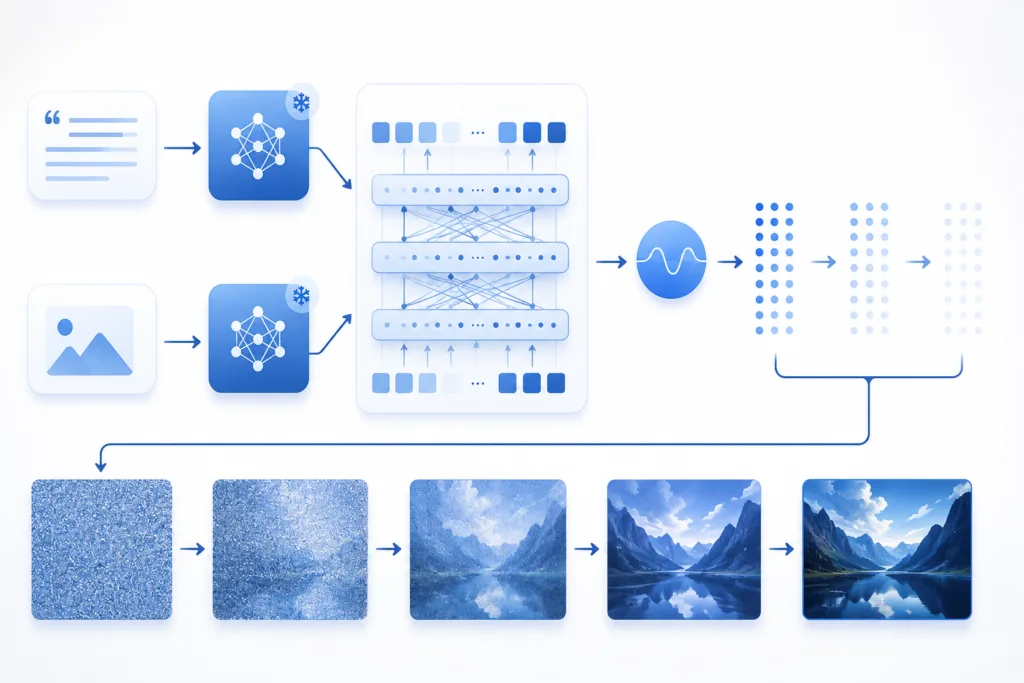
One thing I quickly noticed when reading the technical papers is that Flux AI architecture is not a simple upgrade. It is a fundamental rethink. Traditional diffusion models operate in pixel space or latent space using a U-Net backbone. Flux leverages a Transformer architecture. This allows it to process the relationship between words and visual patches with far greater attention to detail. This is the secret sauce behind its text-rendering capabilities. It sees words not just as semantic tags but as visual glyphs that need to be spatially mapped.
The flow matching technique used here is also cleaner than traditional score-based diffusion. Without getting too deep into the mathematical weeds, it establishes a straighter path between random noise and the final image. This results in fewer sampling steps needed to achieve a coherent image. In practical terms, the Flux AI image generation process feels snappier and less “drunk” during the early diffusion steps compared to older architectures.
The Image Generation Pipeline in 2026
When you submit a prompt, several things happen in sequence. First, the dual text encoders (usually a combination of T5-XXL and CLIP-L) parse your language. The T5 encoder is a massive language model in its own right, and it is the reason you can throw complex, paragraph-long descriptions at Flux and get coherent results. This surprised me early on. I fed it a 400-word descriptive passage from a novel, and the resulting image captured the specific mood of the scene, not just the objects listed in the text. This is a massive leap forward in semantic alignment.
If you are technically inclined, you might want to explore how these processes intersect with broader AI workflows. If you enjoy understanding the mechanics, you will find a similar technical depth in our guide on how AI tools work. It provides a solid foundation for grasping why Flux feels so intuitive.
Navigating the Flux Model Maze: Schnell, Dev, and Pro
Confusion often arises when newcomers look at the Flux AI models lineup. Black Forest Labs has segmented the offering brilliantly for different use cases, but choosing the wrong one can waste your time or money. I have used all three extensively, and here is the unvarnished truth about each.
| Feature | Flux Schnell | Flux Dev | Flux Pro |
|---|---|---|---|
| Speed | Lightning-fast (1-4 steps) | Medium (25-50 steps) | Slowest (50+ steps) |
| Output Quality | Good (slightly simplified) | Excellent (high fidelity) | Exceptional (state-of-the-art) |
| Licence | Apache 2.0 (Open Source) | Non-Commercial (Research) | Commercial (API/Partnerships) |
| Weight Availability | Fully open | Open weights | Hosted only |
| Ideal For | Rapid prototyping, local devices | Artistic exploration, local fine-tuning | Final client delivery, print-ready assets |
Flux Schnell: The Speed Demon
Flux Schnell is the model I fire up when I need to generate a dozen thumbnail concepts for a YouTube video before my coffee gets cold. It is distilled for speed. The timestep distillation process means it can produce a clear image in literally four steps. For a long time, I dismissed it as a “toy” model because of its speed, assuming it cut corners on quality. I was wrong. While it lacks the absolute photographic precision of Pro, for any digital graphic, social media post, or stylised illustration, Schnell is a powerhouse.
The fact that it runs smoothly on consumer-grade hardware is a game-changer. If you are a student or a developer tinkering on a laptop, Schnell is your entry point. I keep a local instance running on my gaming rig, and it barely nudges the GPU usage. This is a great example of what modern AI browser assistants and local tools should feel like: lightweight and invisible until you need them.
Flux Dev: The Tinkerer’s Playground
Flux Dev is the full-fat model available for the open-source community. It is released under a non-commercial licence, which means you can download the weights, run it locally, and fine-tune it for your specific projects, provided you are not selling the output directly. This model is where the community’s magic happens. The majority of custom LoRA files you will find on CivitAI or Hugging Face are trained on Dev. I have fine-tuned it on a dataset of my own hand-drawn storyboard frames, and the resulting stylistic consistency was unnerving. It genuinely felt like the AI had learned my specific shorthand for shading and perspective.
⚠️ Common Mistake
Do not assume “Dev” means low quality. I fell into the trap of waiting for Pro API access before doing any serious work. Looking back, 80% of my portfolio-quality images could have been rendered on Dev. If you have the hardware, run Dev locally. You maintain full privacy and avoid inference costs entirely.
Flux Pro: The Professional Workhorse
Flux Pro is the black box. It is accessible only via the API or official partnerships like Replicate and Fal.ai. The output is undeniably superior. The dynamic range is wider, the detail in complex fabrics or fur is denser, and the adherence to prompt nuance is as close to telepathy as I have seen an AI get. The Flux AI commercial licence comes into play here. If you are an agency delivering assets to a client, or a marketer printing a billboard, you need Pro. The legal safety net and the final 5% quality bump justify the cost. I use Pro when the image is the final product, not just a step in the process.
Flux AI vs The World: A Reality Check
It is impossible to talk about the best AI image generator in 2026 without placing Flux in the competitive landscape. I have commercial subscriptions to almost everything, and I run my workflows across them daily. Here is how they stack up.
| Feature | Flux Pro | Midjourney 6.1 | Stable Diffusion 3 | Adobe Firefly |
|---|---|---|---|---|
| Text Rendering | Excellent | Average | Poor | Good |
| Aesthetic Polish | High (Customisable) | Very High (House Style) | Medium (Raw) | Medium (Stock Style) |
| Open Source | Partial (Schnell/Dev) | No | Yes | No |
| Prompt Fidelity | Outstanding | Good | Variable | Good |
| Best For | Precision & Text | Artistic Vibes | Technical Tinkering | Enterprise Safety |
When conducting a Flux AI vs Midjourney comparison, the biggest differentiator is control. Midjourney has that magical taste engine that makes everything look like a coffee table book, but it often feels like you are gently coaxing a temperamental artist. In a Flux AI vs Stable Diffusion face-off, Flux wins hands down on prompt comprehension. SD3 is incredibly flexible, but getting it to render a specific sentence on a sign consistently requires a sacrifice to the AI gods. Flux does it reliably on the first try. This specific capability makes it an invaluable part of the AI in SEO content production strategy, where branded imagery with accurate text is critical; you can read more about that synergy in our guide on AI in SEO.
Mastering the Flux AI Prompt Guide
The difference between a bad AI image and a breathtaking one is rarely the model. It is the prompt. Flux AI prompts require a different mental framework than legacy systems. Because the T5 encoder is so sophisticated, you can write in natural, flowing descriptive sentences rather than staccato keyword lists. I have spent hundreds of hours developing a prompting syntax that works consistently for the Flux AI image generator. It focuses on three pillars: Subject, Scene, and Technical Modifiers.
🧠 Prompt Breakdown
Weak Prompt: “A warrior woman.”
Strong Flux Prompt: “A portrait of a warrior woman with silver braided hair and mud on her cheeks, wearing worn leather armour, standing in a misty pine forest at dawn. Shot on Fujifilm Pro 400H, 85mm lens, f/1.4, natural light, cinematic atmosphere.”
Flux adores atmospheric details and lens simulation. Do not just name an object. Describe the air, the texture, and the light.
The Anatomy of a Professional Prompt
A robust Flux AI prompt guide starts with understanding token weighting. While natural language is king, you can still influence focus. Using descriptive emphasis on words like “weathered” or “shiny” changes texture mapping. In my testing, I found that placing the most important visual element at the very beginning of the prompt acts as an implicit weight boost. Negative prompts are equally vital. The standard “bad anatomy, extra fingers, watermark, text” template works, but I have refined my negative prompts to include “harsh studio lighting, oversaturated colours, plastic skin texture, messy composition” to force that organic, editorial feel.
50+ Flux AI Prompt Examples from My Testing Lab
I have pulled these directly from my personal generation history. I have categorised them by use case. You can copy these exactly. Notice how I blend technical camera terminology with descriptive storytelling. This is the sweet spot for Flux AI image generation.
📸 Photography & Portraiture Prompts
1. Environmental Portrait: “An elderly fisherman mending a net on a weathered wooden boat, morning fog lifting over the harbour, golden hour backlight, Nikon Z9, 50mm f/1.2, hyper-realistic skin texture, wrinkles and sunspots, cinematic colour grading.”
2. Studio Headshot: “Professional corporate headshot of a young woman with curly red hair, wearing a beige cashmere blazer, dark grey seamless background, soft butterfly lighting, Canon R5, 85mm prime lens, sharp focus on eyes.”
3. Lifestyle Photography: “A father teaching his son to ride a bicycle in a sun-drenched park, motion blur on the wheels, genuine laughter, candid moment, Leica M6, Kodak Portra 400 film stock, warm and nostalgic.”
4. Low-Key Portrait: “A mysterious man in a trench coat standing under a streetlamp in the rain, noir style, high contrast, black and white, misty alleyway, rim lighting, cinematic framing.”
🍕 Food & Product Photography
5. Splash Photography: “A ripe strawberry falling into crystal clear water, splash frozen in time, water droplets in sharp focus, bright white background, high-speed sync flash, professional food photography.”
6. Cosmetics: “A luxury face cream jar surrounded by fresh green eucalyptus leaves on a wet marble slab, soft diffused daylight, minimalist aesthetic, high-end product photography.”
7. Beverage: “A frosty pint of amber ale on a dark oak bar top, condensation on the glass, warm bokeh lights in the background, cozy pub atmosphere.”
8. Gourmet Dish: “A chef’s table plating of seared scallops with saffron risotto, steam rising, microgreens garnish, slate plate, warm ambient restaurant lighting, shallow depth of field.”
🚗 Automotive & Industrial
9. Concept Car: “A sleek electric hypercar parked on a neon-soaked Tokyo street at night, rain-slicked asphalt reflecting the city lights, cyberpunk aesthetic, wide-angle shot, Blade Runner mood.”
10. Vintage Classic: “A restored 1965 Ford Mustang convertible driving along a coastal highway at sunset, palm trees silhouetted in the background, vibrant orange and teal colour grading.”
🎨 Logo & Branding Design
For logos, specificity is key. Flux can do it, but you need to guide the typography. This is where the Flux AI for logo design workflow shines.
11. Tech Logo: “A minimal vector logo for an AI startup, abstract geometric shape resembling a neural network, vibrant blue and purple gradient, clean sans-serif text underneath saying ‘SYNAPSE’, white background, flat vector style.”
12. Luxury Brand: “An elegant fashion brand logo, a sleek black panther silhouette inside a golden circular emblem, serif font text saying ‘NOCTURNE’, embossed paper texture, high contrast.”
📺 YouTube Thumbnails & Social Media
I rely heavily on Flux for YouTube thumbnails. It is brilliant at creating that clean, exaggerated look.
13. Tech Review Thumbnail: “A shocked young man holding a cracked smartphone, neon blue glow, cyberpunk goggles pushed up on his forehead, vibrant, saturated colours, YouTube thumbnail style, clear facial expression.”
14. Instagram Story: “A flat lay of a minimalist workspace, beige desk mat, iPad with handwritten notes, iced matcha latte, morning sunlight, soft shadows, aesthetic lifestyle, blogger flat lay.”
Professional Workflows for Designers and Marketers
Using Flux for a one-off image is fun. Building a pipeline with it is profitable. My workflow for Flux AI for marketing involves a cascade approach. I begin with a rough sketch or a mood board image passed through an image-to-image control net via the API. I use Schnell to generate twenty rapid-fire variations. I select the top three, then send them to Dev for refinement. Only the absolute hero image gets the Pro treatment for retouching and upscaling.
If you are looking into AI image prompts for a living, you need to build a prompt library. I use a simple spreadsheet with columns for category, lighting style, camera settings, and negative triggers. This saves me hours. Whenever I nail a specific look, I save the metadata. For teams, the Flux AI API is non-negotiable. It plugs seamlessly into Zapier or custom Python scripts. I currently have an automation where my CMS automatically generates a hero image based on the blog post title and meta description. It is not perfect every time, but it beats hunting for stock photos.
For a broader look at how these workflows fit into a larger toolkit, our ultimate guide to AI tools is a great resource. It contextualises Flux among the wider suite of AI productivity tools you should be using.
Lighting and Camera Cheat Sheets
Getting photorealistic results relies on knowing your lighting and lens terminology. I keep these tables pinned to my monitor when prompting.
| Lighting Style | Prompt Modifier | Emotional Effect |
|---|---|---|
| Rembrandt | Dramatic triangle of light under the eye, chiaroscuro | Moody, artistic |
| Butterfly | Symmetrical shadow under the nose | Glamour, beauty |
| Split Lighting | One side of the face fully lit | Mysterious, edgy |
| Cinematic | Volumetric fog, haze, anamorphic lens flare | Epic, narrative |
Pricing, API, and the Commercial Licence
The Flux AI pricing structure in 2026 is relatively straightforward, but the devil is in the licensing details. If you are a startup building a product on top of Flux, the Flux AI commercial licence attached to Pro is your safe harbour. You can fine-tune Dev for research and internal tools, but the moment you sell that output or offer it as a service, you are legally grey. Black Forest Labs offers enterprise packages that include indemnification, which I strongly recommend for agencies.
| Plan | Access | Price (Approx.) | Best Use |
|---|---|---|---|
| Open Source (Schnell) | Self-hosted | Free | Personal, Learning, Rapid Prototyping |
| Developer (Dev) | Self-hosted | Free (Non-Commercial) | Fine-tuning, Research, Portfolio |
| Pro API | Cloud API | Pay-per-Image (~$0.05-$0.10) | Commercial SaaS, Marketing Assets |
| Enterprise | Dedicated | Custom Quote | High-volume, Legal Indemnity |
Common Mistakes and How to Fix Them
I have mentored a few junior designers on how to use Flux AI effectively, and I see the same errors crop up repeatedly. The biggest one is ignoring the seed parameter. If you are iterating on a composition, lock your seed. If you change a tiny detail in the prompt without locking the seed, Flux will regenerate the entire noise map, and the subject will look completely different. The second sin is over-crowding the prompt. Yes, Flux handles long prompts well, but giving it five conflicting subjects dilutes the attention mechanism. Keep the primary subject dominant. The third mistake is forgetting to refresh the negative prompt. A negative prompt optimized for photorealism will ruin an illustration prompt. Toggle your negatives with every style shift.
⚠️ WARNING
Do not copy and paste negative prompts from Midjourney. Flux interprets attention differently. A huge string of “ugly, deformed, bad quality” can actually confuse the model. Be precise. “Missing limbs, conjoined bodies, text artifacts” is more effective than generic hate-words.
The Creative Future of Flux AI
Looking ahead, the trajectory of Black Forest Labs Flux is firmly pointed toward controllability. We are seeing the early integration of native 3D awareness and consistent character rendering across multiple generations. As we move deeper into 2026, I suspect the line between video and image generation will blur further within the Flux ecosystem. For someone like me, who spends a lot of time working with interactive code and design, the synergy between tools like Cursor AI and image generation AI is creating a reality where one person can build an entire animated short film or a fully illustrated web application in a weekend. It is a brilliant time to be a creator, provided you ride the wave rather than resist it.
Where Flux AI Goes Next
If I were starting my journey with Flux again today, I would ignore the noise and focus entirely on the fundamentals of visual literacy. The model is a powerful lens, but you are the eye behind it. Spend more time studying real light than memorising prompt tricks. Look at how shadows fall in real life. Notice how fabric folds. The gap between a good prompter and a great artist is narrowing, and Flux is the tool that makes that gap visible. The future of Flux AI for content creators is not just about generating images faster. It is about seeing the world with more clarity, and then translating that clarity into a box of pixels. I, for one, cannot wait to see what you create with it.
If you are exploring the wider world of conversational and generative assistants, you might find our deep dives into ChatGPT