

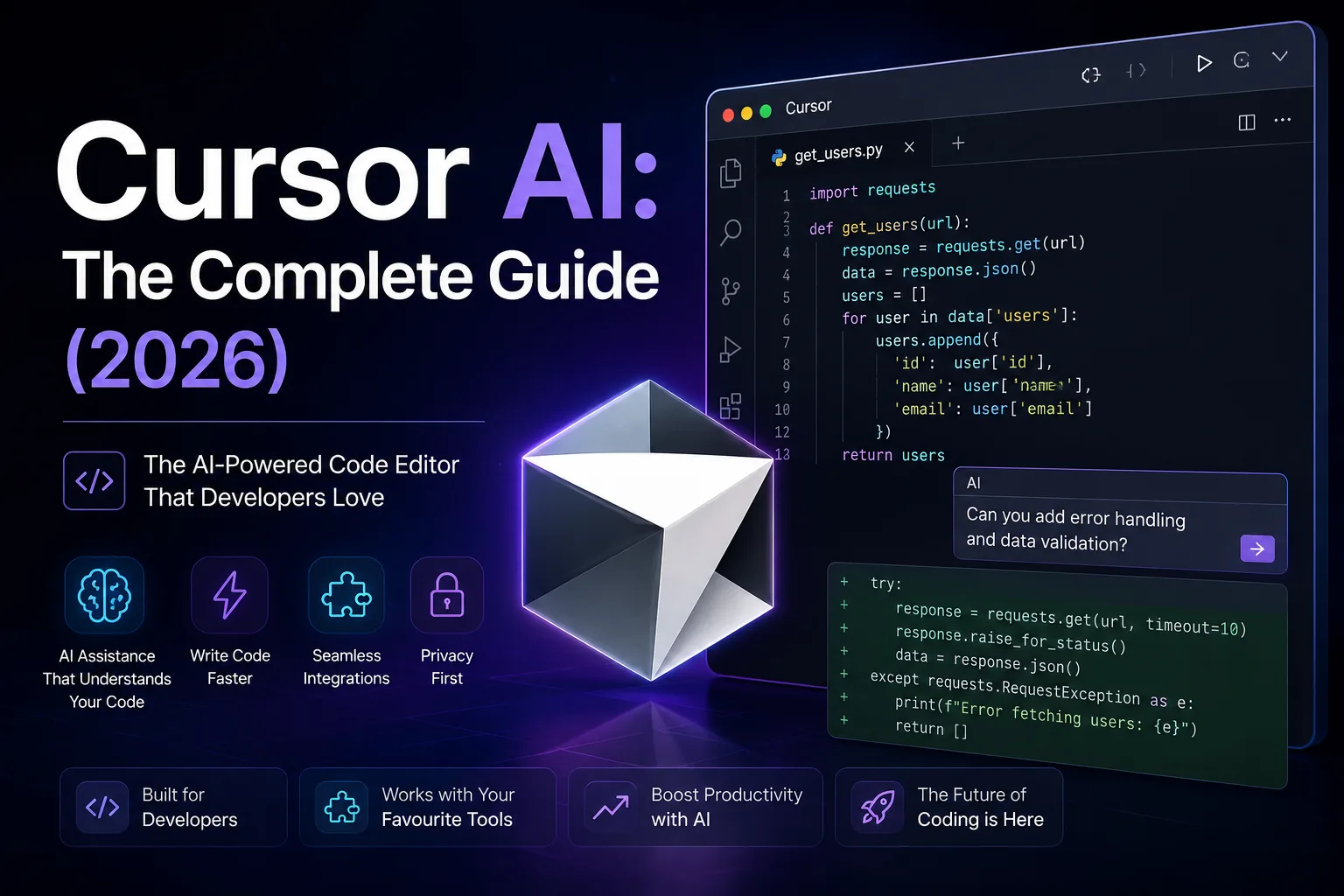
Cursor AI sits in a peculiar middle ground. It is a full code editor, forked from VS Code, so it feels immediately familiar. But under the surface, it has stitched large language models so deeply into the editing experience that the boundary between writing code and prompting an AI starts to blur. That sounds like marketing speak, I know. I promise it is not. I will walk through exactly what I mean.
If you have been following the broader shift in AI tools for development, you will have noticed a clear trend: the assistive models are moving out of browser tabs and into the editor itself. This guide is my attempt to give you a clear-eyed, honest picture of where Cursor AI actually stands in mid-2026, without the usual marketing gloss.
What Is Cursor AI?
Cursor AI is a code editor built on top of the open-source foundations of Visual Studio Code. It isn’t a plugin or an extension you bolt onto an existing setup, but a standalone application that looks and behaves almost identically to VS Code, with one critical difference: large language models are wired into every corner of the interface, from the tab key to the terminal.
The company behind it, Anysphere, started with a clear thesis. Rather than building yet another AI wrapper, they forked VS Code and rebuilt the editing experience around the idea that an AI model should have persistent, deep awareness of your entire codebase. That means indexing your files, understanding the relationships between modules, and using that context whenever you ask it to generate, refactor, or debug code.
At its core, Cursor AI is an AI-first integrated development environment. The AI is not an afterthought. It is the primary interaction model. You still write code manually when you want to, but the AI is always available through tab completions, inline editing, a chat sidebar, a multi-file composer, and an increasingly capable agent mode that can autonomously plan and execute tasks across your project.
For anyone curious about how AI tools work under the hood, the short version is that Cursor combines several techniques. It uses retrieval-augmented generation with code embeddings to pull relevant snippets from your codebase into the model’s context window. It also maintains a running understanding of your project structure, recent edits, and terminal output. All of this gets fed into the model alongside your prompt, which is why its suggestions tend to be far more contextually relevant than what you would get from a chat interface alone.
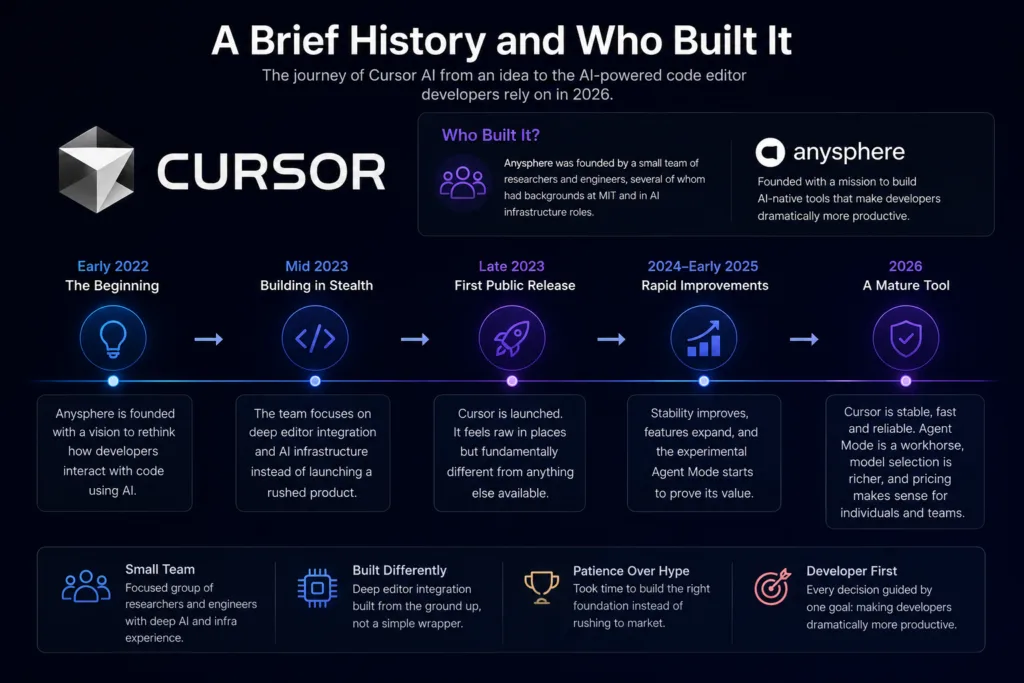
A Brief History and Who Built It
Anysphere was founded by a small team of researchers and engineers, several of whom had backgrounds at MIT and in AI infrastructure roles. They raised significant funding early on, but unlike many AI startups, they did not rush to launch a thin ChatGPT wrapper. They spent considerable time building the editor integration from the ground up. The result, when it first appeared, felt rough in places but fundamentally different from anything else available.
By 2026, Cursor is a lot more solid than it was at launch. Most of the early complaints about stability have been addressed. The agent mode, which was experimental in earlier versions, is now a reliable workhorse for multi-step coding tasks. The model selection has expanded, and the pricing has settled into a structure that makes sense for both individual developers and larger teams.
How Cursor AI Works: The Technical Bits Explained Simply
If you are the type who likes to understand what is happening behind the curtain, this section is for you. If not, feel free to skip ahead to the features. But I think understanding the mechanics helps you use the tool more effectively.
Codebase Indexing and Embeddings
When you open a project in Cursor, it does not just passively wait for you to type. It begins indexing your codebase. It generates vector embeddings for your files, functions, classes, and other structural elements. These embeddings are stored locally and used to retrieve the most relevant code when you make a query. This is why Cursor can answer questions about your specific codebase without you needing to paste files into a chat window.
The indexing process is incremental and reasonably fast. On a project with a few hundred files, it takes under a minute. On larger monorepos, it can take longer, and I have noticed that very large codebases can sometimes expose limitations in how much context the model can meaningfully hold at once. I will cover that in the limitations section.
Context Windows and Model Selection
Cursor supports multiple underlying models, including GPT-4o, Claude 3.5 and 4 models, and Google’s Gemini series. Each model has a different context window size, which determines how much of your codebase can be fed into a single prompt. Claude models, for instance, offer particularly large context windows, making them well-suited for tasks that span many files. You can switch models on the fly depending on the task.
Understanding context windows matters because Cursor is constantly making decisions about what to include. It prioritises recently viewed files, open tabs, and semantically relevant snippets from the index. You can also explicitly include or exclude files using @-mentions in the chat or composer.
Agent Mode
Agent mode is where Cursor shifts from being a helpful autocomplete tool to something closer to an autonomous coding assistant. When you enable agent mode and give it a task, it can plan a sequence of steps, read files, write code, run terminal commands, check the output, and iterate until the task is complete. It is not perfect, but it has saved me hours on repetitive tasks like migrating configuration files, updating import paths across a project, and writing boilerplate test files.
Agent mode uses a combination of the selected LLM and a set of built-in tools that allow it to interact with your filesystem and terminal. You can watch it work step by step, and you retain full control to approve or reject changes. It feels a bit like pair programming with a very fast, occasionally overconfident junior developer who happens to have memorised a vast amount of documentation.
Key Features in 2026: A Detailed Walkthrough
Tab Completion
Tab completion is the most immediately noticeable feature. As you type, Cursor suggests completions not just for the current line but for entire blocks of code. Unlike older autocomplete tools that rely on static analysis, Cursor’s suggestions are generated by the LLM with awareness of your surrounding code. It often correctly anticipates the next logical piece of code, sometimes several lines ahead. The quality varies by language. It is strongest in Python, TypeScript, JavaScript, and Rust. In more niche languages, it can still be useful but makes more mistakes.
Chat Sidebar
The chat sidebar is where you can have conversations with the AI about your code. You can ask it to explain a function, suggest improvements, find bugs, or generate new code. The key advantage over using something like ChatGPT in a browser is that Cursor’s chat already has context about your project. You do not need to explain your file structure or paste relevant code. You can simply say, “The function in auth.ts is throwing an error when the token expires, can you check the logic?” and it will know which file and function you mean.
Composer
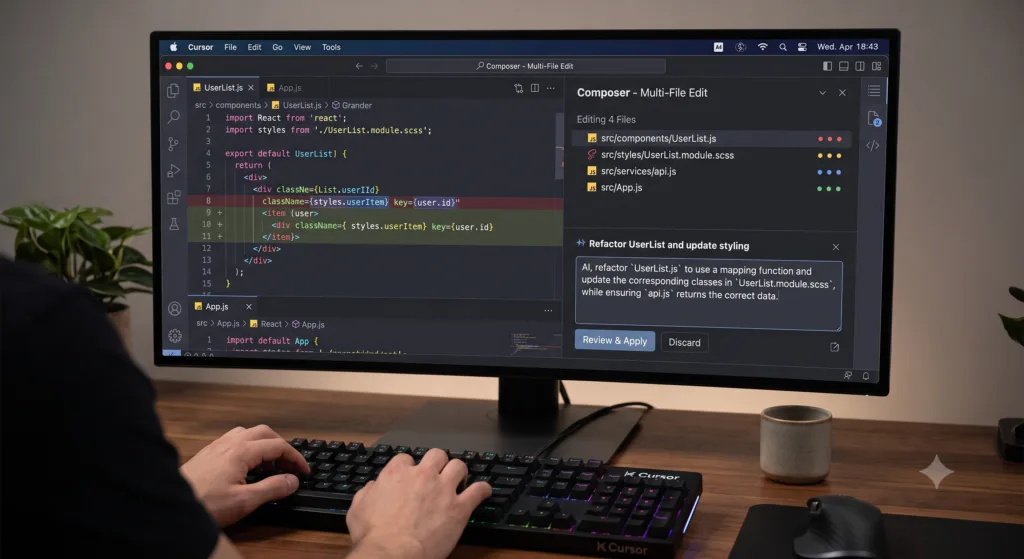
The composer is where multi-file editing happens. You give it a natural language prompt describing a change or a new feature, and it can generate or modify code across multiple files simultaneously. For example, you might ask it to add a new API endpoint, create the corresponding database migration, update the frontend component, and write a test. It handles the coordination between files, which is something that single-file tools simply cannot do.
Terminal Integration
Cursor’s terminal is a standard integrated terminal with one twist: the AI can see it, and in agent mode, it can run commands in it. You can ask the chat, “Why is this build failing?” and it will read the terminal output, diagnose the issue, and suggest or apply a fix. This tight feedback loop between code changes and terminal output is one of the features that genuinely changes how you work.
MCP Support
Model Context Protocol support arrived in 2025 and has matured nicely. MCP allows Cursor to connect to external data sources and tools through a standardised interface. You can, for instance, connect it to a database so it can query schemas directly, or to a documentation API so it can pull in up-to-date references. This is particularly useful in enterprise settings where codebases interact with internal services that the base model knows nothing about.
Rules and Memory
Cursor allows you to define rules that shape how the AI behaves. You can create a .cursorrules file in your project root where you specify coding conventions, preferred libraries, architectural patterns, and even stylistic preferences. The AI reads these rules and applies them when generating code. This is far more powerful than it sounds. After a week of tuning my rules file, the AI was generating code that matched my team’s conventions almost perfectly, saving significant review time.
Memory is a newer feature that allows Cursor to remember facts across sessions. You can tell it things like, “We use PostgreSQL with Prisma, and all API routes follow the /api/v2/ prefix,” and it will retain that information for future interactions.
Git Workflow
Cursor integrates with Git in ways that feel natural. You can ask it to write commit messages based on your staged changes, and it usually produces sensible, conventional-commit-style messages. You can also ask it to review your diff before committing, catching issues you might have missed. It is not a replacement for proper code review, but it catches a surprising number of small mistakes.
Cursor AI Pricing in 2026
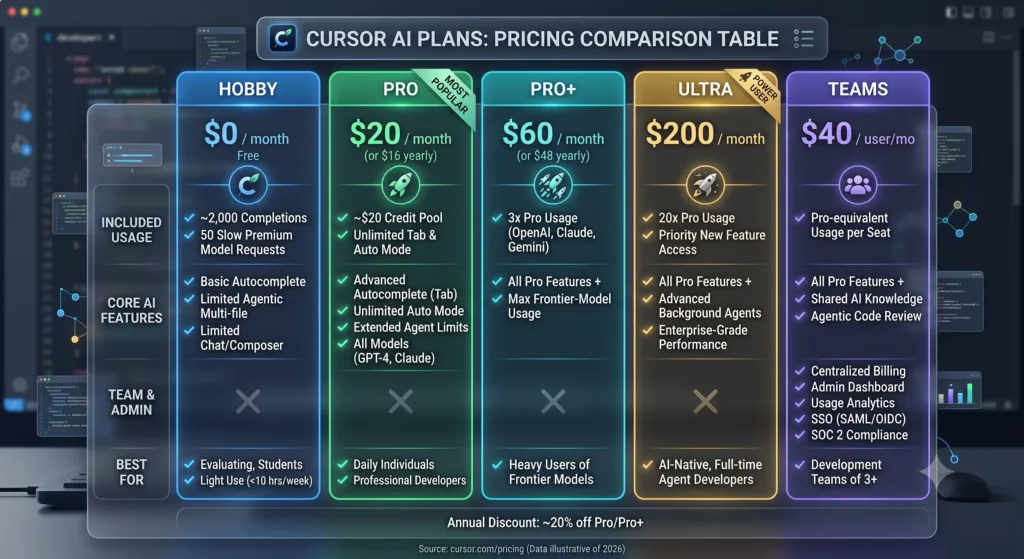
Pricing has evolved but remains competitive. Here is the breakdown as of mid-2026:
| Plan | Monthly Price | Key Features |
|---|---|---|
| Free | £0 | Limited completions, basic chat, community models, 2,000 completions per month |
| Pro | £16 | Unlimited completions, priority models, agent mode, larger context windows, 500 agent requests per month |
| Business | £32 per seat | Everything in Pro, team management, centralised billing, admin controls, SAML SSO, audit logs |
| Enterprise | Custom pricing | Self-hosted options, dedicated support, custom model fine-tuning, on-premise deployment, advanced security controls |
The free plan is genuinely usable for light work, which is rare in this space. The Pro plan hits a sweet spot for professional developers. The Business and Enterprise tiers make sense for organisations that need administrative controls and compliance features. Compared to some AI browser assistants that charge similar prices for less integrated experiences, Cursor offers solid value.
Privacy and Security Considerations
Privacy is a legitimate concern with any AI coding tool. Cursor offers several options. By default, code snippets are sent to Cursor’s servers for processing. However, you can enable privacy mode, which prevents code from being stored or used for training. For enterprise customers, there are options for on-premise deployment and using your own API keys directly with model providers, bypassing Cursor’s infrastructure entirely.
That said, I would still advise caution. Do not paste secrets, API keys, or proprietary algorithms into any AI tool without understanding exactly where that data goes. Cursor is transparent about its data handling, but the responsibility ultimately sits with you. For highly sensitive work, the enterprise self-hosted option or direct API key usage is the safer route. Organisations evaluating enterprise AI infrastructure like Amazon Bedrock may find that approach more suitable for compliance-heavy environments.
Cursor AI vs The Competition
Cursor AI vs GitHub Copilot
| Feature | Cursor AI | GitHub Copilot |
|---|---|---|
| Editor | Standalone (VS Code fork) | Extension for multiple editors |
| Codebase awareness | Deep indexing with embeddings | Moderate (open tabs + workspace) |
| Multi-file editing | Yes, via Composer and Agent | Limited, mostly single-file |
| Agent mode | Yes, autonomous task execution | Copilot Workspace (separate tool) |
| Model choice | Multiple (GPT, Claude, Gemini) | Primarily OpenAI models |
| Pricing (Pro) | £16/month | £10/month (individual) |
Copilot wins on price and editor flexibility. If you are deeply tied to JetBrains IDEs or want a lighter-weight extension rather than a whole new editor, Copilot may be the better fit. Cursor wins on depth of integration and codebase understanding. The agent mode alone has saved me enough time to justify the price difference several times over. For a broader look at how Microsoft Copilot fits into the wider ecosystem, that is worth exploring separately.
Cursor AI vs ChatGPT
ChatGPT is a general-purpose conversational AI. It can write code, debug, explain concepts, and generate documentation. What it cannot do is see your project files, understand your directory structure, or edit files directly. Using ChatGPT for coding means copy-pasting code back and forth, which is fine for isolated questions but becomes tedious for sustained development work.
Where ChatGPT still shines is in the breadth of its knowledge. It can discuss system design, compare frameworks, explain unfamiliar concepts, and help you think through architectural decisions in ways that Cursor’s more code-focused interface does not encourage. I often use both: Cursor for writing and editing code within my project, and ChatGPT for stepping back and thinking about higher-level design questions.
Cursor AI vs Claude
Claude, particularly the newer models from Anthropic, excels at long-form reasoning and handling very large contexts. Cursor actually lets you use Claude as the underlying model, which combines Claude’s reasoning strengths with Cursor’s editor integration. Using Claude directly through a chat interface gives you more control over the prompt and the conversation style, but you lose the project awareness that Cursor provides.
For tasks that involve reading and reasoning about an entire codebase at once, Claude’s large context window is a genuine advantage. If you regularly work with very large files or need to reason across dozens of files simultaneously, using Claude directly or setting Claude as your Cursor model is a smart move.
Cursor AI vs Perplexity AI
Perplexity AI is primarily a research and search tool, not a coding assistant. It can answer technical questions and find documentation, but it does not integrate with your editor or generate code within your project. It serves a different purpose entirely. I use Perplexity when I need to quickly look up documentation or find solutions to obscure error messages that the model may not have seen in its training data.

Broader Model Comparison
| Tool / Model | Strengths | Weaknesses | Best For | Pricing (approx.) |
|---|---|---|---|---|
| Cursor AI | Deep editor integration, agent mode, multi-file editing, codebase indexing | Requires switching editor, occasional agent errors on complex tasks | Daily development work, refactoring, multi-file changes | £16/month (Pro) |
| GitHub Copilot | Wide editor support, solid tab completion, good value | Shallow codebase awareness, limited multi-file support | Quick completions, developers tied to various IDEs | £10/month |
| ChatGPT | Broad knowledge, great for explanations and design discussions | No editor integration, copy-paste workflow, no codebase awareness | Learning, system design, isolated coding questions | £20/month (Plus) |
| Claude | Large context window, strong reasoning, nuanced responses | No native editor integration, primarily chat-based | Complex reasoning tasks, large-file analysis, architectural thinking | £18/month (Pro) |
| Google Gemini | Integration with Google ecosystem, strong multimodal capabilities | Less focused on coding specifically, editor integration via third parties | Projects using Google Cloud, multimodal development tasks | Varies by tier |
| Perplexity AI | Real-time web search, accurate documentation lookup | Not a code editor, no project integration | Research, documentation search, troubleshooting | £20/month (Pro) |
For those interested in a deeper dive into Google Gemini’s capabilities, that is covered in detail elsewhere. The important takeaway is that no single tool dominates every use case. The best choice depends on your workflow, your tech stack, and how much you value deep editor integration versus flexibility.
20 Practical Cursor AI Prompts With Expected Outcomes
Here are prompts I have actually used, organised by category. Each includes the realistic outcome you should expect.
Debugging
- “The function processOrder in orders.ts throws a TypeError when the quantity field is missing. Trace the logic and suggest a fix with proper null checking.”
Expect: A clear explanation of where the null access occurs, plus a code diff adding optional chaining or a guard clause. - “My React component keeps re-rendering in an infinite loop. Check the useEffect dependencies in Dashboard.tsx and identify the culprit.”
Expect: Identification of a missing dependency array, an object reference that changes on every render, or a state update inside useEffect without proper guards.
Refactoring
- “Refactor this 200-line function into smaller, testable units. Keep the same public API but extract internal logic into helper functions.”
Expect: The function broken into 4-6 smaller functions with clear names, each handling a single responsibility. - “Convert this class-based React component to a functional component with hooks. Preserve all behaviour exactly.”
Expect: A complete rewrite using useState, useEffect, and other hooks as needed, with the original lifecycle logic correctly mapped.
Writing Tests
- “Write unit tests for the calculateDiscount function covering edge cases: zero quantity, negative prices, maximum discount caps, and invalid input types.”
Expect: A test file with 6-8 test cases using Jest or Vitest, covering happy paths and edge cases. - “Generate integration tests for the /api/users endpoint. Test GET, POST with valid data, POST with missing fields, and DELETE with an invalid ID.”
Expect: A test suite using Supertest or similar, with proper setup and teardown logic.
Creating APIs
- “Create a REST API endpoint in Express that accepts a product ID and returns the product details with its associated category and reviews. Use TypeScript and include input validation.”
Expect: A complete route handler with TypeScript types, validation middleware, and a database query joining three tables. - “Build a FastAPI endpoint that accepts a CSV file upload, validates the schema, and inserts rows into a PostgreSQL database asynchronously.”
Expect: A FastAPI route with file handling, CSV parsing, schema validation, and background task queuing.
React
- “Create a custom hook called useDebounce that accepts a value and a delay in milliseconds. Include TypeScript generics so it works with any value type.”
Expect: A well-typed custom hook using useState and useEffect with a setTimeout pattern. - “Build a responsive navigation bar component with a mobile hamburger menu, using Tailwind CSS. It should close when clicking outside or pressing Escape.”
Expect: A complete React component with state management for the menu, event listeners for outside clicks, and Tailwind classes for responsiveness.
Python
- “Write a Python script that reads a large JSON file line by line, filters records where status is ‘active’, and writes the result to a new JSON file. Handle memory efficiently.”
Expect: A script using ijson or a streaming approach, processing the file incrementally rather than loading everything into memory. - “Create a decorator that retries a function up to 3 times with exponential backoff when it raises a ConnectionError.”
Expect: A decorator using functools.wraps, with configurable retry count and backoff multiplier.
Node.js
- “Write a Node.js worker thread that processes image resizing jobs from a queue. Include proper error handling and graceful shutdown.”
Expect: A worker script using the worker_threads module, with a job processing loop and signal handlers for SIGTERM.
Docker
- “Create a multi-stage Dockerfile for a Next.js application. The build stage should use a Node image, and the production stage should use a minimal Alpine image.”
Expect: A two-stage Dockerfile with proper layer caching, copying only production dependencies and the build output to the final stage.
SQL
- “Write a query to find the top 5 customers by total order value in the last quarter, including their name, total spent, and order count. Use window functions.”
Expect: A query using RANK() or ROW_NUMBER(), a subquery or CTE, and proper date filtering.
Documentation
- “Generate JSDoc comments for all exported functions in this module. Include parameter types, return types, and usage examples where helpful.”
Expect: Complete JSDoc blocks with @param, @returns, and @example tags, derived from the actual code signatures and logic.
Code Review
- “Review this pull request diff for potential issues: security vulnerabilities, performance problems, race conditions, and deviation from best practices.”
Expect: A structured review highlighting specific lines, explaining the risk, and suggesting concrete fixes.
Optimisation
- “This array processing function is slow with large datasets. Analyse the time complexity and suggest optimisations, possibly using different data structures.”
Expect: Big O analysis of the current implementation, identification of nested loops or unnecessary operations, and a refactored version using Set, Map, or a more efficient algorithm.
Security
- “Audit this authentication middleware for common vulnerabilities: timing attacks, token leakage, insufficient validation, and session management issues.”
Expect: A list of identified vulnerabilities with severity ratings and code patches for each.
Regex
- “Write a regular expression that validates email addresses according to RFC 5322. Also provide a simpler version that covers 99% of real-world use cases.”
Expect: Two regex patterns, the first being the full RFC-compliant monster, the second being a practical compromise with an explanation of the trade-offs.
Accessibility
- “Review this form component for WCAG 2.1 AA compliance. Check labels, focus management, error announcements, and keyboard navigation.”
Expect: Specific issues flagged with references to WCAG criteria, plus code fixes for each issue.
Code Explanation
- “Explain what this recursive function does, step by step, as if I am a developer who understands basic JavaScript but has never seen this algorithm before.”
Expect: A clear, patient walkthrough with a small example input traced through each recursive call.
My Honest Experience Using Cursor AI for Daily Development
I switched to Cursor as my primary editor about six weeks ago. Before that, I used VS Code with GitHub Copilot. The transition was easy because Cursor looks and feels almost identical to VS Code. All my extensions worked. My keybindings carried over. The settings synced. There was essentially zero friction in the switch itself.
The first thing I noticed was how much better the tab completion felt. Copilot’s completions were often useful but just as often felt random. Cursor’s suggestions, particularly after it had indexed my project for a few minutes, were noticeably more relevant. It seemed to understand the patterns I was using, the libraries I had imported, and the naming conventions I followed. Within a day, I was accepting far more suggestions than I ever did with Copilot.
The chat sidebar quickly became my favourite feature. Instead of switching to a browser, navigating to ChatGPT, pasting code, typing context, and waiting for a response, I could hit a keyboard shortcut and ask a question directly. The fact that it already knew about my project meant I could be much more concise. A simple “Why is this function returning undefined?” would work without further explanation.
Agent mode took longer to trust. My first few attempts were frustrating. I asked it to implement a feature across several files, and it made a mess, overwriting code I had not intended to change and introducing subtle bugs. I almost gave up on it. But I learned that agent mode works best with very specific, well-scoped tasks. “Add a createdAt timestamp to the User model and update all references” is a good prompt. “Build the authentication system” is not. Once I calibrated my expectations and started reviewing its output more carefully, agent mode became a genuine productivity boost.
The real test came during a tight deadline. I had to migrate a legacy codebase from JavaScript to TypeScript, add type definitions, fix the resulting type errors, and write tests. I estimated it would take me three days. With Cursor handling the repetitive parts, I finished in a day and a half. The time savings came not from doing anything I could not have done manually, but from removing the friction of context switching and automating the tedious bits.
That is not to say everything was smooth. There were moments where Cursor confidently suggested code that looked plausible but was fundamentally wrong. It hallucinated API methods that did not exist. It occasionally ignored my cursor rules file when the prompt was complex. And on a very large monorepo with thousands of files, the indexing sometimes felt sluggish, and the context retrieval was not always accurate. These are not dealbreakers, but they are real frustrations that you should be prepared for.
For students exploring AI tools for learning and coursework, Cursor can be genuinely helpful, but I would caution against relying on it too early. You need enough foundational knowledge to spot when the AI is confidently wrong, which happens more often than the marketing might suggest.
Where Cursor AI Still Falls Short
No tool is perfect, and Cursor has its share of rough edges. Here is an honest accounting of the limitations I have encountered.
Hallucinations and Incorrect Code
Cursor can and does generate code that is syntactically valid but logically wrong. It invents functions from libraries that do not exist. It uses deprecated APIs. It makes reasonable-looking but incorrect assumptions about your data structures. The problem is compounded by the fact that the code looks credible at a glance. You must review everything it generates, especially in agent mode where it can modify files without you seeing every line.
Context Limitations with Large Repositories
Even with embeddings and smart retrieval, Cursor struggles with very large codebases. When your project spans thousands of files and the model needs to understand relationships across many modules, the context window becomes a bottleneck. The AI might miss important interactions or make changes that break things elsewhere. For large enterprise monorepos, this is a significant limitation.
Security Concerns
AI-generated code can introduce vulnerabilities. Cursor does not have a built-in security scanner that catches every issue. I have seen it generate SQL queries vulnerable to injection, code with hardcoded secrets, and authentication logic with subtle flaws. If you are working on security-sensitive code, treat AI suggestions with extra scepticism.
Internet Dependency
Cursor requires an internet connection for most AI features. There is some movement towards local model support, but as of 2026, the best models still run in the cloud. If you are working in an environment with limited connectivity, Cursor’s value drops considerably.
Cost at Scale
For individual developers, £16 a month is reasonable. For a team of 50, that adds up. The Business plan at £32 per seat is not cheap, and organisations need to weigh whether the productivity gains justify the expense. Some teams will find that Copilot’s lower price point offers sufficient value.
Over-Reliance Risk
This is more of a human limitation than a technical one, but it is worth mentioning. Using Cursor extensively can make you lazy. You stop remembering syntax. You stop thinking through logic as carefully. You defer to the AI’s judgement even when your gut says something is off. I have caught myself accepting suggestions I should have questioned, simply because the AI sounded confident. This is a real risk, especially for newer developers.
When to Use Cursor AI (and When Not To)
After weeks of daily use, here is my mental framework for deciding which tool to reach for.
Use Cursor AI when: you are working on a project where deep editor integration saves time, you need multi-file refactoring, you want agent mode for repetitive tasks, or you value having AI that understands your codebase without explanation.
Use ChatGPT when: you need to brainstorm architecture, learn a new concept, discuss trade-offs between technologies, or work on code outside the context of a specific project. ChatGPT remains better for open-ended reasoning and explanation.
Use Claude when: you need to process very large files or reason across extensive documentation. Claude’s context window is a genuine advantage for certain tasks, and you can still use it within Cursor as the underlying model.
Use GitHub Copilot when: you are committed to a JetBrains IDE, want a lighter-weight tool, or need to keep costs lower across a large team. Copilot’s tab completion is still very good, even if its deeper integration lags behind Cursor.
For those working on AI-driven SEO projects or content-heavy applications, the choice often comes down to how much of your workflow involves code generation versus strategic thinking. Cursor excels at the former; ChatGPT and Claude still lead on the latter.
Pros and Cons Summary
| Pros | Cons |
|---|---|
| Deep, native editor integration with VS Code familiarity | Requires switching from your current editor |
| Codebase indexing enables contextually relevant suggestions | Can be slow on very large repositories |
| Agent mode automates multi-step tasks | Agent mode can make mistakes that are hard to catch |
| Multiple model choices (GPT, Claude, Gemini) | Internet dependency for cloud models |
| Multi-file composer handles cross-cutting changes well | Hallucinations remain a real problem |
| Rules system enforces team conventions | Business plan pricing can add up for larger teams |
| Privacy mode and enterprise options available | Risk of over-reliance on AI suggestions |
| Free tier is genuinely usable for evaluation | Occasional stability quirks with complex agent tasks |
Frequently Asked Questions
1. What is Cursor AI and how does it differ from VS Code?
Cursor AI is a standalone code editor built on the same open-source foundation as VS Code. The key difference is that Cursor has large language models integrated directly into the editor. It indexes your codebase, understands project context, and provides AI-assisted coding through tab completions, a chat sidebar, a multi-file composer, and an autonomous agent mode. VS Code can achieve some of this through extensions, but Cursor’s integration is deeper and more cohesive.
2. Is Cursor AI free?
There is a free plan that includes limited completions and access to community models, capped at around 2,000 completions per month. For professional use, the Pro plan at £16 per month removes those limits and unlocks priority models, agent mode, and larger context windows.
3. How does Cursor AI handle my code privacy?
Cursor offers a privacy mode that prevents your code from being stored or used for training. Enterprise customers can opt for self-hosted deployment or use their own API keys directly with model providers, keeping code off Cursor’s infrastructure entirely. You should still avoid exposing secrets or sensitive proprietary code to any AI tool without understanding the data flow.
4. Can Cursor AI replace a human developer?
No. Cursor AI is a productivity tool, not a replacement for human judgement. It accelerates coding tasks, reduces boilerplate, and helps with debugging, but it makes mistakes, hallucinates, and lacks the contextual understanding that comes from real-world experience. Every line of AI-generated code should be reviewed.
5. What programming languages does Cursor AI support?
Cursor works with any programming language that VS Code supports, which is essentially all of them. The quality of AI suggestions varies by language. Python, TypeScript, JavaScript, Rust, Go, and Java see the strongest results. Niche languages with less training data produce less reliable suggestions.
6. How does Cursor AI’s Agent Mode work?
Agent mode allows Cursor to autonomously plan and execute multi-step coding tasks. You provide a natural language prompt, and the agent reads relevant files, writes code, runs terminal commands, checks output, and iterates until the task is complete. You retain full control and can approve or reject changes at each step.
7. Can I use my own API keys with Cursor AI?
Yes. Cursor allows you to bring your own API keys for supported model providers, including OpenAI and Anthropic. This is particularly useful for enterprise users who want to keep data within their existing cloud infrastructure and avoid routing code through Cursor’s servers.
8. How does Cursor AI compare to GitHub Copilot?
Cursor offers deeper editor integration, multi-file editing, agent mode, and multiple model choices. Copilot is cheaper, works across more editors, and has solid tab completion. Cursor is better for developers who want a fully integrated AI coding experience. Copilot is better for those who want a lighter-weight extension within their existing editor.
9. Does Cursor AI work offline?
Most AI features require an internet connection because the models run in the cloud. There is ongoing work on local model support, but as of 2026, the best experience requires connectivity. Basic editing functions work offline like any VS Code-based editor.
10. How accurate is Cursor AI’s code generation?
Accuracy depends heavily on the task, the programming language, and the complexity of your codebase. For common patterns in popular languages, accuracy is high. For niche use cases, complex algorithms, or less common languages, it is lower. Always review generated code carefully. Hallucinations do happen.
11. Can Cursor AI write entire applications?
It can generate substantial portions of an application, but it cannot reliably produce a complete, production-ready application from a single prompt. Complex applications require architectural decisions, trade-off analysis, and iterative refinement that currently require human oversight.
12. What are Cursor Rules and how do I use them?
Cursor Rules are defined in a .cursorrules file in your project root. You can specify coding conventions, preferred libraries, architectural patterns, testing requirements, and stylistic preferences. The AI reads these rules and applies them when generating code, which helps maintain consistency across your project.
13. Is Cursor AI suitable for enterprise use?
Yes, with caveats. The Business and Enterprise plans offer admin controls, SAML SSO, audit logs, and self-hosted options. Organisations in regulated industries should evaluate the privacy and security features carefully and consider the self-hosted or bring-your-own-key options.
14. How do I give Cursor AI context about my codebase?
Cursor automatically indexes your project and retrieves relevant code using embeddings. You can also explicitly reference files, folders, or symbols using @-mentions in chat and composer prompts. For example, @src/auth/login.ts tells Cursor to include that specific file in its context.
15. What happens if Cursor AI generates buggy code?
You are responsible for reviewing and testing all AI-generated code. If Cursor introduces a bug, you can use its debugging features to help diagnose and fix the issue. You can also use Git to revert changes. The tool is an assistant, not an authority. Treat its output with the same scrutiny you would apply to code from a colleague.
Final Thoughts
Cursor AI won’t turn a novice into a senior engineer overnight, and it won’t write your entire application while you sip coffee. What it actually does well is remove friction: it keeps you in flow by cutting down on context switches, handles the tedious bits so you can focus on the harder problems, and in agent mode takes on grunt work that would otherwise eat up hours of your week.
By 2026 it’s a genuinely solid AI coding assistant, though not the right choice for everyone. If you’re happy with Copilot, or you prefer keeping your AI interactions in a separate chat window, that’s a perfectly reasonable call. But if you’re curious what happens when an editor gets rebuilt from the ground up around AI, Cursor is worth a proper look.
My advice: try the free plan first, spend a week with it, and tune your rules file before judging it. It takes a bit of time to learn when to trust the agent and when to rein it in, but once you do, it rewards the effort.
Published by Carmenton. For more guides on AI tools for developers, browse our complete AI tools resource.