

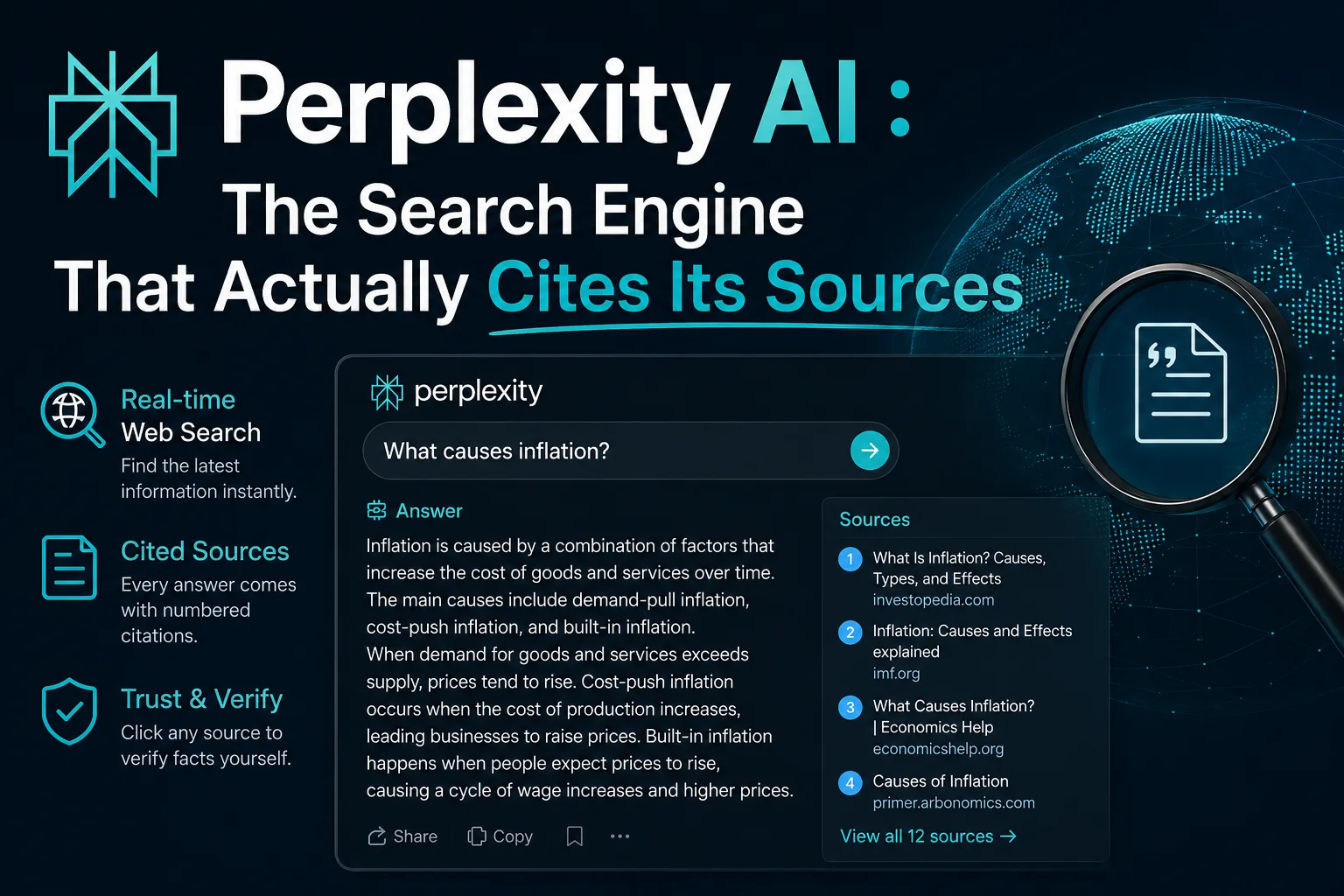
I have tested dozens of AI products over the past few years. Most blend together after a while. Perplexity is one of the few that genuinely changed how I work. Not because it is flashy or packed with features you will never touch, but because it solved a specific problem I kept running into: finding information quickly and knowing whether I could trust it.
If you have ever asked ChatGPT something factual and received a confident but completely wrong answer, you already understand the frustration. Perplexity takes a different approach. It searches the web in real time, reads multiple sources, and then gives you a concise answer with numbered citations. You can click through and verify everything yourself.
This review is based on months of daily use. I have used it for researching articles, fact-checking claims, comparing products, and even settling debates with colleagues. I have also spent time with the Pro version, tested Deep Research, and compared it extensively with ChatGPT, Google Gemini, Microsoft Copilot, and Claude.
Here is everything I have learnt.
What Is Perplexity?
At its core, Perplexity is an AI search engine. You type a question in plain English, and instead of returning ten blue links like Google, it generates a direct answer backed by sources. Think of it as a research assistant that reads the top results for you and summarises them, whilst showing exactly where each fact came from.
It launched in 2022, founded by a team that included Aravind Srinivas, who had previously worked at OpenAI and Google. The company grew quickly. Investors took notice, and so did users who were tired of search engines cluttered with adverts and SEO-optimised fluff.
Unlike a standard chatbot, Perplexity stays connected to the live internet by default rather than relying only on training data with a cutoff date. That makes it useful for current events, recent research, and anything else that changes often.
Why Has Perplexity Become So Popular?
There are a few reasons. First, people are increasingly frustrated with traditional search. Google results have become crowded with sponsored posts, low-quality content farms, and AI-generated articles that say nothing. Perplexity cuts through that noise.
Second, the citation system builds trust. Every claim links to a source, so you are not left wondering whether the AI invented something. That matters a lot if you do serious research.
Third, it is genuinely fast. A query that might take ten minutes of opening tabs and comparing pages can be answered in seconds. The time savings add up quickly.
How Perplexity Works
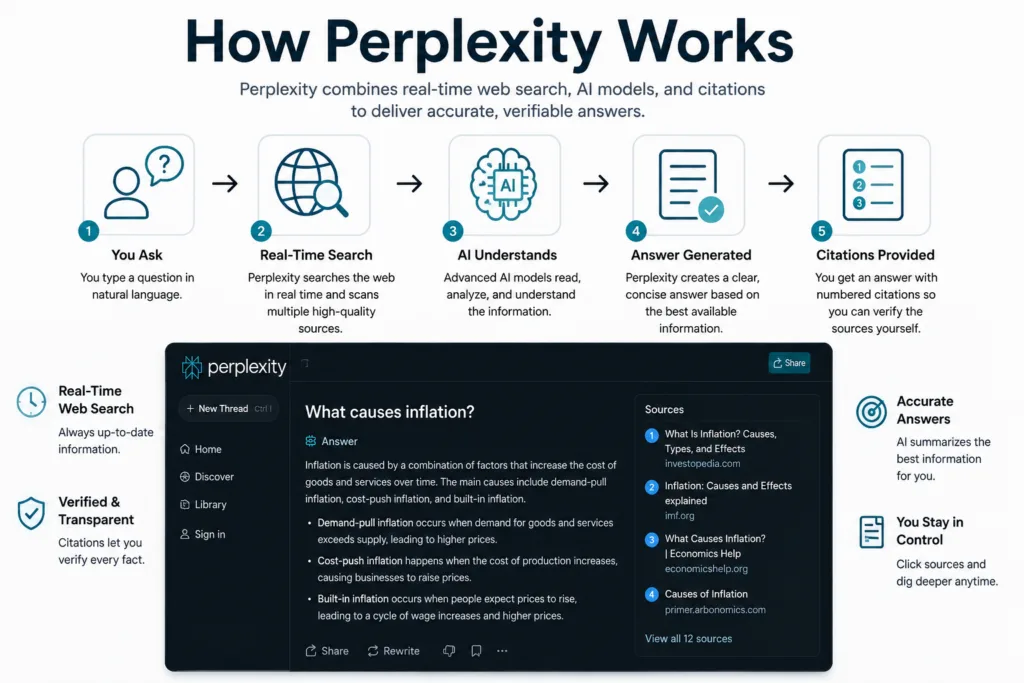
When you submit a query, Perplexity performs a web search in real time. It retrieves relevant pages, extracts the key information, and feeds that context into a large language model. The model then generates an answer based on those sources rather than relying purely on its internal knowledge.
This approach, often called retrieval-augmented generation or RAG, significantly reduces hallucinations. The model is grounded in actual web content. If the sources are good, the answer tends to be good. If the sources contradict each other, the model usually acknowledges the uncertainty.
If you are curious about the underlying mechanics of how these tools function, our guide to how AI tools work explains retrieval-augmented generation in more detail.
The Technology Behind Perplexity
Perplexity builds on top of existing large language models but layers its own search and retrieval infrastructure on top. The company has developed proprietary indexing and ranking systems that determine which sources to pull from and how to prioritise them.
On the model side, Perplexity gives users a choice. The free tier runs on a fine-tuned model optimised for search tasks. Pro subscribers can switch between GPT-4o from OpenAI, Claude 3.5 Sonnet from Anthropic, and experimental models available through Perplexity Labs. This flexibility is one of the platform’s strongest selling points. You are not locked into a single AI provider.
Available AI Models
Here is a breakdown of the models you can use with Perplexity Pro:
| Model | Provider | Best For | Availability |
|---|---|---|---|
| Default (Fine-tuned) | Perplexity | Quick searches, general queries | Free and Pro |
| GPT-4o | OpenAI | Complex reasoning, creative tasks | Pro only |
| Claude 3.5 Sonnet | Anthropic | Long-form writing, nuanced analysis | Pro only |
| Experimental Models | Perplexity Labs | Testing new capabilities | Pro only |
Key Features Worth Knowing About
Perplexity packs quite a lot into a clean interface. Some features are obvious, others are tucked away and easy to miss. Here are the ones that matter most in daily use.
Search Focus Modes
You can scope your searches to specific domains. The options include Academic for scholarly papers, Wolfram Alpha for computational queries, YouTube for video content, Reddit for community discussions, and Writing mode which skips the search and acts more like a traditional AI writing assistant. This feature alone makes Perplexity far more versatile than it first appears.
Deep Research
Deep Research is one of the standout Pro features. Instead of answering in a single pass, it conducts a multi-step investigation. It searches, reads, refines its query, searches again, and eventually produces a detailed report. I have used this for competitor analysis and literature reviews. It is not perfect, but it saves hours of manual work. The reports come with full citations so you can trace every claim.
Perplexity Labs
Labs is where Perplexity tests experimental features. You might find new models, different interface designs, or prototype tools. It is worth checking periodically if you enjoy trying things before they are polished. Not everything in Labs makes it to the main product, but some genuinely useful features have emerged from there.
Spaces
Spaces lets you create dedicated research environments with custom instructions and uploaded files. Think of it as a project folder that remembers context across sessions. You can share Spaces with colleagues, making collaborative research easier. I keep a Space for each major writing project I am working on.
File Analysis
You can upload PDFs, spreadsheets, and text files for Perplexity to analyse. This works well for extracting key points from long documents or comparing data across multiple files. The quality depends on the document’s clarity, but for well-structured PDFs, it is impressively accurate.
Image Generation
Pro subscribers can generate images within the chat interface. It uses models like DALL-E and Stable Diffusion. The feature works adequately for social media graphics and quick visual ideas. It is not the main reason to subscribe, but it is a convenient addition.
Shopping Capabilities
Perplexity has introduced shopping features that help you compare products and find purchasing options. It pulls pricing from multiple retailers and presents them alongside product details. It is not yet a full shopping engine, but for quick price comparisons, it saves opening several tabs.
Mobile Apps, Browser, and Extensions
Perplexity offers mobile apps for iOS and Android. Both are well-designed and responsive. Voice input works reliably, which makes the mobile experience feel natural. You can dictate a question and get a spoken answer back.
The web browser experience is where Perplexity shines brightest. The interface is clean and uncluttered. The Chrome extension adds Perplexity search directly to your browser’s address bar, so you can query it without navigating to the website each time. There is also a dedicated Perplexity browser for macOS that integrates search even more deeply into the browsing experience.
Pricing: Free vs Pro
| Feature | Free | Pro ($20/month) |
|---|---|---|
| Quick searches | Unlimited | Unlimited |
| Pro searches (advanced) | Limited daily | Unlimited |
| Model selection | Default only | GPT-4o, Claude 3.5, Labs models |
| Deep Research | Not available | Unlimited |
| File upload | Limited | Unlimited |
| Image generation | Not available | Included |
| Spaces | Basic | Advanced with collaboration |
| API access | Not available | Available |
The free version is genuinely useful for casual searching. The Pro subscription makes sense if you do research daily, need specific models, or want Deep Research. At $20 per month, it sits in the same price bracket as ChatGPT Plus and Claude Pro.
Strengths and Weaknesses
No tool is perfect. Here is an honest assessment after months of use.
Strengths
- Source citations make fact-checking straightforward
- Real-time web search keeps answers current
- Multiple model choices prevent lock-in
- Clean, fast interface with minimal friction
- Deep Research saves hours on complex investigations
- Free tier is genuinely capable
Weaknesses
- Answer quality depends heavily on source quality
- Can struggle with highly niche or poorly documented topics
- No offline capability
- Image generation is basic compared to dedicated tools
- Pro subscription adds up if you already pay for other AI tools
- Occasionally pulls from low-authority sources without obvious filtering
Privacy and Data Handling
Perplexity stores search history to enable features like Threads and Spaces. Pro users can opt out of having their data used for AI training. The company’s privacy policy is reasonably transparent, but as with any cloud-based AI service, you should avoid entering sensitive personal information, confidential business data, or anything you would not want stored on external servers. If privacy is a primary concern, self-hosted solutions or tools with stronger encryption guarantees may be more suitable.
Who Should Use Perplexity?
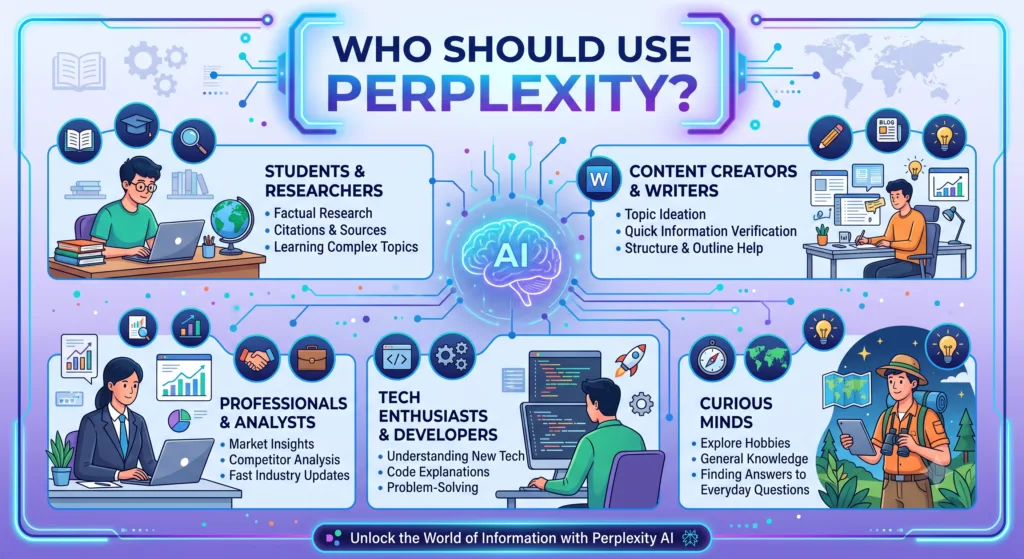
Different users get different value from Perplexity. Here is who benefits most:
Researchers and Academics
The Academic search focus combined with source citations makes Perplexity excellent for literature reviews and initial topic exploration. Deep Research can map out a field quickly. Students will find it helpful, though they must verify sources and follow their institution’s policies. Our guide to AI tools for students covers responsible usage in more depth.
Business Professionals
For market research, competitor analysis, and staying current on industry trends, Perplexity Pro is a solid investment. Spaces allows teams to collaborate on research projects. The time saved on manual searching often justifies the subscription cost within the first week.
Content Creators and Journalists
Fact-checking claims and finding original sources is faster with Perplexity than with traditional search. The citation system provides a clear audit trail, which matters for editorial standards. If you work in AI and SEO, understanding how Perplexity surfaces and cites content is also valuable for your own strategy.
Developers and Coders
Perplexity can answer coding questions with references to documentation and Stack Overflow discussions. It is not a replacement for a dedicated coding assistant like GitHub Copilot, but for quick lookups and debugging, it works well. The ability to switch to Claude 3.5 Sonnet for complex code reasoning is a genuine advantage.
Comparison Tables
Perplexity vs ChatGPT
| Feature | Perplexity | ChatGPT |
|---|---|---|
| Real-time web search | Built-in, default | Available with search mode |
| Source citations | Always included | Sometimes included, not standard |
| Model options | GPT-4o, Claude, own models | GPT-4o, GPT-4o mini |
| Deep research | Multi-step Pro feature | Available in some tiers |
| Best for | Research, fact-checking | Conversation, creative writing |
For a broader look at ChatGPT, see our complete ChatGPT guide.
Perplexity vs Google Gemini
| Feature | Perplexity | Google Gemini |
|---|---|---|
| Search integration | Independent web search | Google Search integration |
| Ecosystem | Standalone | Gmail, Drive, YouTube, Maps |
| Citations | Standard, numbered | Available but less prominent |
| Pricing | Free tier, Pro at $20/month | Free tier, Advanced at $19.99/month |
Perplexity vs Microsoft Copilot
| Feature | Perplexity | Microsoft Copilot |
|---|---|---|
| Search approach | Independent, citation-focused | Bing-powered, conversational |
| Office integration | None | Deep integration with Microsoft 365 |
| Model access | Multiple providers | OpenAI models via Microsoft |
| Enterprise readiness | Growing but limited | Strong enterprise features |
Perplexity vs Claude
| Feature | Perplexity | Claude (Anthropic) |
|---|---|---|
| Web search | Default | Not native (third-party integrations) |
| Citations | Standard | Not built into core product |
| Long-form writing | Good with Claude model | Excellent, especially for nuanced analysis |
| Pricing | Free and $20/month | Free tier and $20/month |
My Experience Using Perplexity
I started using Perplexity about eight months ago, initially as a supplement to Google. Within a fortnight, it had become my default for any question that required more than a simple fact lookup.
One thing I noticed early on was how much mental overhead it removed. With Google, I would open five or six tabs, skim each page, mentally cross-reference claims, and piece together an answer. Perplexity does the cross-referencing for me. I still check the sources when something matters, but the initial synthesis saves a surprising amount of cognitive effort.
I use it most heavily for researching products. Before buying anything significant, I ask Perplexity to compare models, summarise reviews, and highlight common complaints. The shopping feature then shows me current prices across retailers. It is not always perfectly up to date on pricing, but for product research, it is genuinely useful.
Fact-checking is another daily use case. When I read a claim in an article or hear something on a podcast, I can quickly verify it. The citations let me trace the information back to its origin. Occasionally, I find that the cited source does not actually support the claim Perplexity made. This is rare but worth watching for. It tends to happen more with complex or ambiguous topics where the model misinterprets the source material.
For academic research, I have used Deep Research to map out literature on several topics. It produces structured reports with sections and references. The quality varies by topic. On well-studied subjects with abundant high-quality sources, the reports are excellent. On niche topics with sparse coverage, the results can be thin or rely too heavily on a single source.
The mobile app has become my go-to for quick lookups whilst out. Voice input works well enough that I use it regularly. The spoken answers are concise and to the point. It feels like having a knowledgeable friend who can look things up instantly.
My main frustration is that Perplexity occasionally pulls from sources I would not consider authoritative. A marketing blog post gets the same treatment as a peer-reviewed paper unless you explicitly use the Academic focus mode. I have learnt to apply focus modes more deliberately as a result.
Practical Workflows and Productivity Tips
After months of use, I have settled into a few workflows that maximise what Perplexity does well:
- Morning briefing: I start each day by asking Perplexity for the top news in my industry. It gives me a summary with sources I can dive into if needed.
- Research sprints: For a new topic, I begin with a broad query, then use follow-up questions to drill deeper. I save the entire thread to a Space for later reference.
- Cross-model checking: On important questions, I run the same query through the default model and then through Claude 3.5 Sonnet. The answers often differ in useful ways.
- Document digestion: I upload lengthy PDFs and ask for executive summaries before deciding whether to read the full document.
Common Mistakes to Avoid
- Trusting citations blindly. Always click through and verify that the source actually says what Perplexity claims it says.
- Ignoring focus modes. Using Academic mode for scholarly queries noticeably improves source quality, and skipping it for academic work wastes a useful setting.
- Asking overly broad questions. Perplexity works best with specific, well-defined queries. Broad questions produce broad, less useful answers.
- Forgetting to use Threads. Follow-up questions refine answers. Treating each query as isolated wastes the conversational capability.
Expert Recommendations
If you are new to AI search tools, start with the free version of Perplexity. Use it alongside Google for a week and compare the experience. Pay attention to when you instinctively reach for one versus the other. That alone will tell you whether Pro is worth it.
For professionals who research daily, the Pro subscription is easy to justify. The time saved on a single Deep Research session can exceed the monthly cost. Choose your model based on the task: default for speed, GPT-4o for complex reasoning, Claude for nuanced writing tasks.
For teams, Spaces provides a lightweight collaboration layer that works well for shared research projects. It is not a full knowledge management system, but it fills a useful niche between chat and document storage. If you are exploring the broader AI tools landscape, Perplexity deserves a spot in your toolkit alongside more specialised applications.
Future Roadmap
Based on public statements and recent feature releases, Perplexity appears to be moving in several directions. Deeper enterprise features are likely, including team management controls and enhanced privacy options. The shopping capabilities will probably expand into a more complete commerce experience. Integration with third-party services and APIs seems like a natural next step.
The company has also hinted at more sophisticated agent-like behaviours, where Perplexity could take action on behalf of users rather than just providing information. How quickly this materialises is uncertain, but the direction is clear. For those interested in the infrastructure side, platforms like Amazon Bedrock show how the underlying AI model ecosystem continues to evolve.
Final Verdict
Perplexity is the most useful AI tool I have adopted in the past two years, mainly because it does not try to do everything. It focuses on search and research, and it does those two things better than any alternative I have tested. The citation system alone makes it worth using if you value verifiable information.
The free version is capable enough to replace a significant portion of traditional web searches. The Pro version adds meaningful capabilities that serious researchers will appreciate. Neither is perfect, but both are genuinely useful in ways that improve with regular use.
If you are tired of sifting through search results and wondering what to trust, Perplexity is worth your attention. Start with the free version. Give it a proper trial over several days. I suspect you will find, as I did, that it quietly becomes indispensable.
Frequently Asked Questions
What is Perplexity AI and how does it work?
Perplexity is an AI-powered search engine that combines large language models with real-time web access. You type a question in natural language, and instead of returning a list of blue links, it generates a concise answer with numbered citations pointing to the original sources.
Is Perplexity better than ChatGPT for research?
For research tasks requiring up-to-date information and verifiable sources, Perplexity typically outperforms standard ChatGPT. Its built-in web search and automatic source citations make fact-checking straightforward. ChatGPT with search can match some capabilities, but Perplexity’s citation system remains more transparent.
Is Perplexity free to use?
Yes, Perplexity offers a free tier that includes unlimited quick searches and a limited number of Pro searches per day. The free version uses the default model. Perplexity Pro costs $20 per month and unlocks access to GPT-4o, Claude 3.5 Sonnet, and other advanced models alongside higher usage limits.
How accurate is Perplexity AI?
Perplexity’s accuracy depends heavily on the quality of sources it pulls from. Because it cites its references, you can quickly verify claims. Like all AI systems, it can occasionally misinterpret data or surface outdated information. Cross-checking important facts against the cited sources is always recommended.
Can students use Perplexity for academic research?
Yes, students can use Perplexity for initial literature exploration and finding academic sources. The Pro version’s Deep Research feature conducts multi-step investigations. However, students should always verify citations, read original papers, and follow their institution’s guidelines on AI tool usage in coursework.
What AI models does Perplexity use?
Perplexity uses several models. The free tier runs on a fine-tuned model optimised for search. Pro subscribers can choose between GPT-4o (OpenAI), Claude 3.5 Sonnet (Anthropic), and experimental models from Perplexity’s own Labs. This multi-model approach lets users pick the best engine for different tasks.
Does Perplexity store my search history?
Perplexity does store search history to power features like Threads and Spaces. Pro users can opt out of data collection for AI training. The company’s privacy policy outlines data handling practices. Users concerned about privacy should review these settings and avoid entering sensitive personal information.
What is Perplexity Deep Research?
Deep Research is a Pro feature that conducts multi-step, autonomous investigations. Instead of answering in one pass, it performs iterative searches, reads multiple sources, synthesises findings, and produces a detailed report. It is particularly useful for market analysis, academic literature reviews, and competitive intelligence.
Can Perplexity generate images?
Yes, Perplexity Pro includes image generation capabilities. Subscribers can create images directly within the chat interface. The feature is powered by models such as DALL-E and Stable Diffusion depending on availability. It is not the primary focus of the platform but works adequately for basic visual content needs.
How does Perplexity compare to Google Gemini?
Perplexity and Google Gemini both combine AI with web search, but their approaches differ. Perplexity focuses on cited, research-style answers. Gemini integrates deeply with Google’s ecosystem including Gmail and Drive. For pure search with transparent sourcing, Perplexity often wins. For ecosystem integration, Gemini has the advantage.
This article was written based on hands-on experience with Perplexity Free and Pro versions. No sponsorship or affiliate relationships influenced the content. Always verify AI-generated information against original sources before relying on it for important decisions.