

I first opened Midjourney’s Discord server on a rainy Tuesday afternoon in late 2023, fully expecting to be underwhelmed. At that point I had already tested a dozen AI image generators and most of them produced the same plasticky, soulless results. Within twenty minutes of typing my first prompt, I was staring at an image so evocative it genuinely stopped me mid-scroll. The lighting was atmospheric, the composition felt intentional, and there was a mood to it I had not seen from any other AI image generator. I have been using Midjourney regularly ever since, across hundreds of projects and thousands of prompts. This guide is the result of that accumulated experience, written for anyone who wants to move beyond dabbling and start creating images with genuine professional quality.
What makes Midjourney AI different isn’t any single feature, it’s the aesthetic sensibility baked into the model itself. Other tools produce technically accurate images; Midjourney produces images with atmosphere and a point of view, and that matters whether you’re designing a book cover, concepting a brand campaign, or generating social media graphics that actually stop the scroll. In this guide I’ll walk through how the Midjourney AI image generator works under the hood, what Midjourney V7 brings to the table in 2026, how to structure Midjourney prompts for consistent results, what the Midjourney pricing plans actually get you, and how the platform compares to every major alternative, based on what I’ve run into using it.
What Midjourney Actually Is
Midjourney is a text to image AI platform that converts natural language descriptions into high-resolution images. It was founded by David Holz, previously the co-founder of Leap Motion, and launched its open beta in July 2022. The research lab operates independently, headquartered in San Francisco, and has deliberately avoided the venture capital hyper-growth playbook. That independence shows in the product decisions: Midjourney prioritises aesthetic quality over speed, and creative control over mass-market accessibility. As of 2026, the platform serves millions of users through both its original Discord bot interface and a dedicated web application.
Unlike some competitors that position themselves as general-purpose AI design tools, Midjourney has always been unapologetically focused on artistic output. The team trains their models on curated datasets with a heavy emphasis on composition, lighting, colour theory, and emotional resonance. The result is a generative AI art platform that professional creatives actually respect, not just tolerate. I have spoken with illustrators, concept artists, and creative directors who were initially sceptical and are now incorporating Midjourney into their daily workflow.
“After testing Midjourney across hundreds of prompts for client work, I quickly noticed that the images required far less post-processing than outputs from other generators. The base quality was simply higher.”
How Midjourney Works: Diffusion Explained Simply
If you have ever wondered what actually happens when you type a prompt and wait thirty seconds, here is the short version. Midjourney AI uses a technique called diffusion-based image generation. The model starts with pure random noise, essentially a canvas of static, and gradually refines it step by step. At each step it consults the text prompt to guide the denoising process, slowly revealing an image that matches the description. It is not retrieving or collaging existing images. It is synthesising something new from learned patterns. If you want a deeper dive into the underlying technology, how AI tools work behind the screen explains the mechanics in accessible detail.
The training process involves showing the model billions of image-text pairs so it learns associations between words and visual concepts. “Golden hour” becomes linked to warm, directional light. “Fujifilm Pro 400H” becomes linked to a specific colour palette and grain structure. This is why prompt engineering matters so much: the more precisely you can reference concepts the model understands, the better your results will be.
Getting Started: The Discord Workflow and Web Interface
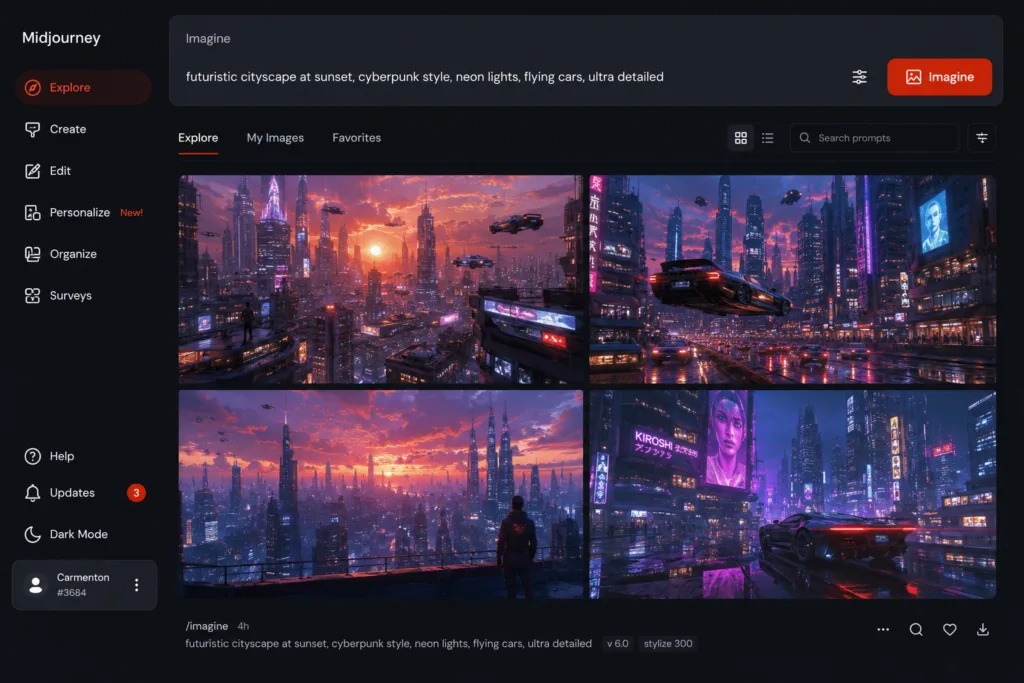
Midjourney originally operated exclusively through Discord, functioning as a Discord AI bot that you interact with by typing commands. You join the official Midjourney server, navigate to a newcomer channel, and type /imagine followed by your prompt. The bot returns a grid of four low-resolution previews. You then choose to upscale one, create variations, or reroll entirely. That Discord workflow remains fully functional in 2026 and many power users still prefer it for the community aspect and rapid iteration.
In mid-2024, Midjourney launched a standalone web interface that has since matured considerably. The web app features a clean imagine bar, gallery management, image history, and direct access to most parameters without needing to memorise command syntax. For newcomers wondering how to use Midjourney without learning Discord commands, the web interface is now the recommended starting point. I use both depending on context: Discord when I want to iterate rapidly and bounce ideas off other creators, the web app when I need focused, uninterrupted work.
Midjourney V7 and the 2026 Feature Landscape
Midjourney V7 arrived in early 2026 and represents the most substantial architectural update since V5. The headline improvements include dramatically better text rendering within images, significantly improved character consistency across multiple generations, and a new personalisation system that learns your aesthetic preferences over time. The Midjourney features that have matured most impressively include:
- Image expansion and outpainting: Extend images beyond their original borders with contextually aware content that matches lighting and perspective.
- Repainting and inpainting: Select specific areas of an image and regenerate them with new prompts while preserving the surrounding content.
- Style reference images: Upload a reference image and Midjourney applies its stylistic qualities to your generation without copying the content.
- Moodboards: Combine multiple reference images to define a composite aesthetic direction for your project.
- Improved upscaling: The subtle upscaler produces print-resolution outputs suitable for print design and large-format advertising.
The biggest surprise for me was the personalisation feature. After rating a few hundred images, the model began producing outputs noticeably closer to my preferred aesthetic without me needing to specify every parameter. It is not perfect, it still drifts occasionally, but it has cut my iteration time roughly in half.
Midjourney Pricing: What Each Plan Gets You
Understanding Midjourney pricing is essential before committing. The plans have evolved and as of 2026 there are four tiers. Here is the current breakdown:
| Plan | Monthly Cost | Fast GPU Hours | Key Features | Best For |
|---|---|---|---|---|
| Basic | £8 / $10 | ~3.5 hours | Standard generation, Discord access, web app | Casual experimentation |
| Standard | £24 / $30 | ~15 hours | Unlimited relaxed mode, personalisation, basic commercial licence | Regular creators, freelancers |
| Pro | £48 / $60 | ~30 hours | Stealth mode, priority support, advanced parameters | Professional designers, agencies |
| Turbo | £96 / $120 | ~60 hours | Maximum concurrency, fastest generation, full commercial rights | High-volume studios, production teams |
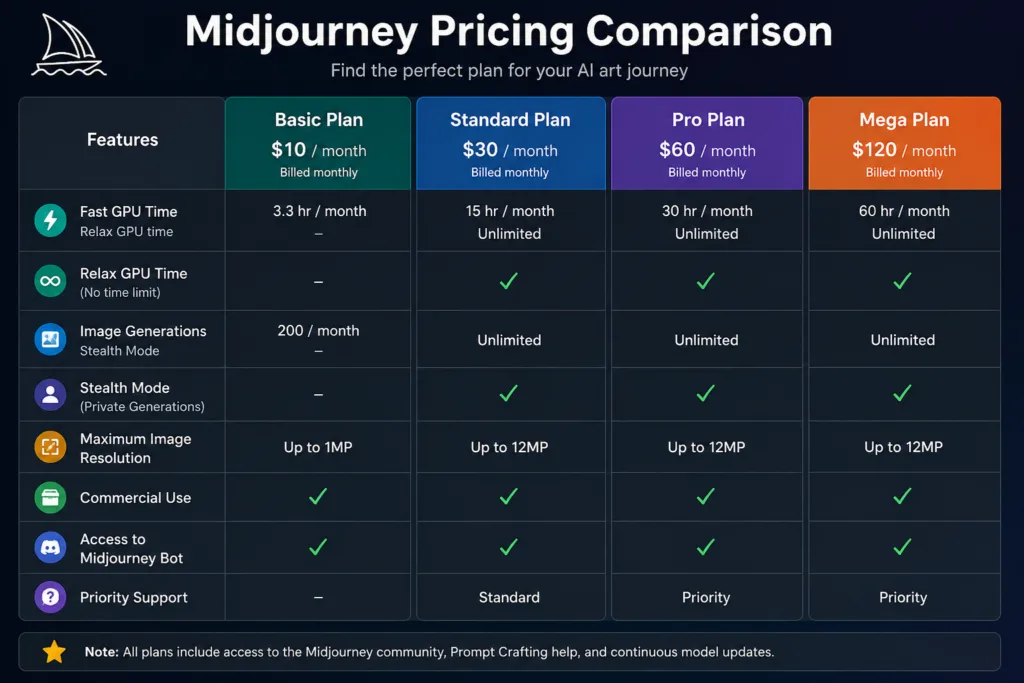
One mistake beginners often make is signing up for the Basic plan and burning through their GPU hours in a weekend. The relaxed mode on Standard and above is genuinely useful: generations queue for a minute or two longer but you can run essentially unlimited jobs overnight. If you are using Midjourney for any kind of commercial use, the Pro plan is the pragmatic minimum. The stealth mode alone, which keeps your generations private, is worth the upgrade for client work.
Mastering Midjourney Prompts: Anatomy of an Effective Prompt
A well-structured Midjourney prompt has four layers: subject, context, style, and parameters. The subject is what you want to see. The context is where it exists, what surrounds it, the lighting conditions. The style is the artistic treatment: photographic, illustrated, cinematic, painterly. The parameters are the technical settings like aspect ratio, stylisation, and model version.[Prompt Example: Side-by-side showing a basic prompt and the improved version with annotations explaining each layer]
Here is a basic prompt for a portrait:
a portrait of an elderly fishermanAnd here is the same subject with proper prompt architecture:
Close-up portrait of an elderly Icelandic fisherman, weathered skin, deep wrinkles, piercing blue eyes, wearing a hand-knitted wool jumper, soft diffused window light from the left, shallow depth of field, photographed on Fujifilm GFX 100S, 85mm lens, f/1.4, editorial photography style, muted earthy colour palette --ar 3:4 --style raw --stylize 250 --v 7The difference is not subtle. The second prompt gives the model specific visual references it can latch onto: a camera system with a known colour profile, a focal length that implies a certain perspective, lighting direction, and a defined colour palette. This is not about using more words. It is about using words that map to distinct visual concepts in the model’s training data. For more on crafting effective prompts across AI platforms, the complete ChatGPT guide for beginners covers transferable prompt engineering principles that apply broadly.
Portrait Prompts
Editorial portrait of a young South Asian woman, natural makeup, gold jewellery catching the light, warm golden hour backlighting, shot on Kodak Portra 400, 50mm lens, f/2, soft bokeh background, confident expression, fashion editorial aesthetic --ar 2:3 --style raw --v 7This works because it specifies film stock for colour science, lens for depth of field, and an emotional quality through facial expression. The --style raw parameter reduces Midjourney’s default beautification, producing a more natural, less processed look.
Landscape Prompts
Aerial view of the Scottish Highlands at dawn, mist rolling through glacial valleys, ancient stone bothy nestled beside a dark loch, dramatic cloud formations catching first light, cinematic wide shot, photographed on Hasselblad X2D, long exposure, ethereal atmosphere --ar 16:9 --stylize 400 --v 7The high stylisation value here encourages Midjourney to lean into the atmospheric, painterly qualities. I found that for landscapes, --stylize values between 300 and 500 produce the most compelling results without drifting into artificiality.
Architecture Prompts
Brutalist concrete library interior, dramatic shafts of natural light from clerestory windows, geometric shadows across polished concrete floors, solitary figure reading, monumental scale, photographed by Hélène Binet, high contrast black and white, architectural photography --ar 4:5 --style raw --v 7Food Photography Prompts
Overhead flat lay of a rustic Mediterranean mezze spread, grilled aubergine, fresh pomegranate, torn flatbread, olive oil drizzled, scattered fresh herbs, natural light from a nearby window, shot on Sony A7R V, 35mm, shallow depth of field, editorial food photography, warm inviting tones --ar 1:1 --v 7Fashion Prompts
High fashion editorial, model in sculptural avant-garde white dress, dramatic desert landscape at blue hour, fabric billowing in wind, minimalist composition, shot on medium format film, desaturated colour grade, Vogue Italia aesthetic --ar 3:4 --stylize 300 --v 7Product Photography Prompts
Luxury watch macro photograph, intricate mechanical movement visible through sapphire case back, golden gears and ruby bearings, precision engineering detail, dramatic side lighting revealing texture, depth of field falloff, commercial product photography, clean background --ar 4:5 --style raw --v 7Fantasy Art Prompts
Ancient forest guardian spirit, translucent form made of intertwining branches and bioluminescent moss, dappled light filtering through canopy, magical atmosphere, digital painting by Charlie Bowater and WLOP, ethereal glow particles, fantasy concept art --ar 16:9 --stylize 500 --v 7Anime Prompts
Studio Ghibli inspired scene, young witch organising her cluttered apothecary shelf, glass jars of dried herbs and mysterious ingredients, warm afternoon light through dusty window, detailed background, hand-painted animation cel style, soft colours --ar 16:9 --niji 6The --niji 6 parameter switches to Midjourney’s anime-optimised model, which produces significantly better results for illustrated and animated styles than the standard model.
Cinematic Scene Prompts
Film still from a neo-noir thriller, detective standing under a flickering streetlamp in heavy rain, reflections on wet asphalt, moody blue and amber colour grade, anamorphic lens flares, shot on Arri Alexa 35, 35mm, cinematic composition, suspenseful atmosphere --ar 2.39:1 --v 7Macro Photography Prompts
Extreme macro of a honeybee collecting pollen from a lavender flower, compound eye detail visible, pollen grains dusted on fuzzy body, golden hour rim lighting, focus stacked for perfect sharpness, nature documentary aesthetic --ar 3:2 --style raw --v 7Interior Design Prompts
Scandinavian minimalist living room, warm neutral tones, bouclé sofa, oak flooring, large arched window overlooking a fjord, soft indirect lighting, hygge atmosphere, interior design photography, shot on Canon R5, 24mm tilt-shift lens --ar 4:5 --v 7YouTube Thumbnail Prompts
Shocked expression portrait, dramatic rim lighting, colourful neon edge glow, against dark gradient background, exaggerated facial reaction, vibrant saturated colours, YouTube thumbnail style, ultra sharp, 85mm portrait lens --ar 16:9 --style raw --v 7Book Cover Prompts
Fantasy book cover design, lone cloaked figure walking a spiral staircase carved into a massive ancient tree, glowing runes on bark, star-filled night sky visible through canopy, title space at top, epic scale, illustrated by John Howe, gold foil accents concept --ar 2:3 --stylize 350 --v 7Logo Inspiration Prompts
Minimalist geometric mark, abstract phoenix rising, formed from interconnected golden ratio spirals, negative space use, clean lines, black on white, brand identity concept, vector style, graphic design --ar 1:1 --style raw --stylize 100 --v 7Brand Advertising Prompts
Premium skincare campaign, glass bottle with dropper on a marble surface, surrounded by fresh botanicals, soft diffused studio lighting, elegant minimalist composition, luxury beauty advertising aesthetic, product hero shot --ar 4:5 --v 7Advanced Parameters: Controlling Your Output
Understanding Midjourney parameters is what separates casual users from professionals. Here are the parameters I use most frequently and why they matter.
| Parameter | What It Does | Range | When to Use |
|---|---|---|---|
--ar | Sets aspect ratio | Any ratio, e.g. 16:9, 3:4, 1:1 | Always. Match output to intended platform. |
--stylize or --s | Controls aesthetic strength | 0 to 1000 | Lower for realism, higher for artistic flair. |
--chaos or --c | Variety across the image grid | 0 to 100 | Higher for exploration, lower for consistency. |
--seed | Locks in a specific generation seed | Any integer | Replicating results or iterating on a specific image. |
--style raw | Reduces default beautification | On/off | Photorealistic work where you want natural imperfection. |
--quality or --q | Generation quality vs speed | 0.25, 0.5, 1, 2 | Use 0.5 for rapid iteration, 1 for final output. |
--weird or --w | Introduces unconventional elements | 0 to 3000 | Experimental creative work, surreal concepts. |
In my experience, the --chaos parameter is underused. Setting it to around 20 to 30 when exploring a new concept yields a much wider variety of interpretations from a single prompt. I often run a batch at chaos 25, pick the best direction, then reduce chaos to 5 for refinement.
Midjourney Styles and Aesthetic Control
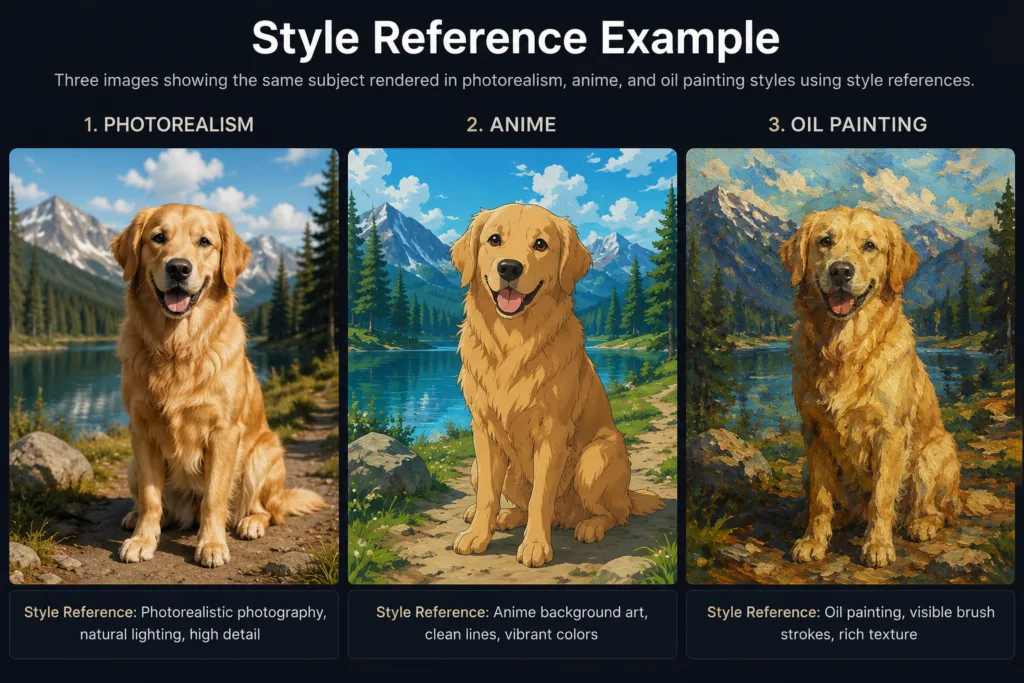
Midjourney styles are not presets in the traditional sense. They emerge from the interaction between your prompt language, parameters, and reference images. The platform excels at a wide range of aesthetics:
- Photorealism: Achieved through specific camera references, film stock mentions, and
--style raw. Best for product photography, advertising, and editorial work. - Illustrations: Referencing specific artists and mediums like watercolour, gouache, or digital painting. Ideal for children’s books, editorial illustration, and book covers.
- Anime: The Niji model specialises in this. Excellent for game assets, storyboarding, and character design.
- Fantasy and concept art: High stylisation values combined with genre-specific language. Used heavily in game assets pre-production and film storyboarding.
- Architecture visualisation: Clean prompts with low stylisation and specific architectural terminology. Used for interior design concepts and architectural presentations.
- Fashion editorial: Model descriptions combined with fashion photography references and specific lighting conditions.
- Branding and logo concepts: Minimalist prompts with geometric language and low stylisation. Useful for logo inspiration and branding moodboards.
One technique I found particularly effective is using style reference images. Upload an image that embodies the aesthetic you want, and Midjourney analyses its stylistic fingerprint, colour distribution, texture quality, and compositional tendencies, then applies those qualities to your new generation. This is different from an image prompt where you want the content copied. Style references are about transferring the feel without the specifics.
Commercial Use, Copyright, and Ethical Considerations
The question of Midjourney commercial use rights has evolved significantly. As of 2026, paid subscribers on Standard plans and above receive commercial usage rights for the images they generate, subject to the platform’s terms of service. The key detail many people miss: if you are on the Basic plan, your generated images are licensed for personal use only. Upgrading to Standard or above is essential for any commercial use, including client work, marketing creatives, social media graphics, and print design.
Copyright and ownership remain complex areas. In most jurisdictions, AI-generated images cannot be copyrighted in the traditional sense because they lack human authorship. However, images that are substantially modified by a human after generation, composited, edited, or incorporated into larger works, may qualify for protection. I advise clients to treat Midjourney outputs as raw material that requires human creative input to become fully ownable assets. For more on the broader AI tools ecosystem and how these platforms fit into professional workflows, the ultimate guide to AI tools provides additional context.
Ethical concerns around training data continue to generate debate. Midjourney, like most generative AI art platforms, trained its models on large datasets that included publicly available images. The company has implemented opt-out mechanisms for artists and continues to refine its data practices. As a user, I believe in transparency: when I use AI-generated imagery in professional work, I disclose it to clients, partly because it’s the right thing to do and partly because it builds trustworthiness with the people I work for.
Midjourney Compared to Alternatives
No Midjourney review would be complete without honest comparisons. I have used every major AI image generator extensively, and each has distinct strengths. Here is how they stack up:
| Platform | Image Quality | Ease of Use | Creative Control | Best For | Main Limitation |
|---|---|---|---|---|---|
| Midjourney | Excellent | Moderate | High | Artistic, editorial, conceptual work | Learning curve, Discord dependency |
| DALL-E | Very Good | Excellent | Moderate | Quick iterations, natural language prompts | Less aesthetic refinement |
| Adobe Firefly | Good | Excellent | Moderate | Integration with Adobe suite, commercially safe | Image quality lags behind Midjourney |
| Flux | Very Good | Good | High | Open-source flexibility, text rendering | Requires technical setup |
| Stable Diffusion | Good to Very Good | Low | Very High | Full control, local running, custom models | Steep technical requirements |
| Leonardo AI | Good | Good | Moderate | Game assets, quick concept generation | Inconsistent quality at high resolutions |
| Ideogram | Good | Good | Moderate | Text-heavy designs, logo concepts | Artistic range is narrower |
DALL-E, accessible through ChatGPT, is the most intuitive for complete beginners. Its natural language understanding is genuinely impressive; you can describe what you want conversationally and get coherent results. However, the aesthetic ceiling is lower. Images tend to look well-executed but generic. For anyone curious about how these AI models compare in the broader landscape, Google Gemini explained offers insight into how multimodal AI systems are evolving across image and text understanding.
Adobe Firefly deserves special mention for its commercial positioning. Because it is trained on Adobe Stock images and public domain content, the commercial indemnification is clearer than Midjourney’s. For enterprise teams where legal safety is paramount, Firefly is compelling even though the image quality is a step behind. The integration with Photoshop and Illustrator is genuinely useful for AI design tools workflows.
Flux and Stable Diffusion represent the open-source wing of the AI image world. The control they offer is unmatched: you can run models locally, train custom LoRAs, and build entirely bespoke pipelines. But the technical overhead is real. I use Stable Diffusion when I need pixel-perfect control over output, and Midjourney when I want an image that simply looks beautiful with minimal fuss. For developers working across AI platforms, Cursor AI and GitHub Copilot represent similar paradigm shifts in their respective domains.
Leonardo AI built its reputation on game asset generation and it still excels there. Its interface feels purpose-built for iterative concept art, with features like tileable textures and sprite sheet generation. Ideogram made its name on text rendering accuracy, which historically was a weakness for Midjourney. With V7, Midjourney has largely closed that gap, but Ideogram remains a strong choice if you need precise typography in your generations.
Real-World Workflows: How Professionals Use Midjourney
The Midjourney workflow I have settled on after months of professional use follows a consistent pattern. First, I define the creative brief: what is the image for, what emotion should it evoke, what are the non-negotiable elements. Then I generate a broad exploration batch with higher chaos values to map the creative territory. From that batch I identify the most promising direction and lock in a seed. Then I refine with lower chaos and targeted prompt adjustments. Once I have a near-final image, I upscale and typically do light post-processing in Photoshop or Lightroom: colour grading, dust spot removal, occasionally compositing elements from multiple generations.
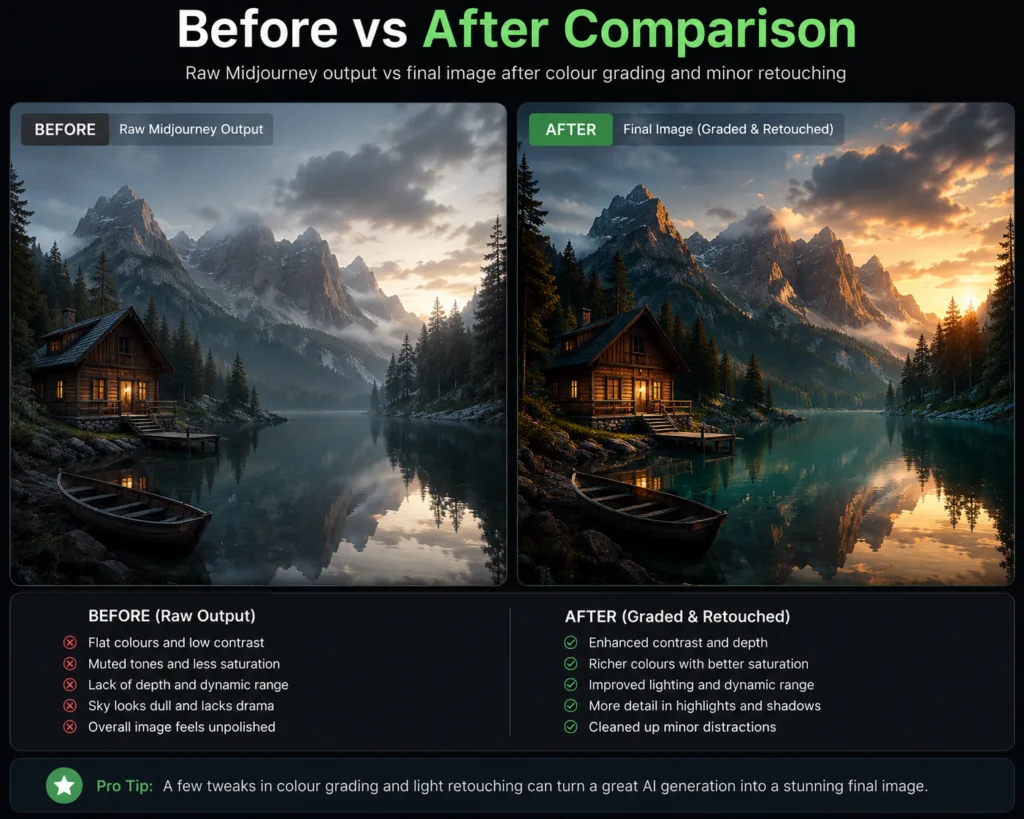
Here is a practical example of a marketing creatives workflow for a fictional skincare brand:
- Concept exploration: Generate 16 images across four prompt variations exploring different lighting setups and compositions for the hero product shot.
- Client selection: Present the top four options, gather feedback, identify the preferred direction.
- Refinement: Lock the seed from the chosen image, fine-tune the prompt, generate variations with
--chaos 5for consistency. - Upscaling: Use subtle upscaler for the final selected image.
- Post-production: Colour grade in Capture One, retouch in Photoshop, add brand typography.
For social media graphics, I have found that Midjourney excels at creating attention-grabbing visual assets that feel distinctly different from stock photography. The key is generating images specifically for the platform: square compositions for Instagram, vertical for Stories, landscape for Twitter headers. If you are building a broader content strategy that incorporates AI, AI in SEO and modern content strategy covers how visual assets fit into a comprehensive approach.
Beginner Mistakes and How to Avoid Them
After watching newcomers use Midjourney in workshops and online communities, certain patterns emerge. Here are the mistakes I see most frequently:
- Vague prompts expecting mind reading: Typing “a cool image” and hoping for magic. The model needs specific visual references to produce quality output.
- Ignoring aspect ratio: Not setting
--armeans you get a square image every time, which may not suit your intended use. - Over-relying on artist names: Referencing living artists by name is ethically questionable and increasingly restricted. Reference styles, movements, and technical descriptions instead.
- Not using seeds for iteration: Without seeds, you cannot replicate or systematically improve a result you liked.
- Burning GPU hours on final-quality generations during exploration: Use
--quality 0.5for early iterations; it is faster and uses fewer resources. - Neglecting post-processing: Treating Midjourney output as finished work. Almost every professional image benefits from at least minor adjustments in an external editor.
- Not organising your image library: After a few hundred generations, finding that one perfect image becomes impossible without a system. Use the web app’s gallery features or maintain your own folder structure.
One mistake beginners often make that I want to highlight is confusing prompt length with prompt quality. A longer prompt is not automatically better. Each word should earn its place by pointing toward a distinct visual concept. Filler words introduce noise, not clarity.
Expert Prompt Tips and Advanced Techniques
After thousands of generations, here are the prompt engineering techniques that consistently produce better results:
- Use camera and film references: Mentioning specific cameras, lenses, and film stocks gives the model a clear aesthetic target. “Shot on Leica M6 with Kodak Tri-X 400” communicates contrast, grain, and tonal character in a way that “black and white photo” cannot.
- Weight important terms: Use double colons to assign importance.
golden hour::2 soft shadows::1tells the model to prioritise the golden hour quality over shadow softness. - Use negative prompting: Specify what you do not want.
--no text watermark signature frameprevents common unwanted elements. - Chain prompts for complex scenes: Generate background and foreground elements separately, then composite them. This gives you far more control than trying to describe everything in a single prompt.
- Build a personal prompt library: Save prompts that worked well, organised by category. After six months you will have a reference bank that dramatically speeds up your workflow.
- Leverage personalisation: Rate images consistently in the web app. The personalisation model improves noticeably after around 200 ratings.
For students and researchers incorporating AI imagery into academic work, the best AI tools for students covers additional platforms that complement Midjourney in an academic context. And for those curious about how browser-based AI assistants are evolving alongside image generation tools, AI browser assistants explores the next frontier of integrated AI experiences.
Optimising Image Quality for Different Outputs
Different use cases demand different optimisation strategies. Here is what I have learned about tailoring output for specific mediums:
| Output Type | Recommended Resolution | Aspect Ratio | Key Settings |
|---|---|---|---|
| Instagram post | 1440 x 1440 px | 1:1 or 4:5 | –style raw, –q 1 |
| YouTube thumbnail | 1920 x 1080 px | 16:9 | –stylize 200, high contrast |
| Print (A4) | 2480 x 3508 px | 1:1.414 | Subtle upscaler, –q 2 |
| Billboard | Upscale to required DPI | Client-specified | Generate at max res, upscale externally |
| Book cover | 1563 x 2500 px (6×9 at 300dpi) | 2:3 | –stylize 300-400, subtle upscale |
| Website hero | 2560 x 1440 px | 16:9 or 21:9 | –style raw, mindful of text placement |
Where Midjourney Fits in the Future of Creative Work
I have spent two years watching Midjourney AI evolve from an experimental research project into a tool I now use constantly. What I see happening in professional studios and agencies isn’t “AI replacing artists,” it’s a hybrid workflow: human creative directors define the vision, AI handles the heavy lifting of visual exploration, and human designers refine and composite the output into finished work.
Midjourney continues to lead not because it has the most features or the lowest price, but because technical accuracy alone isn’t enough. An image needs to feel like something, it needs atmosphere, mood, an emotional core, and that comes down to the dataset curation and training decisions behind the model, which is still what separates Midjourney from most of its competitors. Midjourney V7 has widened that gap further, and the roadmap hints at even tighter integration between human creative direction and AI generation.
The platform is not for everyone. If you need legally indemnified commercial imagery with clear chain-of-title, Adobe Firefly is the safer choice today. If you need maximum technical control and are comfortable with a command-line interface, Stable Diffusion and Flux offer capabilities Midjourney does not. If you want the simplest possible experience, DALL-E remains more accessible. But if you care about the aesthetic quality of the final image above all else, if you want images that make people pause rather than scroll past, Midjourney is still the best AI image generator for creative professionals in 2026. For developers building AI-powered applications, platforms like Amazon Bedrock and Microsoft Copilot represent parallel revolutions in their respective spaces, while Perplexity AI is redefining how we approach search and research. For those building complete development environments in the cloud, Replit AI offers a fascinating counterpart to the creative tools discussed here.
The images you create with Midjourney will only be as good as your ability to direct the model. Prompt craft is a skill that develops with practice and a willingness to study what works, so start with the templates in this guide, adapt them, and build your own from there. The most compelling AI-generated images are usually the ones where you can still see a human creative decision behind the pixels. The tool does the heavy lifting, but your taste and your creative direction are what actually make an image worth looking at.