


Anyone who has spent a serious amount of time generating images and video with AI eventually hits the same wall. The image generator lives in one tab. The video model lives in another. The character reference you trained last week is stranded in a third tool. The camera move you actually wanted is buried in a settings panel that behaves differently depending on which model you picked. Nothing is broken, exactly. It is just fragmented, and fragmentation is what turns a promising output into an afternoon of copy-pasting, re-uploading and re-prompting.
The difference between a good generation and a useful generation is usually the workflow around it. A pretty frame is easy to admire. A repeatable shot is much more useful. That is the lens through which I tend to evaluate any creative AI platform, and it is the reason Higgsfield AI is worth a proper look rather than a quick skim.
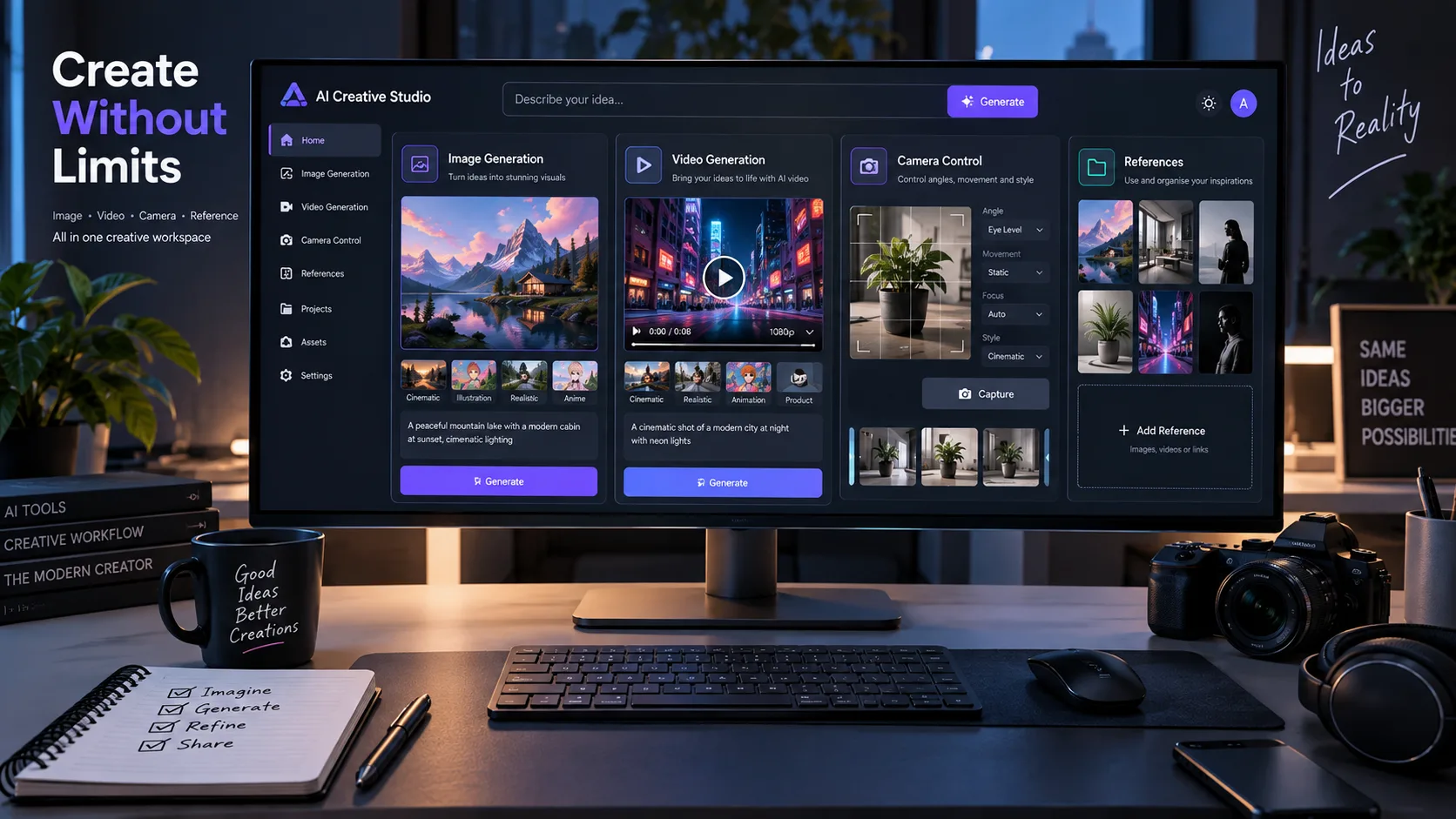
Higgsfield started life in the public imagination as an AI video generator with an unusually strong emphasis on camera control. In 2026 it is better understood as a creative production environment that happens to include video generation. It brings image generation, video generation, editing, effects, reference handling, character consistency and colour consistency into one workspace, and it lets you route your work through a mix of its own models and third-party models. That combination is more interesting than any single output sample, because it changes what a small team can actually produce on a schedule.
This guide walks through what Higgsfield AI is, how the platform has evolved, how Cinema Studio and the Soul family work, how to prompt it properly, how it fits alongside tools like Runway and Midjourney, and where the honest limitations are. Where a detail depends on the current plan, model list or pricing, I will point you at the official Higgsfield pages rather than guess. Capabilities in this space change quickly, and pretending otherwise would be unhelpful.
1. What Is Higgsfield AI?
Higgsfield AI is a generative media platform with a strong cinematic bias. You give it text prompts, reference images or both, and it produces images and video. The reason it stands out from a generic text-to-video tool is the amount of control it exposes over how a shot looks and how the camera behaves, plus the way it tries to keep characters and colours stable across a sequence of shots rather than treating every generation as a fresh lottery.
The platform is aimed at a fairly broad set of users. Filmmakers and directors use it for previsualisation and short-form narrative work. Marketers and social teams use it for product spots, ad variations and vertical content. Creators use it for music videos, concept art and thumbnails. Developers use it for automated pipelines. The common thread is that all of them need more than one output, which is where workflow design starts to matter.
The workflow argument
Most creative AI tools are strong at one thing. Higgsfield’s pitch is closer to a production chain: develop a look, lock a character, generate stills, animate them, adjust camera motion, edit, and export, with the references travelling with the project. If you have ever tried to rebuild a character’s face from scratch across six separate generations, you already understand why that matters.
It also aggregates models. Some of what you use inside Higgsfield is built by Higgsfield, and some is third-party video and image generation technology made available through the platform. Those are not the same thing, and it is worth keeping the distinction clear when you read marketing copy anywhere in this space. If you want a broader grounding in how these systems work under the hood, the explanation of how AI tools actually work is a good companion read.
| Area | What it covers |
|---|---|
| Platform | Browser-based generative media workspace for images, video, editing and effects. |
| Primary focus | Cinematic control over AI image and video generation. |
| Image generation | Soul family models plus access to other image models where documented. |
| Video generation | Proprietary and third-party video models delivered through one interface. |
| Editing | Post-generation editing, restyling and reference-driven adjustments. |
| Cinematic workflows | Cinema Studio for camera, optics, references and shot construction. |
| Creative effects | Apps and one-click effects for social, product and campaign content. |
| Developer access | API availability is documented by Higgsfield. Check the official documentation for the current scope. |
| Target users | Filmmakers, creators, marketers, social teams, developers and designers. |
It is worth saying plainly: Higgsfield is not a replacement for a full non-linear editor, and it is not trying to be. It is a generation and previsualisation environment that increasingly handles the first 80 percent of a shot’s life. The final cut, sound design and grade often still belong elsewhere. Knowing where that boundary sits saves a lot of frustration.
2. How Higgsfield AI Has Evolved
The early reputation of Higgsfield was built on motion. Specifically, on the idea that you could describe a camera move, not just a subject, and get something that felt directed rather than drifted. Camera control as a first-class parameter is what separated it from the first wave of text-to-video tools, where the camera did whatever the model felt like doing.
From there the platform widened. The clearest way to describe the evolution is that it moved from being an AI video generator towards being a creative production environment. A few strands define that shift.
Cinema Studio
A structured workspace for building shots with camera, optics and references rather than relying on one-shot prompting.
Soul Image Models
A family of image generation models including Soul, Soul 2.0 and Soul Cinema, each with a different creative emphasis.
Soul ID
Identity handling that helps a character or product remain recognisable across multiple generations.
Soul HEX
Colour consistency tooling that can be useful when a brand palette needs to remain consistent across an entire sequence.
Editing Layer
Post-generation editing, restyling and reference-driven changes can be handled inside the same creative environment.
Apps and Effects
Purpose-built mini tools for common creative jobs, including angles, shots, transitions, product content and social media assets.
Model Aggregation
Multiple video and image models can be accessed through one interface rather than relying on a single model for every task.
Creator Hub
Documentation, help centre resources and academy-style learning materials provide guidance around the wider toolset.
The aggregation point deserves emphasis because it changes how you work. Instead of committing to a single model’s personality, you can route a shot to whichever model handles that kind of motion or texture best. The trade-off is that you now have to learn several models’ quirks. That is a real cost, and it is one of the reasons a structured workspace beats a launcher page full of tiles.
A note on history. I am deliberately not listing dated version milestones here. Public release timelines in this sector get revised, and a confidently wrong date is worse than no date. Higgsfield’s own about page, academy and help centre are the right places to check how specific features and versions are described today.
3. Higgsfield AI Cinema Studio
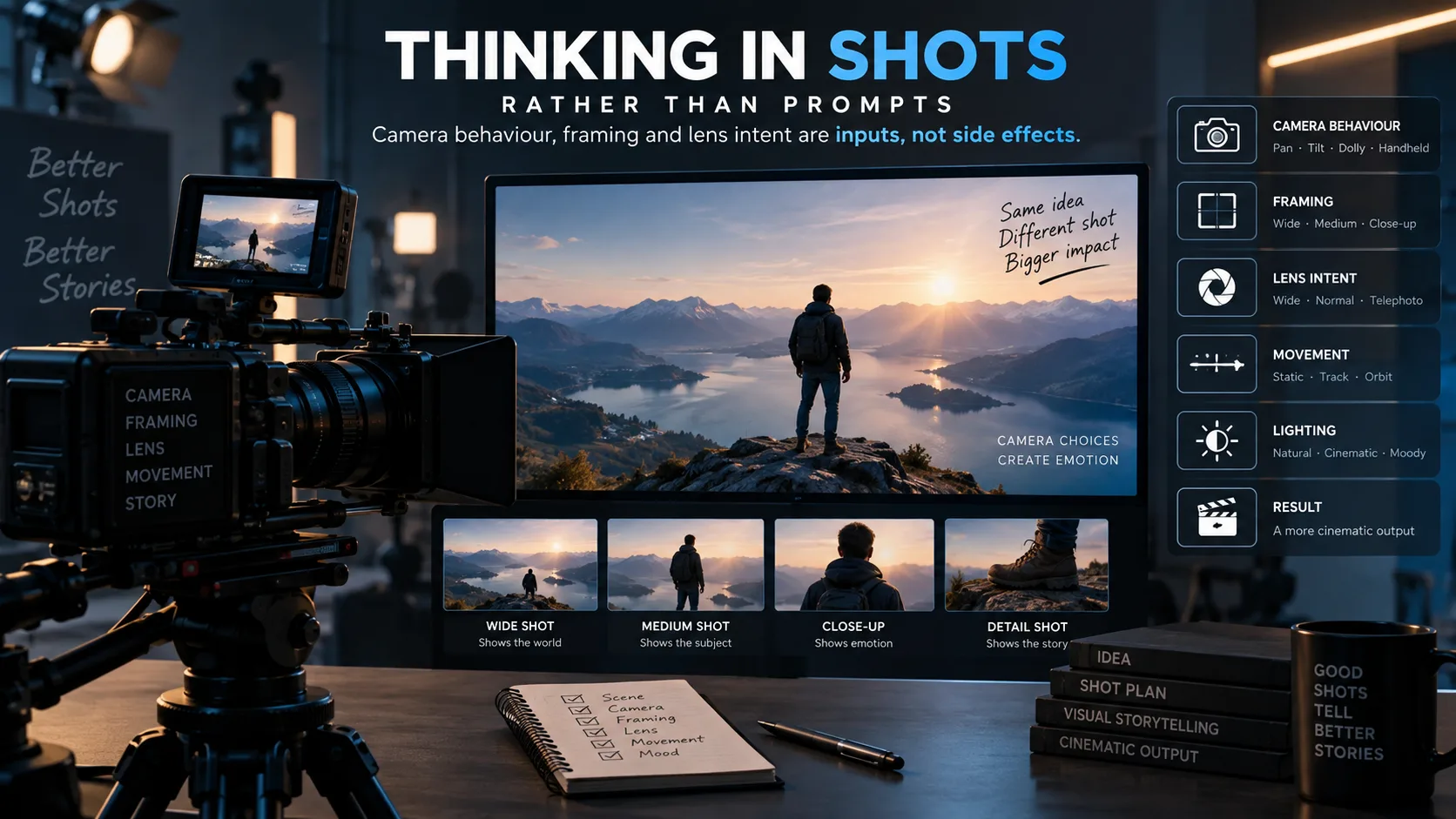
Cinema Studio is the part of Higgsfield AI that most directly addresses the problem of directing rather than gambling. The concept is straightforward: instead of writing a sentence and hoping the model picks an interesting angle, you specify the cinematography. Camera movement, lens behaviour, composition and references become inputs rather than accidents.
The interesting part of Higgsfield AI is not simply that it can generate a video. Plenty of tools can. The interesting part is the degree to which you can describe a shot the way a director or a DP would describe it, and get something that respects the instruction. If you have ever written “slow dolly in, shallow depth of field, low angle” into a generic video prompt and received a drifting wide shot instead, you know exactly why this matters.
What you control
The documented help material for Cinema Studio describes a workflow built around a few recurring ideas. Rather than reprinting marketing language, here is a factual summary of the categories of control that the workspace exposes.
| Feature | What it does | Why it matters |
|---|---|---|
|
01
Camera movement
|
Lets you describe or select how the virtual camera moves during the shot. | Motion is what separates footage from a still with a filter. Direction is the difference between a move that serves the story and one that distracts. |
|
02
Multi-axis movement
|
Combines more than one direction of motion in a single shot. | Real camera work is rarely one-axis. A push combined with a slight rise reads as intentional rather than mechanical. |
|
03
Optics and lens behaviour
|
Describes focal length character, depth of field and related optical qualities. | Lens choice changes emotional distance. A wide lens feels present, while a long lens feels observational. |
|
04
Visual references
|
Attach images that communicate lighting, palette, framing or texture. | Reference images transmit information that words handle badly, especially when communicating light and colour. |
|
05
Character references
|
Provide identity anchors so a person stays recognisable across shots. | Continuity is one of the hardest problems in AI narrative work. |
|
06
Locations and props
|
Describe or supply the setting and objects that must remain consistent. | Audiences forgive a lot, but a set that changes between shots can break the illusion quickly. |
|
07
Photography mode
|
Oriented towards still image creation within the cinematic workspace. | Lets you lock a keyframe before committing credits to motion. |
|
08
Videography mode
|
Oriented towards motion generation. | Keeps the still and moving parts of the job in one project rather than two separate tools. |
|
09
Elements and references
|
Structured inputs that describe what must appear in the shot. | Turns a vague prompt into a shot-list item with requirements attached. |
|
10
Clip duration
|
Controls how long the generated clip runs. | Short clips are easier to control. Longer clips give you more room but also create more chances for visual drift. |
|
11
Colour grading intent
|
Describes the look and palette of the shot. | A consistent grade across a sequence is what makes separate generations feel like one film. |
|
12
Script-to-scene style flow
|
Works from written scene description towards visual output. | Keeps the narrative reason for the shot attached to the shot itself. |
Cinema Studio versions
Higgsfield has released multiple generations of Cinema Studio, and the documented capabilities have grown with each one. If you are reading about Cinema Studio 4.0 specifically, the honest approach is to check the current help centre entry for that version, because the option set and model behaviour are described there rather than in third-party summaries. What I would say generally is that later versions have tended to expand the amount of motion and reference control available, and to improve how faithfully the output tracks the specified camera behaviour. Do not take that as a spec sheet. Take it as a reason to read the current documentation before you plan a shoot around a specific version.
Practical use of Cinema Studio
In practice, Cinema Studio rewards a shot-list mindset. Write down the shot you need in the language a first assistant director would use. Then translate that into the control categories above. A worked example:
- Story need: reveal that a character is being watched.
- Shot description: long lens, slightly high angle, slow push in through foreground foliage, subject centre-frame, shallow focus, cool overcast light.
- Control mapping: camera movement (slow push), optics (long lens, shallow depth of field), composition (subject centred, foreground occlusion), lighting (overcast, cool), reference (a still that communicates the palette).
- Duration: short. The reveal does not need eight seconds.
That translation step is where most people either win or lose. A prompt like “a man being watched” gives the model far too much freedom. The structured version gives it a job.
The temptation is to throw every instruction into one prompt. I would not. Camera, lighting and subject identity are separate variables, and separating them makes it possible to change one without disturbing the others.
4. Higgsfield AI Image Generation
Higgsfield’s image side is built around the Soul family, with additional image models available through the platform where documented. The image workspace is not an afterthought bolted onto a video tool. It is where a lot of the important continuity work happens, because a locked keyframe is the cheapest way to control a video before you spend video credits on it.
From still to motion
The most useful pattern in Higgsfield AI is image-to-video. You generate or upload a still, refine it until the composition and identity are right, then animate it. This matters for three reasons.
- Cost control. Stills are generally cheaper to produce and iterate than video. Fixing composition in the still stage avoids expensive re-rolls later.
- Predictability. The first frame of a video heavily constrains what the model does. A good first frame is a form of direction.
- Continuity. If your character references and colour references live in the image stage, they carry forward into motion more reliably than if you describe them fresh each time.
| Approach | Typical flow | Best when |
|---|---|---|
|
Image-first
Recommended default
|
Generate or upload a still, lock identity and palette, then animate. | You need continuity, a specific composition, or tight control over the look. |
|
Video-first
|
Prompt motion directly and accept more variation. | You are exploring, testing a motion idea, or need a fast rough concept. |
|
Reference-driven hybrid
|
Feed references for style and identity into both stages. | You are producing a sequence where the look must not drift. |
References, presets and moodboards
Where documented, Higgsfield’s image workflow supports reference images, presets and palette control. The practical value of a moodboard is not decorative. It compresses a lot of visual decisions into a single input. If you can show the model the exact quality of light you want, you do not have to spend three paragraphs describing it, and the model is less likely to invent something adjacent.
For anyone coming from a stills-first background, the comparison with tools like Midjourney for professional AI imagery or Flux is natural. Midjourney remains very strong on aesthetic default and prompt interpretation. Higgsfield’s advantage is not that its stills are inherently better, it is that the stills feed directly into a motion and editing pipeline without leaving the platform.
5. Soul, Soul 2.0 and Soul Cinema Explained
The Soul family is where Higgsfield’s image identity lives. The names are easy to confuse, so here is a practical breakdown. The table below is organised by intended use rather than by ranking, because “best” depends entirely on what you are shooting.
| Model | Best suited for | Main strengths | Typical workflow |
|---|---|---|---|
| Soul | General image generation and everyday visual development | A dependable baseline for portraits, scenes and concept frames | Prompt, refine, then use the result as a keyframe or reference for other models |
| Soul 2.0 | Higher fidelity stills where detail and prompt adherence matter | Improved rendering quality and control compared with the earlier generation | Use for hero frames, product close-ups and anything likely to be seen at full size |
| Soul Cinema | Cinematic stills and previsualisation frames | Oriented towards film-like lighting, composition and lens character | Generate the look first, lock it, then animate in the video stage |
| Soul ID | Character or subject consistency across shots | Keeps a recognisable identity stable across multiple generations | Establish the identity once, then reuse it as an anchor for every shot in the sequence |
| Soul HEX | Colour and palette consistency | Helps hold a defined colour direction across a set of images or clips | Define the palette early and apply it through the sequence to stop the grade drifting |
Why consistency is the whole game
Identity and colour consistency sound like technical details until you try to make a sixty-second piece with eight shots. Then they become the only details that matter.
Consider a character. Generation models are probabilistic. Ask for “a woman in her thirties with dark hair” six times and you will get six different people who all technically match the description. For a single striking image, that is fine. For a sequence, it is fatal. The audience tracks faces automatically, and a change of bone structure between shots reads as a continuity error even if they cannot articulate why. Soul ID exists to solve exactly this problem by anchoring identity to a reference rather than a description.
Colour works the same way. A brand palette, or a deliberate filmic look, is a promise to the viewer. If shot three is warm and shot four is cold for no narrative reason, the piece feels assembled rather than made. Soul HEX gives you a way to define that direction once and hold it.
Where both matter most: narrative shorts, music videos with a recurring performer, fashion campaigns across multiple looks, product spots where the packaging must stay the right shade, and any episodic content where a returning character needs to be instantly recognisable.
6. Higgsfield AI Video Generator
The video side of Higgsfield AI is a workspace rather than a single model. That is the key thing to understand. It offers Higgsfield’s own systems alongside third-party video models made available through the platform, and part of the skill of using it well is knowing which one to send a given shot to.
Proprietary versus third-party
This distinction is worth being precise about, because the marketing in this sector tends to blur it.
Proprietary Systems built and maintained by Higgsfield, including the Soul image family and the Cinema Studio control layer. These are the parts of the platform that carry its particular point of view, especially around camera and cinematography.
Third-party Video and image models from other labs that Higgsfield makes available through its interface. These come with their own strengths, their own failure modes and their own licensing. Higgsfield did not create them, and describing them as Higgsfield models would be inaccurate.
Model availability shifts. Names that are present in the workspace today may be replaced or joined by others next quarter. Rather than print a list that will age badly, the sensible move is to check the current model selection inside the app or on Higgsfield’s official pages before you build a workflow that depends on one particular model.
The generation workflow
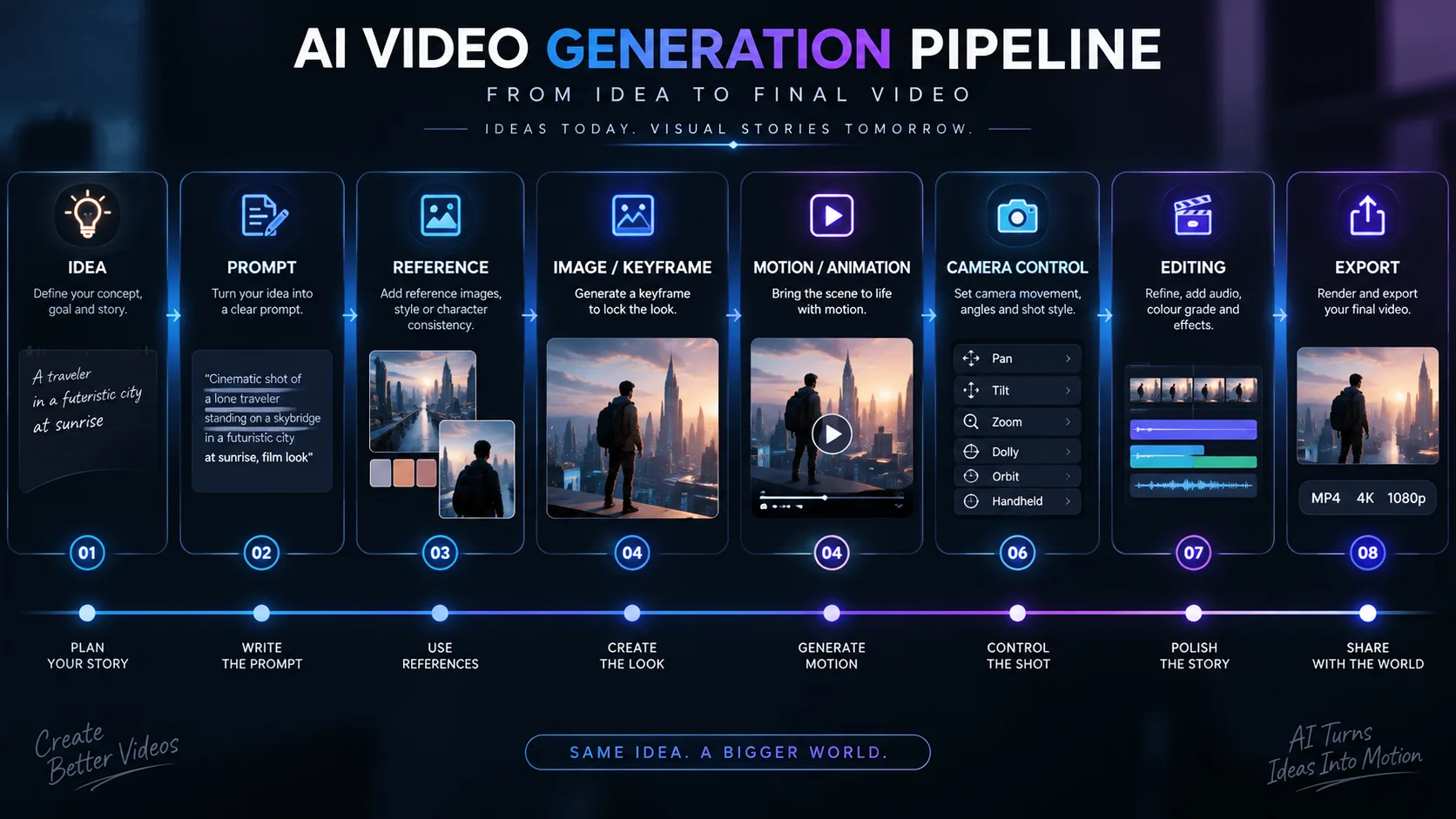
Whether you are using a proprietary or third-party model, the shape of a good workflow is fairly consistent.
Each stage has a job. Skipping the reference stage is the most common shortcut and the most common cause of disappointment, because the model then has to guess at everything you did not say.
7. Higgsfield AI Video Editor
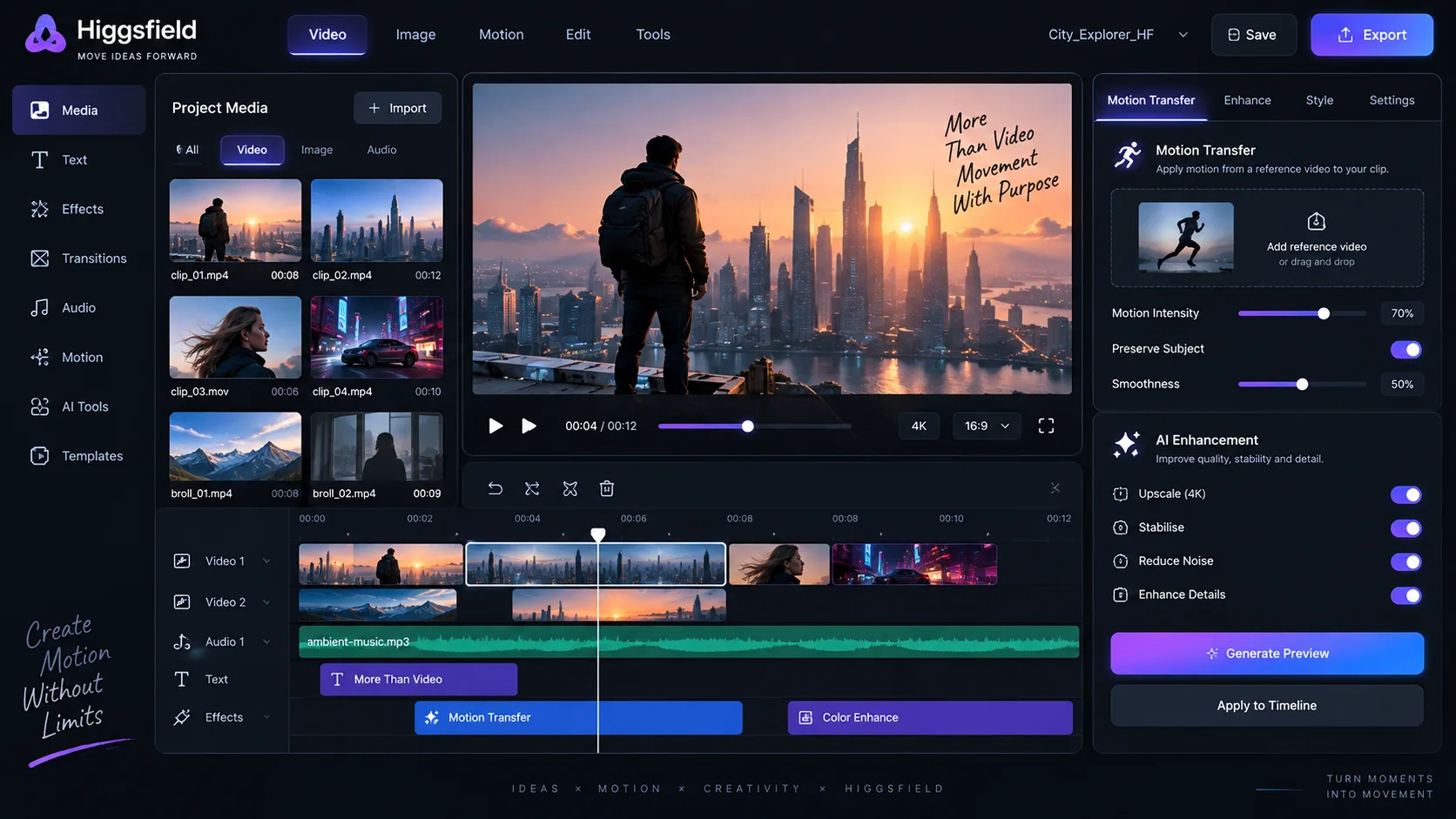
Generation is only half the job. Higgsfield’s editor covers the post-generation work: adjusting a clip, restyling it, transferring motion from a reference, making reference-driven edits, and where documented, tasks such as inpainting, enhancement and upscaling.
What this means in practice is that you can fix a shot without regenerating it from scratch. That is a bigger deal than it sounds. In a pipeline where every correction costs a fresh generation, iteration is expensive and you end up accepting shots that are nearly right. A working editing layer changes the economics of iteration, which changes the quality ceiling of the whole project.
Where it fits
I would not describe Higgsfield’s editor as a full non-linear editor, and I do not think it is presented as one. It is a generation-adjacent editing layer. It is very good at the things that only make sense in the context of generated footage: restyling a clip, transferring motion, refining a region, pushing a resolution up for delivery. It is not where you would build a complex multi-track timeline with detailed audio automation.
The practical division of labour looks like this:
- Inside Higgsfield: shot generation, camera control, clip-level editing, restyling, motion transfer, enhancement, upscaling.
- Outside Higgsfield: final assembly, audio mixing, music, sound design, narration, delivery encoding for specific platforms.
Contextual comparison
It is tempting to line up every creative AI tool and declare a winner. That exercise is not useful, because they are not doing the same job. Runway has a strong reputation for a broad suite of video tools and a mature editing environment. Seedance 2.0 is a video generation model with its own motion characteristics. Sora, Flux and Midjourney each occupy different niches in image or video generation. Higgsfield’s position is closer to an integrated production workspace with a cinematic emphasis.
Many teams end up using more than one. That is normal and not a failure of tool selection. If you are assembling a wider stack, the overview of the best AI tools across categories is a reasonable place to map out the options before committing budget.
8. Higgsfield AI Effects and Apps
The Apps section is the part of Higgsfield AI aimed at speed rather than shot design. These are purpose-built mini tools that handle a specific, common job with fewer decisions. You are trading some control for a much shorter path to a result.
Documented categories tend to cluster around a few practical needs:
Creative effects
Stylised transformations applied to images or clips for a specific look.
Social content
Formats and treatments aimed at short-form vertical platforms.
Video editing tools
Focused utilities for common clip-level corrections and transformations.
Face and identity
Tools that work with a subject’s likeness, tied into the consistency story.
Advertising content
Templates and flows oriented towards product and campaign output.
Product content
Tools for presenting an object cleanly, often with controlled angles and lighting.
Angles and shots
Generate alternative viewpoints of an existing image without rebuilding the scene.
Transitions
Connective motion between shots, which is often the hardest thing to prompt directly.
Image expansion
Extend a frame outward, useful when an aspect ratio change is needed late in the process.
One-click effects get dismissed as gimmicks by people who care about craft, and sometimes that criticism is fair. But for short-form content the economics are different. If a platform rewards volume and speed, a tool that produces a usable variation in thirty seconds has genuine value, even if it would never appear in a short film. The mistake is using effects as a substitute for direction rather than as a way to test an idea quickly.
Where these tools earn their place: rapid creative testing for paid social, generating multiple angle variants of the same product shot, producing hook variations for a campaign, and filling in connective shots that would otherwise eat a disproportionate share of your time.
9. How Higgsfield AI Fits Into a Real AI Filmmaking Workflow
An AI filmmaking workflow is not a single tool doing everything. It is a chain of specialised stages where each one constrains the next. Higgsfield AI sits in the visual middle of that chain: after the script, before the final cut.
Stage by stage
Idea and script. This belongs outside Higgsfield. Large language models are good at structure, dialogue and beat sheets. Tools like ChatGPT, Claude or Google Gemini can help you get from a premise to a shot-by-shot breakdown. None of them should be generating your visuals at this stage.
Reference and style lock. Collect stills, palettes and lighting references before you generate anything. This is where Soul ID and Soul HEX become relevant. Lock identity and colour before you start producing shots, not after.
Keyframes. Generate the still for each shot. Use Soul Cinema or Soul 2.0 depending on how much detail the final frame needs to carry. Approve the composition here, because changing it later is expensive.
Video generation and camera. Animate the approved keyframes. This is the Cinema Studio stage, where camera movement, optics and duration are specified. Short clips, tight direction.
Edit and upscale. Assemble inside Higgsfield for clip-level work, then push resolution for delivery. Any clip that needs surgery gets fixed here rather than regenerated.
Export and finish elsewhere. Final cut, colour finishing, sound design, music and narration usually happen in dedicated tools. For voice work, something like ElevenLabs for AI voice covers narration and character voices. Presentation-style content may be better served by Synthesia if you need a presenter on camera.
Where the creative workflow happens
Conceptual workflow emphasis, not benchmark data. Percentages are illustrative values showing how effort tends to be distributed across stages, not measurements of any product.
Note: These percentages are illustrative only and are intended to visualise relative workflow emphasis rather than measure the performance of a specific AI video tool.
The chart reflects something worth internalising. Generation itself is not where most of the time goes. Iteration is. Any tool or workflow that makes iteration cheaper, faster or more predictable has a disproportionate effect on the finished result, which is the strongest argument for an integrated environment over a collection of disconnected generators.
10. Higgsfield AI Prompting Guide
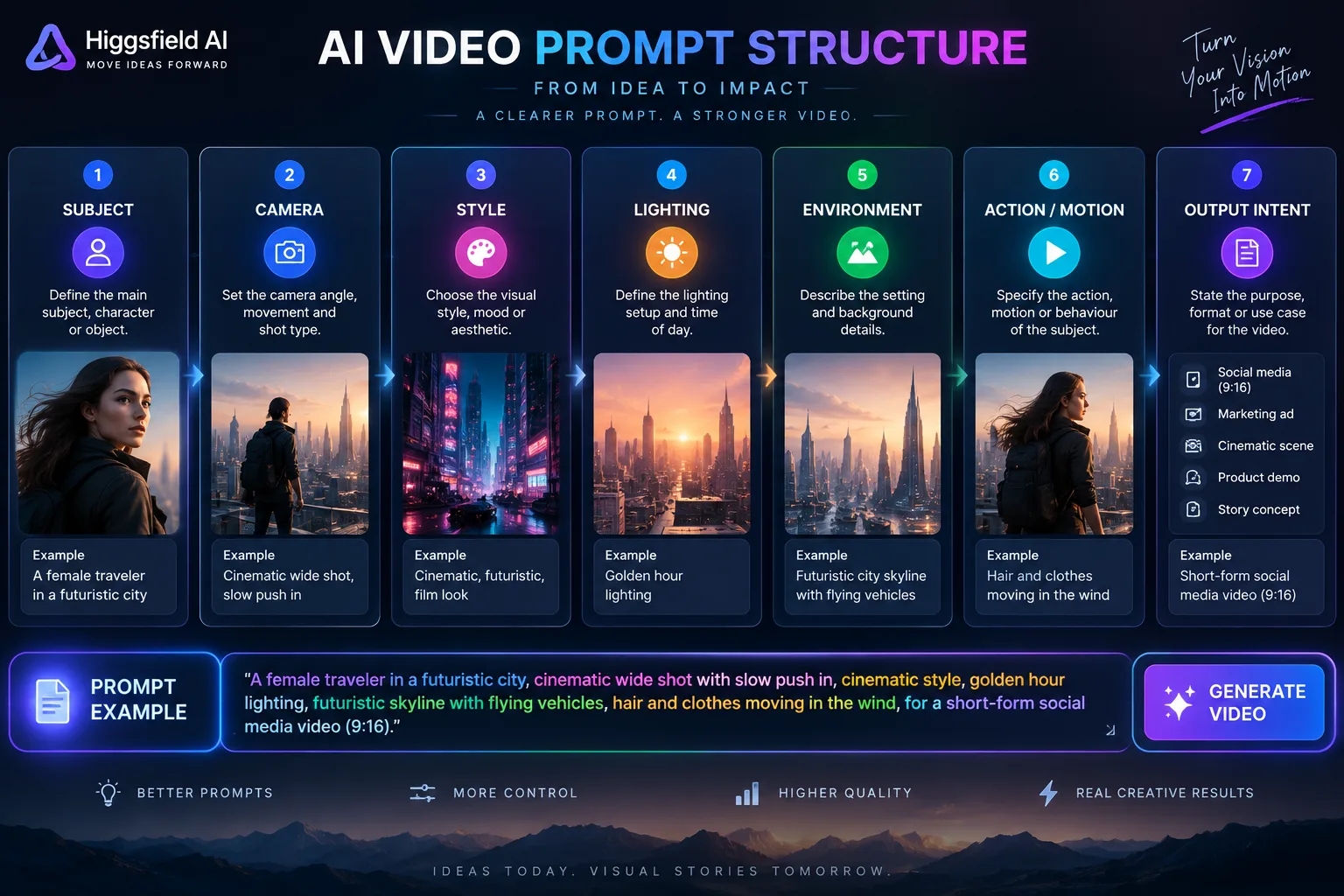
Most prompt advice is vague to the point of uselessness. “Be specific” and “describe what you want” tell you nothing you did not already know. What actually helps is a consistent structure, so that you always cover the same categories and can change one variable at a time when something goes wrong.
Here is the structure I would use for Higgsfield AI prompts. It maps reasonably well onto the control categories the platform exposes, especially in Cinema Studio.
SUBJECT + ENVIRONMENT + CAMERA + LENS + LIGHTING + MOTION + COMPOSITION + MATERIAL + MOOD + OUTPUT INTENT
Ten components. Not every prompt needs all ten at full detail, but you should consciously decide which ones to leave out rather than forgetting them.
What each component does
Subject. Who or what the shot is about, described concretely. Age, build, clothing, expression, distinguishing detail. If identity consistency matters, keep this wording identical across shots and let Soul ID carry the rest.
Environment. Where the subject is and what surrounds them. Interior or exterior, time of day, weather, level of clutter. Environment is often what makes a shot feel grounded rather than floating.
Camera. The physical behaviour of the virtual camera: position, height, angle and movement. Low angle, eye level, high angle, dolly in, tracking sideways, crane up, handheld drift. This is the component Higgsfield rewards most.
Lens. Focal length character and depth of field. Wide lenses exaggerate space and feel immersive. Long lenses compress distance and feel observational. Shallow depth of field isolates a subject; deep focus keeps the whole scene legible.
Lighting. Direction, quality and colour temperature. Hard or soft, motivated or stylised, key direction, practical sources in frame. Lighting is the single biggest lever on whether a shot reads as cheap or expensive.
Motion. What moves within the frame, separate from what the camera does. Hair, fabric, water, crowds, vehicles, drifting smoke. Even a still frame benefits from knowing what would move if it were animated.
Composition. Where things sit in the frame. Rule of thirds, centred symmetry, negative space, foreground occlusion, horizon placement.
Material. Surface qualities. Brushed metal, matte ceramic, weathered leather, wet asphalt, fine knit fabric. Material language pushes output away from a generic plastic smoothness.
Mood. The emotional register. Tense, calm, nostalgic, clinical, playful, ominous. Keep this to one or two words, because too many competing moods produce mush.
Output intent. What the generation is for. A vertical social hook, a wide cinematic establishing shot, a product detail for a landing page. Stating the destination helps the model make sensible trade-offs about framing and detail density.
Ten practical Higgsfield AI prompts
These are original prompts written for the structure above. Adjust the specifics to your project rather than copying them literally.
1. Cinematic portrait
A woman in her late thirties, short dark hair, wearing a charcoal wool coat, standing in a bare concrete corridor at dusk. Camera at eye level, slow push in, medium telephoto, shallow depth of field. Soft cool light from a single high window, deep shadows. Subject slightly left of centre, negative space to the right. Matte fabric, concrete texture. Quiet, contemplative. Cinematic still for previsualisation.
2. Fashion campaign
A model in an oversized structured linen jacket, pale sand colour, standing against a seamless warm grey backdrop. Camera at chest height, static, 85mm equivalent, moderate depth of field. Large softbox from the left, gentle fill, subtle rim light on the shoulder. Full body, centred, generous headroom. Crisp linen weave, matte skin. Confident, editorial. Square format for a print-style campaign key visual.
3. Product advertisemen
A matte black wireless speaker on a polished dark stone surface. Camera slightly above product level, slow orbit to the right, 50mm equivalent, deep focus. Hard directional key from the upper right, cool blue fill from behind, water-like reflections on the surface. Product centred, tight framing. Brushed aluminium grille, matte rubber base. Precise, premium. Sixteen by nine hero frame for a product launch.
4. Futuristic city
A dense coastal city at blue hour, layered towers with glass facades, elevated transit lines crossing between buildings. Camera low and rising slowly, wide lens, deep focus. Ambient blue light from the sky, warm amber practicals in windows, thin mist between buildings. Strong verticals, leading lines towards a distant harbour. Wet concrete, reflective glass. Awe, quiet scale. Wide cinematic establishing shot.
5. Documentary scene
A craftsman in his sixties working at a wooden bench in a small workshop, hands occupied with a hand plane. Camera handheld at chest height, subtle drift, 35mm equivalent, moderate depth of field. Daylight from a side window, dust visible in the air, warm wood tones. Subject right of centre, tools in soft foreground. Worn wood, iron shavings. Honest, unhurried. Observational documentary still for a short film.
6. Music video
A performer in a reflective silver jacket standing in an empty indoor swimming pool, dry tiles, overhead strip lighting. Camera circling slowly at shoulder height, wide lens, deep focus. Hard top light with strong specular highlights, deep shadow in the background. Subject centred, symmetrical composition. Reflective fabric, glazed tile. Restless, stylised. Vertical crop for a short-form music clip.
7. Cinematic car commercial
A dark grey electric saloon on a wet mountain road at first light. Camera tracking alongside at low height, then rising slightly, 40mm equivalent, shallow depth of field on the bodywork. Cold ambient dawn light, warm highlights from the headlights, mist in the valley. Vehicle positioned on the left third, road leading away to the right. Wet paint, beaded water on glass. Composed, powerful. Wide cinematic frame for a commercial.
8. Social media product video
A skincare bottle on a pale pink plinth, minimalist studio setting. Camera locked off, very slight push in, 50mm equivalent, shallow depth of field. Bright soft light from the front, soft shadows, pastel background. Product centred, generous negative space above for text. Frosted glass, soft matte label. Clean, friendly. Vertical nine by sixteen for a short-form ad.
9. Short film establishing shot
A lone farmhouse on a wide flat plain under a heavy overcast sky, single lit window. Camera static, very slow push, 28mm equivalent, deep focus. Flat diffused daylight, no direct sun, muted greens and greys. House on the lower left third, vast sky above. Weathered timber, wet grass. Isolated, expectant. Wide establishing shot for a short film.
10. Image-to-video motion prompt
Using the attached keyframe: keep the subject and framing identical. Add a slow push in of roughly ten percent over the clip, a gentle handheld drift, and subtle movement in the subject's hair and the fabric of their coat. Keep the lighting direction unchanged. No camera shake. No change to colour or grade.
The tenth prompt is deliberately written as an instruction set for a still, not a description of a new scene. That is how you keep an image-to-video generation faithful to the frame you approved.
11. Higgsfield AI Prompt Formula
If you only take one thing from this guide, take the table below. It is a reusable prompt builder. Work down the rows, fill in what is relevant, and leave the rest out consciously.
Prompt builder for Higgsfield AI. Not every row is needed every time, but each one should be a deliberate choice.
| Component | What to describe | Example |
|---|---|---|
| Subject | Who or what, with concrete identifying detail |
A woman in her thirties, short dark hair, charcoal coat
|
| Action | What the subject is doing, even if subtle |
Turning slowly to look over her shoulder
|
| Environment | Setting, time of day, weather, surrounding detail |
Bare concrete corridor at dusk, light rain outside
|
| Camera | Position, height, angle, movement |
Eye level, slow push in, slight handheld drift
|
| Lens | Focal length character and depth of field |
Medium telephoto, shallow depth of field
|
| Lighting | Direction, quality, colour temperature, sources |
Single soft window from the left, cool tone, deep shadow
|
| Colour | Palette and grade direction |
Muted desaturated palette with a warm skin tone
|
| Texture | Materials and surface qualities |
Matte wool, rough concrete, fine dust in the air
|
| Composition | Framing, placement, negative space |
Subject left of centre, negative space to the right
|
| Motion | Movement within the frame, separate from camera |
Fabric shifting, hair moving in a draught
|
| Mood | Emotional register, one or two words |
Quiet, contemplative
|
| Reference | Attached image or identity anchor |
Character reference attached, style reference attached
|
| Continuity | What must stay identical to a previous shot |
Same wardrobe, same lighting direction, same lens
|
12. Higgsfield AI for Developers
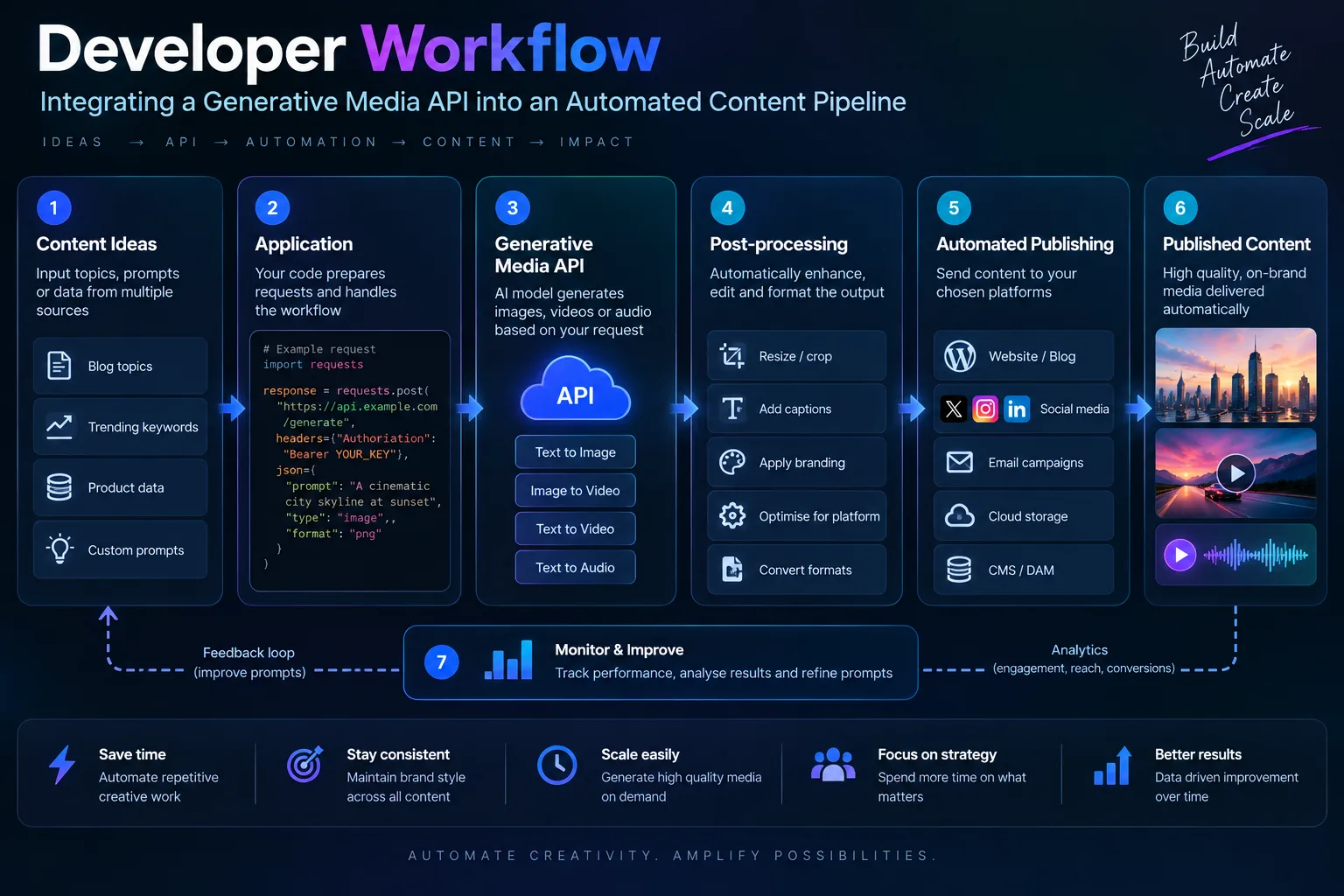
From a developer’s point of view, the interesting question is not what the interface can do, it is what the API can do. Higgsfield documents API access, and the current scope, endpoints, authentication and rate behaviour belong in the official documentation rather than in a third-party article. I am not going to invent endpoint names or code samples that might not match reality. Go to the official Higgsfield API documentation and work from there.
What is useful is thinking about how a generative media API fits into a content pipeline, because that architecture is fairly stable regardless of which vendor you pick.
A conceptual pipeline
Most automated creative pipelines follow a similar shape. A trigger produces a brief. A language model turns the brief into structured shot specifications. An image step produces keyframes. A video step animates the approved ones. A finishing step handles upscaling and export. A publishing step distributes.
Pseudocode sketch, deliberately generic.
brief = load_brief(job_id)

shots = llm.generate_shot_list(brief)        # structured JSON

for shot in shots:
    prompt = build_prompt(shot)              # your prompt formula
    keyframe = image_api.generate(
        prompt=prompt,
        reference=brand_style_ref,
        identity=brand_identity_ref
    )
    if not approve(keyframe):
        continue

    clip = video_api.animate(
        image=keyframe,
        camera=shot.camera_spec,
        duration=shot.duration
    )

    store(clip, shot.id)

manifest = assemble(shots)
publish(manifest)
Two design notes from that sketch. First, the approval step. Fully automatic generation with no human gate is how you end up publishing a frame with six fingers. Second, the reference handling. Passing the same style and identity references into every generation is what makes the output feel like one campaign rather than a set of unrelated images.
On the automation layer around it, tools like n8n for AI automation and Zapier are the usual glue for connecting a trigger to a generation job and then to a publishing destination. If you are building on cloud infrastructure, Amazon Bedrock is a common way to host the language model side of the pipeline, and there are specialist Amazon AI tools worth knowing about if your stack already lives in AWS.
For the coding side, GitHub Copilot and Cursor are both useful when you are writing the orchestration layer, and Replit AI is a reasonable option if you want to prototype the pipeline in a browser without setting up a local environment.
13. Higgsfield AI for Marketers
The marketing use case is different from the filmmaking use case, and conflating them causes bad decisions. A filmmaker needs one exceptional shot. A marketer needs twenty acceptable variations, a consistent brand look, and a turnaround measured in hours.
That difference changes what you optimise for. Higgsfield AI is useful for marketers precisely because of the consistency tooling. Soul ID keeps a spokesperson or product recognisable across variants. Soul HEX holds a brand palette. Cinema Studio gives you repeatable camera setups, which means a second round of creative does not look like it came from a different agency.
The repeatable system argument
There is a real difference between generating one impressive video and building a repeatable creative system. The impressive video is a demo. The system is an asset. A system means:
- A defined set of camera setups you reuse across campaigns.
- A locked palette that every asset inherits.
- A stored identity reference for the product or presenter.
- A prompt template that non-specialists can fill in safely.
- A review gate so nothing publishes unapproved.
Once that exists, adding a new campaign variant is a matter of filling in the template rather than starting from a blank page. That is where the return on a subscription actually comes from.
Where this connects to the wider stack: campaign copy and landing pages often come out of writing tools like Jasper, and content planning often lives in Notion AI. Design-side production for static assets frequently runs through Canva’s AI features. Higgsfield handles the moving-image generation layer that sits between the plan and the published asset.
For e-commerce specifically, the combination of product references plus angle-generating tools plus short-form output is a genuinely useful loop. You can test a hook, see how it performs, and produce a variant without booking a studio. That is not a replacement for real product photography, but it is a fast way to find out which angle deserves the studio budget.
14. Higgsfield AI for Filmmakers and Creators
For filmmakers, the strongest argument for Higgsfield AI is previsualisation. Storyboards are useful. Animated storyboards that show the intended camera move are substantially more useful, because they communicate pacing and coverage in a way static boards cannot.
Practical applications I would expect a director to get value from:
Storyboarding
Generate a full board from a script breakdown, then refine the shots that matter.
Previsualisation
Animate key boards to test whether a camera move actually works in sequence.
Concept development
Explore a visual direction before committing to a location, a set or a wardrobe.
Shot design
Test lens choices and framings without a camera, quickly and cheaply.
Character continuity
Lock a performer’s look across a sequence using an identity reference.
Location scouting
Generate a version of a location in a specific light before you travel to it.
Where human direction remains essential: deciding what the shot is for. A model can produce a beautiful frame. It cannot tell you that the scene needs a cut to the reaction instead of a push in, because it does not know what the scene is about. It cannot judge performance, comic timing, or whether an image is emotionally true to the story.
It also cannot decide what not to show. Restraint is a directorial choice, and it is the one thing a generative tool will never volunteer. If you ask for more, you will get more. Knowing when to ask for less is a human job.
15. Higgsfield AI vs Other AI Creative Tools
There is no overall winner here, and any article that declares one is selling something. These tools occupy different positions, and most working teams use several. The table below is a neutral comparison of how they differ, not a ranking.
Contextual comparison. Capabilities in this sector change quickly, so verify current specifics with each vendor before making a decision.
| Tool | Primary use | Image generation | Video generation | Editing | Cinematic control | Character consistency | Workflow integration | Developer relevance |
|---|---|---|---|---|---|---|---|---|
| Higgsfield AI Featured | Integrated cinematic image and video production | Yes, Soul family plus other models where documented | Yes, proprietary and third-party models | Yes, generation-adjacent editing layer | Strong emphasis via Cinema Studio | Yes, via Soul ID | High, single environment for multiple stages | API documented; check official docs |
| Runway | Broad video creation and editing suite | Yes | Yes | Yes, mature editing tools | Present but structured differently | Varies by feature | High | API available |
| Midjourney | High-quality still image generation | Strong focus | Limited | Minimal | Prompt-driven, less explicit camera control | Partial via references | Moderate | Limited API relevance |
| Flux | Image generation model family | Strong focus | Not its primary role | Minimal | Not applicable | Varies by implementation | Integrates into other tools | Widely used in pipelines |
| Seedance 2.0 | Video generation model | Limited | Strong focus | Minimal | Model-dependent | Model-dependent | Integrates into platforms | Model access varies |
| Sora | Video generation | Limited | Strong focus | Limited | Prompt-driven | Varies | Moderate | Access varies |
| Google Gemini | Multimodal assistant with generation capability | Yes | Yes, where available | Limited | Not its primary focus | Limited | Broad ecosystem integration | Strong API ecosystem |
The honest summary is that Midjourney and Flux are excellent at stills, Runway is a broad video suite, Seedance and Sora are video models, and Gemini is a general assistant that can generate media. Higgsfield’s distinguishing position is the integration of image, video and camera control in one production environment with consistency tooling attached. If your work is single images, you may not need that integration. If your work is a sequence, you probably do.
16. Higgsfield AI Pricing and Credits
Higgsfield operates a subscription model with credits. Different plans unlock different levels of access, different generation volumes and different model availability, and there are both individual and business-oriented options. Credits are consumed by generations, and the consumption rate varies by what you are generating and which model you route the job to.
I am not going to print specific prices here. Pricing in this sector changes, regional pricing differs, and a number copied from a blog post is worse than no number at all. Check the current Higgsfield pricing page for accurate figures, and read the plan comparison carefully rather than skimming the headline tier.
What to evaluate before subscribing
Practical factors to weigh before committing to a plan. Exact values should be confirmed on Higgsfield’s official pricing and plans pages.
| Factor | Why it matters |
|---|---|
| Credit consumption per generation | Determines how far a monthly allowance actually goes for your kind of work |
| Video length | Longer clips consume more and are harder to control; short clips are cheaper to iterate |
| Model selection | Different models have different costs, so routing decisions have budget consequences |
| Number of generations | Real projects need many attempts. Estimate your iteration rate, not your output count |
| Commercial requirements | Usage terms can vary by plan. Confirm what you need before you rely on it |
| Workflow volume | A solo creator and a five-person content team have very different consumption profiles |
| Editing and upscaling costs | Post-generation steps may also consume credits, so budget for the whole pipeline |
My practical advice: start on a lower tier, run one real project through it, and measure what you actually consume. Estimated usage is almost always optimistic, because iteration is invisible until you are doing it.
17. Is Higgsfield AI Useful for Serious Production?
A simple yes or no would be dishonest, because “serious production” means different things in different contexts. It is more useful to break the question into the dimensions that actually determine whether a tool holds up under real deadlines.
Creative control. Strong. The camera and optics controls in Cinema Studio give you a level of directorial input that generic text-to-video tools do not. That is the platform’s clearest advantage.
Repeatability. Strong where consistency tooling is used properly. If you skip Soul ID and Soul HEX, repeatability drops sharply, because you are back to describing identity in words and hoping.
Character consistency. Good when set up correctly, but it requires discipline. The reference has to be established before the sequence begins, not retrofitted afterwards.
Camera control. The standout feature. Multi-axis movement and explicit lens behaviour are what most competing tools handle less explicitly.
Generation speed. Varies by model and by load. Cloud generation means you are sharing capacity with everyone else, so plan for variability rather than assuming a fixed turnaround.
Editing workflow. Useful at the clip level, not a replacement for a full editor. Expect to finish elsewhere.
Model choice. A genuine advantage and a genuine learning curve. Having several models available means better fit per shot, but it also means you need to know their characteristics.
Cost. Depends entirely on your iteration rate. High-iteration workflows consume credits quickly. The planning stages exist partly to reduce wasted generations.
Learning curve. Moderate. The interface is approachable, but getting consistently good results requires understanding camera language, prompt structure and reference handling. This is not a tool where the first ten minutes tell you everything.
Human supervision. Non-negotiable. Every serious workflow needs a review gate. Generated frames with anatomical errors, text rendering problems or continuity slips will get through otherwise.
The evidence-based conclusion: Higgsfield AI is a credible production tool for work where cinematic control and sequence consistency matter, particularly previsualisation, short-form narrative, campaign content and product video. It is less suited to work that demands frame-accurate finishing in a single environment, and it is not a substitute for craft judgement. Treat it as a strong component in a pipeline rather than a complete pipeline in itself.
18. Common Higgsfield AI Mistakes
Most disappointing output comes from process errors rather than model limitations. Here are the ones I see most often, and how to fix them.
Common workflow mistakes and practical corrections.
| Mistake | What goes wrong | How to fix it |
|---|---|---|
| Overloaded prompts | Too many competing instructions produce a muddled average of everything | Cut to the components that matter for this shot. Add detail only where it changes the output |
| No visual reference | The model guesses at light, palette and texture, usually towards a generic look | Attach at least one reference image for anything where the look matters |
| Changing too many variables at once | You cannot tell which change caused the improvement or the regression | Change one component per iteration. Keep a note of what you altered |
| Ignoring camera language | The camera drifts, and the shot feels accidental rather than directed | Always specify position, height, angle and movement, even if briefly |
| Inconsistent character references | The subject’s face changes between shots and the sequence falls apart | Lock identity once with a reference and reuse it in every shot of the sequence |
| Generating without a shot list | You produce attractive clips that do not cut together | Write the shot list first. Generate to fill it, not to explore |
| Solving editing problems during generation | Wasted credits re-rolling a shot that a small edit would have fixed | Decide whether the problem is generation or assembly, then use the right stage |
| Ignoring aspect ratio | A beautifully composed frame cannot be cropped to the platform you need | Decide the delivery format before generating, and compose for it |
| Not planning the final platform | Runtime, pacing and framing end up wrong for where the piece will live | Write the platform into the brief. Vertical shorts and widescreen films are different jobs |
| Using every effect because it exists | The result feels like a feature demo rather than a piece of work | Use effects to serve a specific creative decision, not to fill a gap in the concept |
The theme running through all of these is that generation is the visible part and planning is the invisible part. Planning is where the result is actually decided.
19. A Practical Higgsfield AI Workflow I Would Use
Abstract advice is easy to give and hard to apply. So here is a concrete walkthrough for a specific brief: a thirty-second product advertisement for a fictional premium water bottle. I have not run this exact project, so treat it as practical guidance rather than a case study.
Concept
The brief is simple. Show the bottle in three environments that suggest where it belongs: a kitchen counter at first light, a hiking trail at midday, a desk in a warm office in the evening. End on the logo area with space for a tagline. Tone is calm and premium, not loud.
Script
Six shots, roughly five seconds each. Shot one establishes the object. Shots two and three show it in use. Shot four is a detail on the cap. Shot five is a wide showing scale. Shot six is the end card. Write this out before touching the tool. A language model handles this stage perfectly well, and you can use the research and drafting capabilities of a tool like Perplexity if you need competitive context while writing the brief.
Moodboard
Collect six to eight reference images covering light quality, palette and surface texture. Not to copy, but to communicate. Two of those become the style reference for the whole piece.
Keyframes and product reference
Generate the still for each of the six shots using an image model appropriate to the detail level required. Attach the product reference and the style reference to every generation so the bottle and the palette stay consistent. Approve each frame before moving on. Reject anything that is merely acceptable, because a mediocre keyframe becomes a mediocre clip.
Video generation and camera motion
Animate each approved keyframe in Cinema Studio. Keep the moves small. Shot one gets a slow push. Shot two a gentle tracking move. Shot four a slow orbit around the cap. Shot five a slow rise. Nothing fast, because the product is meant to feel considered.
Editing and audio
Assemble the clips and check the sequence for pacing. Cut anything that lingers. Then take the assembled piece out of Higgsfield for sound. Narration or a voiceover, if you use one, is a good fit for voice generation tools. Music and sound design belong in a dedicated audio environment.
Final export
Upscale to delivery resolution inside Higgsfield, then encode for the target platforms. Produce a vertical cut alongside the widescreen version, which means composing for both from the keyframe stage rather than cropping later.
Notice how much of this workflow is not generation. The concept, script, moodboard and shot list decide the outcome. Generation executes the decision.
20. Higgsfield AI for Different Content Formats
Different formats need different workflows, and the same tool can serve all of them if you adjust the approach. This table maps content types to sensible workflows and the features most likely to help.
| Content Type | Recommended Workflow | Useful Higgsfield Features |
|---|---|---|
| YouTube long form | Keyframes first, animate in sequence, finish in an external editor | Cinema Studio Soul Cinema Image-to-video |
| TikTok | Fast concepts, vertical framing, high iteration | Apps and effects Short clip generation |
| Instagram Reels | Vertical keyframes, tight pacing, strong opening frame | Effects Soul 2.0 Colour consistency |
| Product ads | Product reference locked, controlled lighting, repeatable setups | Soul ID Soul HEX Product identity |
| Fashion campaigns | Character locked across looks, consistent grade | Soul ID Soul HEX Cinema Studio |
| Music videos | Stylised sequences, recurring performer, experimental camera | Camera control Effects Multi-axis movement |
| Short films | Script to shot list to boards to animated previz | Cinema Studio Soul Cinema Image-to-video |
| Storyboards | Generate a full board from a breakdown, refine key shots | Image generation Reference handling |
| Concept art | Rapid visual exploration, wide variation | Soul family Prompt iteration |
| E-commerce | Multiple angles per product, consistent lighting | Angle tools Product references Effects |
| UGC-style content | Casual framing, handheld feel, fast turnaround | Effects Apps Short-form presets |
| Brand campaigns | Systemised templates, locked palette, review gates | Soul HEX Soul ID Reusable prompt templates |
Feature references are general and should be confirmed against current Higgsfield documentation.
21. What Makes Higgsfield AI Different?
Not the best. Different. That distinction matters, because the useful question is not which tool wins but which tool fits the shape of your work.
Cinematic workflow as the organising principle. Most generative tools organise around the prompt. Higgsfield organises around the shot. Camera, lens, lighting and composition are treated as first-class inputs rather than things you hope emerge from a sentence. That is a genuinely different design decision and it shapes everything else.
Camera control depth. Multi-axis camera movement and explicit optics control are the features that most clearly separate it from general video generators. If you do not care about camera behaviour, this advantage is irrelevant to you.
Integrated image and video workflow. Generating a still and animating it in the same environment removes a whole class of friction. You are not exporting, re-uploading and re-establishing context between stages.
Character and colour consistency. Soul ID and Soul HEX address the two problems that make AI sequences fall apart. Their value scales with the length of your piece. For a single shot they barely matter. For eight shots they are the difference between a film and a slideshow.
Multiple models in one workspace. Model aggregation means you can route shots to whichever engine suits them. The cost is a learning curve, and the benefit is avoiding the limitations of any single model.
Creative apps and effects. The App layer handles common jobs quickly. It is not where craft lives, but it is where speed lives, and for high-volume content that matters.
Production-shaped workflows. References, keyframes, sequences and consistency suggest a tool designed by people who have thought about how content actually gets made, not just how a single generation gets demonstrated.
22. Higgsfield AI Limitations
An honest tool review has to cover where a platform falls short. None of these are disqualifying, but all of them are worth knowing before you plan a project around the tool.
Generation cost and credit consumption. Iteration is expensive. The better your planning, the less this bites, but there is no way to make high-volume generation free. Budget for re-rolls you did not plan for.
Inconsistent generations. Even with references, results vary between runs. This is a characteristic of probabilistic models rather than a specific product flaw, but it means you should never assume a second generation will match the first.
Model variability. Because the platform offers multiple models, quality and behaviour differ between them. A prompt that works beautifully on one may underperform on another. Learning the differences takes time.
Anatomy and detail issues. Hands, complex limb positions and fine mechanical details remain common failure points across the industry. Check every frame at full size before approving it.
Text rendering. Depending on the model used, rendering legible text within a generated frame can be unreliable. Plan to add typography in post rather than generating it.
Continuity challenges. Consistency tooling helps significantly, but it is not absolute. Long sequences with many shots will still require manual checking, and occasionally manual correction.
Editing limitations. The editing layer is built around generated footage. It is not a full non-linear editor, and complex timeline work belongs elsewhere.
Learning curve. Getting the most out of the camera and reference controls requires understanding cinematography and prompting. A casual user will produce casual results.
Rapidly changing model availability. Models come and go. A workflow built on one specific third-party model may need rethinking when that model is updated or replaced.
Dependency on cloud generation. Everything runs remotely, which means generation speed depends on server load and you need a stable connection. There is no local option.
Commercial terms that vary by plan. Usage rights and commercial permissions can differ between subscription tiers. Read the terms for the plan you are on rather than assuming, and check the official documentation for the current position.
23. Higgsfield AI Prompt Library
Fifteen additional original prompts, written for the formula in section 11. Adapt the specifics rather than copying them directly.
1. Cinematic portrait, rain
A man in his fifties, weathered face, wearing a dark waterproof jacket, standing under a shop awning in heavy rain. Camera at eye level, static, slight handheld tremor, 85mm equivalent, shallow depth of field. Cold blue ambient light from the street, warm sodium glow from behind. Subject right of centre, wet reflections in the foreground. Wet nylon, running water, rough brick. Melancholy, still. Widescreen cinematic frame.
2. Fashion editorial, movement
A model in a long ivory coat mid-stride across a wind-swept rooftop. Camera tracking sideways at hip height, 50mm equivalent, moderate depth of field. Overcast diffused daylight, slight cool cast, no harsh shadows. Subject centred with strong horizontal movement, city skyline soft in the background. Heavy wool, wind-lifted fabric. Confident, brisk. Wide editorial frame.
3. Product photography, minimal
A stainless steel wristwatch on a pale grey stone block against a soft gradient background. Camera at product level, static, 100mm equivalent, very shallow depth of field. Single large soft source from above left, subtle reflection beneath the watch. Product centred with generous space above. Brushed steel, sapphire glass. Precise, restrained. Square format for a product page.
4. Car commercial, night
A deep blue coupé parked in a multi-storey car park at night, wet concrete floor. Camera low, slow arc from front to side, 35mm equivalent, moderate depth of field. Hard overhead strip lighting with strong specular highlights on the paint, cool ambient fill. Vehicle across the lower third, ceiling structure above. Glossy paint, wet concrete, cold metal. Clinical, moody. Wide cinematic frame.
5. Luxury product, macro
A glass perfume bottle on a black mirrored surface, single droplet running down the side. Camera static, extremely shallow depth of field, macro lens character. Single narrow light from the right creating a sharp edge highlight, deep shadow on the left. Bottle centred, tight crop. Glass, liquid, mirror finish. Luxurious, quiet. Square format for a campaign visual.
6. Documentary, interior
A librarian in her seventies shelving books in a narrow aisle of an old library. Camera handheld at shoulder height, gentle drift, 35mm equivalent, moderate depth of field. Warm afternoon light through tall windows, dust in the air, deep wooden tones. Subject left of centre, shelves receding to the right. Aged paper, worn wood, soft wool. Patient, warm. Sixteen by nine documentary still.
7. Sci-fi interior
A narrow corridor inside a research station, pale composite panels, a single circular viewport showing a distant planet. Camera at chest height, very slow forward push, wide lens, deep focus. Cool white overhead panels, faint blue glow from the viewport. Strong central perspective, symmetrical framing. Matte composite, brushed metal fixings. Isolated, tense. Wide cinematic frame.
8. Street photography
A busy market street at midday, a vendor arranging produce in the foreground. Camera at chest height, static with slight handheld movement, 28mm equivalent, deep focus. Harsh overhead sun with strong shadows, bright saturated colour. Vendor on the left third, crowd receding to the right. Crates, canvas, damp stone. Energetic, ordinary. Four by three documentary frame.
9. Travel
A narrow coastal road winding along cliffs at golden hour, a single car visible in the distance. Camera high and static, 24mm equivalent, deep focus. Warm low sun from the left, long shadows across the road, hazy atmosphere in the distance. Road leading from lower left towards the horizon, sea on the right. Dry grass, weathered tarmac, chalk cliff. Expansive, calm. Wide panoramic frame.
10. Food advertisement
A bowl of dark ramen on a wooden counter, steam rising, a soft-boiled egg halved on top. Camera slightly above, static, 60mm equivalent, shallow depth of field. Warm directional light from the left, steam catching the light, dark background. Bowl centred, chopsticks resting to the right. Glossy broth, matte ceramic, steam. Appetising, intimate. Vertical nine by sixteen for a social ad.
11. Technology product
A slim laptop open on a dark desk, screen showing an abstract gradient, a stylus resting beside it. Camera at keyboard level, slow push in, 50mm equivalent, moderate depth of field. Cool ambient light from behind, soft front fill, controlled reflections on the screen. Laptop centred, negative space above. Anodised aluminium, glass, matte plastic. Focused, modern. Sixteen by nine hero frame.
12. Music video, performance
A drummer in a plain grey t-shirt playing in a bare rehearsal room, single overhead lamp. Camera handheld, circling slowly, 35mm equivalent, moderate depth of field. Single hard practical light from above, deep shadow around the edges, slight haze. Subject centred, drum kit filling the lower frame. Worn drum skins, chrome hardware, cotton. Raw, kinetic. Vertical crop for short-form.
13. Sports commercial
A runner on a floodlit track at night, mid-stride, sweat visible. Camera tracking alongside at hip height, 70mm equivalent, shallow depth of field. Hard floodlight from above and behind, strong rim light, cool ambient. Runner on the right third, track lines leading left. Technical fabric, rubber, wet skin. Determined, sharp. Wide cinematic frame.
14. Film opening shot
An empty rural bus stop at dawn, a single bench, low mist across a field. Camera static, very slow push in, 28mm equivalent, deep focus. Flat cold dawn light, pale blue and grey, no direct sun. Bench on the lower right third, empty road leading away. Weathered timber, wet grass, peeling paint. Expectant, quiet. Wide cinematic frame.
15. Social media ad
A pair of trainers on a bright coral background, laces neatly tied, slight angle. Camera at ground level, static, 50mm equivalent, shallow depth of field. Bright even softbox lighting from above, minimal shadow, punchy colour. Shoes centred with space at the top for text. Woven mesh, rubber sole, matte finish. Energetic, clean. Vertical nine by sixteen for a paid social ad.
Where Higgsfield AI Fits in the Next Generation of Creative Workflows
The most significant shift in creative tooling is not that models got better. It is that they stopped being isolated websites and started becoming components. A few years ago, using AI in a project meant visiting six different services and manually moving files between them. That friction is what limited what a small team could produce, far more than any model limitation.
Higgsfield AI is a clear example of the direction of travel. It is not a single generator with a nice interface. It is an environment where generation, reference handling, consistency, camera control and editing share a project context. The value is cumulative rather than individual. Any one feature could be matched elsewhere. The combination is what changes the working day.
You can see the same pattern across the wider ecosystem. Writing and research tools like ChatGPT and Perplexity have moved from answering questions to participating in workflows. Coding assistants such as GitHub Copilot and Cursor now sit inside the editor rather than beside it. Browser-level assistants are starting to operate across tabs rather than within one page, a shift explored in this look at AI browser assistants. Search and content strategy have absorbed AI as a structural component, which is why AI in SEO is now less a specialist topic and more a baseline requirement.
The connective tissue between these components is automation. Workflow platforms like n8n and Zapier turn separate tools into a pipeline, which is what makes an integrated creative platform genuinely more valuable than the sum of its features. A generation tool that can be called from an automation is worth more than one that can only be operated by hand.
Meanwhile the assistant layer keeps broadening. Microsoft Copilot is embedded across productivity software, Notion AI handles documentation and planning, and Google Gemini operates across a wide ecosystem of services. Content platforms such as Makiverse and Shoomble apply similar ideas to content production specifically.
For developers and technically minded creators, the interesting frontier is where these layers meet. Tools like Continua AI, Muse Spark 1.3, Claude Fable 5.1 and Microduck Robot AI each occupy a slightly different position in the developer workflow, and the pattern is consistent: specialised capability, exposed through an interface that composes with other systems. Even education is following the same path, with AI tools for students increasingly built around integration rather than novelty.
What does this mean for Higgsfield AI specifically? It means the platform should be judged on how well it participates in a pipeline rather than on how impressive any single generation looks. The camera controls matter because they give you directorial intent that survives into an edit. The consistency tools matter because they make sequences possible. The editing layer matters because it makes iteration affordable. None of these are interesting in isolation. Together they reduce the distance between an idea and a finished piece of work.
The practical implication for anyone reading this in 2026 is straightforward. Stop evaluating tools by the quality of their demo reel. Start evaluating them by how well they handle the third, fourth and tenth iteration, because that is where real projects are won or lost. A platform that makes iteration cheap and consistent will beat a platform with a better first output almost every time, especially on a deadline.
And keep a human in the loop. Generation models are getting better at producing plausible images. They are not getting better at knowing what a scene is about. The director’s job, deciding what to show, what to withhold and why any of it matters, remains entirely human. The tools have moved from being the bottleneck to being the amplifier. What gets amplified is still your judgement.
About this guide
This article was produced by the Carmenton Technology Editorial Team. Our editorial approach for software and AI coverage is straightforward: we check claims against official vendor documentation wherever it exists, we separate a vendor’s marketing language from factual description, we explain workflows in practical terms rather than repeating feature lists, and we state limitations clearly instead of writing promotional copy.
Where a detail depends on current pricing, plan structure, model availability or API scope, we point readers to the official source rather than publishing a figure that may change. Where we describe a workflow, we present it as practical guidance rather than a reported test unless the surrounding information supports a first-hand account. Capabilities across generative media change quickly, so always confirm specifics against the vendor’s current documentation before committing to a production plan.