

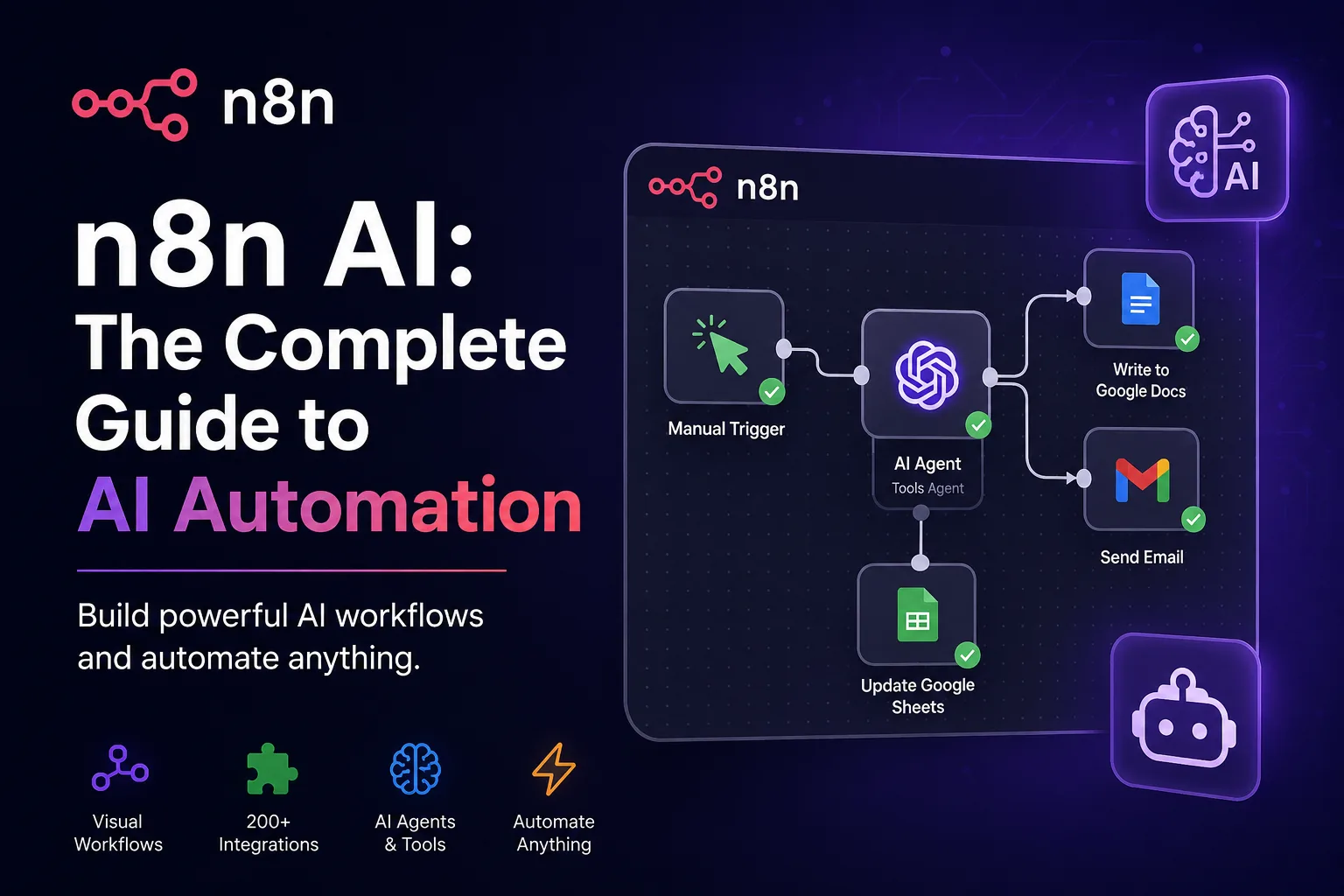
Most automation platforms are excellent at moving data from A to B when the rules are obvious. A new row in a sheet triggers an email. A form submission creates a CRM contact. A scheduled webhook pulls invoice data. This works until the real world intervenes and the input is messy, the intent is unclear, or the next action depends on context rather than a fixed condition.
n8n AI is built for that second case. Instead of forcing every workflow to follow rigid if-this-then-that logic, it lets a workflow interpret information, call tools, ask an LLM to make a judgement, then continue processing based on structured output. You still keep control over what runs, where data goes, and what a user can approve. The AI is just another node, not a black box that owns the entire process.
Developers, automation specialists and technical founders use n8n AI to connect language models to real business processes. This guide covers how n8n AI actually works, where agents make sense, what to build first, what breaks, and how to handle security and reliability once AI moves from a demo into production.
Quick take: n8n AI at a glance
What it is: n8n’s native AI capabilities for building intelligent automations, agents and LLM-powered workflows inside a visual editor.
Who it suits: Developers, automation engineers, technical marketers, lean operations teams and businesses wanting self-hosted AI automation.
Core strengths: Visual workflow control, custom code nodes, API flexibility, AI agent nodes, structured outputs, human approval steps, self-hosting.
Main risk: Treating LLM output as reliable without validation, retries and monitoring. AI steps fail gracefully only if you design for failure.
What is n8n AI, exactly?
n8n is an open-source workflow automation platform. It uses a node-based editor where each node represents an action, trigger, condition or data transformation. You connect nodes to build an executable workflow. It is popular with developers because it does not hide complexity behind rigid templates. You can write JavaScript, call arbitrary APIs, handle JSON directly, and run the whole thing on your own infrastructure.
n8n AI refers to the set of capabilities that allow n8n workflows to use language models, embeddings, AI agents and other machine learning services as part of that automation logic. It includes pre-built AI nodes for popular providers, the ability to call any AI API through HTTP requests, and the LangChain-based AI Agent node that can reason across tools and data sources.
n8n AI is not a separate product. It is automation logic that includes AI as a component. The workflow still has triggers, actions, branches and storage. AI sits inside that system rather than replacing it.
Traditional automation vs n8n AI automation
Traditional automation fails when the input requires judgement. n8n AI works because it can convert that judgement into structured data that a normal workflow can then process. That is the core shift.
How n8n AI actually works
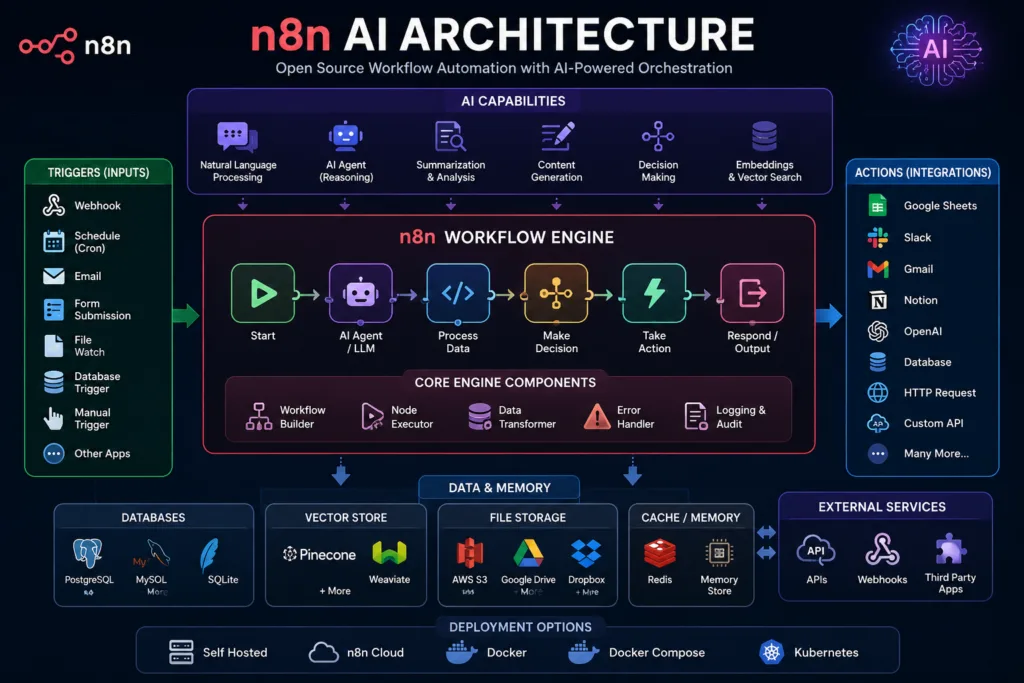
An n8n AI workflow is still a directed graph of nodes. The difference is the presence of one or more AI nodes that process natural language, images or structured prompts and return a result that the next node can use. The most common pattern looks like this.
Trigger (Webhook, Email, Schedule)
↓
Input Data (raw message, document, JSON)
↓
AI Model (LLM call, classification, extraction)
↓
Tool / API Call (CRM, database, search)
↓
Decision (score, classification, threshold)
↓
Validation (JSON schema, required fields)
↓
Action (send email, update record, notify Slack)
↓
Storage / Notification
Here is what happens at each stage. A webhook receives an incoming lead from a landing page. The input data contains the person’s name, company, message and maybe a LinkedIn URL. This is unstructured enough that a fixed rule cannot determine intent.
The next node is an AI model call. It receives a prompt that says: analyse this lead, return a score, identify buying signals, classify intent and suggest a follow-up. The model returns JSON. That JSON is validated by a schema node. If the score is above a threshold, the workflow calls a CRM API to create a deal. If not, it logs the lead and sends a Slack notification. A human may review before any final action.
Each stage can be monitored. Each AI call can time out or return nonsense. That is why a production n8n AI workflow rarely contains a single AI node and nothing else. The AI is surrounded by guardrails.
n8n AI nodes and core components
The real power of n8n AI comes from its node ecosystem. You are not limited to one provider or one model. A workflow might use OpenAI for classification, Anthropic for longer reasoning, a local model for privacy-sensitive data and an embedding model for retrieval. The nodes let you mix providers without writing separate integrations.
Common n8n AI nodes
The most frequently used n8n AI nodes include:
- AI Agent: A LangChain-based node that can use tools, memory and multiple models to complete a task.
- OpenAI / Anthropic / Google Gemini nodes: Direct model calls for chat, completion and structured output.
- Embeddings nodes: Convert text to vectors for similarity search and retrieval.
- Vector store nodes: Connect to Pinecone, Qdrant, Supabase, Postgres and similar systems.
- Text classifier: Quick classification using a language model.
- HTTP Request node: Call any AI API that does not have a dedicated node, including Azure OpenAI, Mistral, local models or custom inference endpoints.
You can also use the Code node to run custom JavaScript before or after an AI call. This is where developers usually clean prompts, validate response shapes, or transform LLM output before sending it to another service.
Example: a simple n8n AI JSON output
Here is a typical structured response from an n8n AI node when you ask the model to qualify a lead:
{
  "lead_score": 82,
  "company_size": "50-200",
  "intent": "high",
  "buying_signal": "requested pricing and mentioned timeline",
  "recommended_next_action": "schedule sales call within 24 hours",
  "reason": "explicit budget authority and short evaluation window"
}
You can then use this JSON in a Switch node. If lead_score is above 70 and intent equals high, the workflow sends the lead to a human via Slack or a CRM. If not, it adds the lead to a nurture sequence. The AI does not make the final decision; it structures the input so the workflow can decide reliably.
n8n AI agents: more than a single LLM call
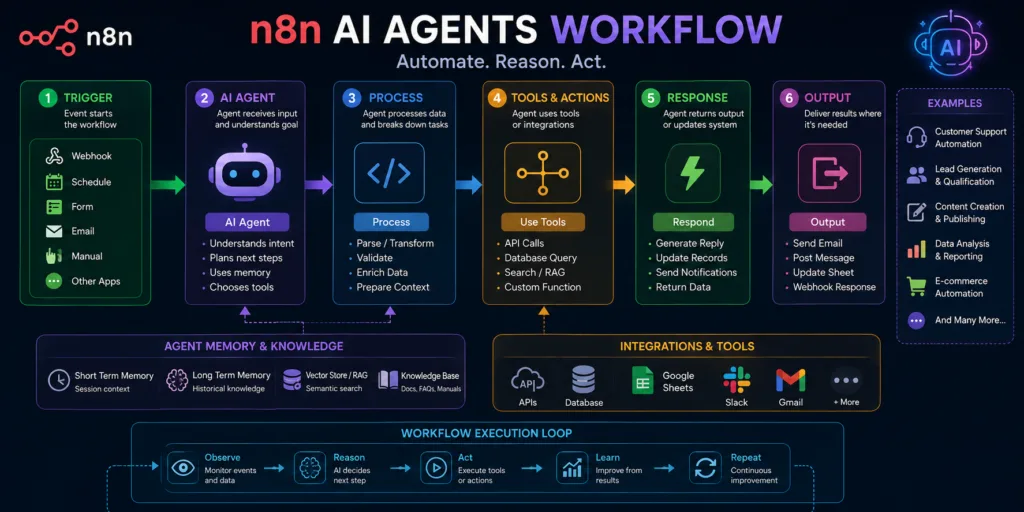
A basic LLM step takes one input, returns one output. That is useful for extraction, classification and summarisation. An AI agent is different. It can plan across multiple steps, call tools, observe results, and decide what to do next. In n8n AI, the AI Agent node allows a model to interact with connected tools such as HTTP requests, databases, calculators or custom functions.
How an n8n AI agent works in practice
Suppose you build an agent that answers operational questions about your business. It has access to a database tool, a CRM tool, a Slack tool and a web search tool. When a message arrives, the model may decide to query the database for revenue data, call the CRM for a customer record, then compose a response. It does this through a reasoning loop, not a fixed sequence of nodes.
That flexibility is powerful but also risky. Agents can loop, call the wrong tool, or return a confident but incorrect answer. The practical approach is to constrain the agent with clear instructions, limit available tools, set a maximum iteration count, and always validate the final output before any irreversible action.
In most production workflows, you do not need a fully autonomous agent. A hybrid design works better: use an LLM for the fuzzy part, then let deterministic nodes handle routing, storage and notifications.
n8n AI vs Zapier AI vs Make
Zapier, Make and n8n all offer AI features now. The difference is not just pricing or integrations. It is how much control a technical user has over the logic, data structures and execution environment.
| Capability | ⚡ n8n AI | ✨ Zapier AI | 🔷 Make |
|---|---|---|---|
| Ease of use | Medium, developer-friendly | Very easy for non-technical users | Medium, visual and logical |
| Developer control | High, custom code, APIs, Git | Limited | Moderate, some scripting |
| AI workflows | Strong, LangChain agents, custom models | AI steps and Zapier Agents, simpler | AI modules but less agent flexibility |
| Visual design | Node-based canvas | Linear builder | Visual scenario builder |
| Integrations | Large, open and custom | Largest app directory | Good, growing |
| Custom APIs | Excellent | Limited | Good |
| Self-hosting | Yes, open-source | No | Limited/enterprise |
| Complex logic | High, loops, sub-workflows, branching | Simple filters and paths | Good branching and iterators |
| Best for |
POWER USERS Technical teams, custom AI, data-heavy workflows |
EASY AUTOMATION Simple business automations |
VISUAL BUILDER Mid-complexity visual automations |
If your team is already comfortable with code, APIs and self-hosting, n8n AI is usually the strongest fit. If you need the fastest possible setup for a straightforward marketing workflow, Zapier AI can be quicker. For a deeper comparison of Zapier’s AI features, see this practical guide on Zapier AI.
Practical n8n AI workflow examples
The best way to understand n8n AI is to look at real workflow designs. These are not theoretical. Each one follows a pattern you can adapt to your own stack.
1. AI lead qualification workflow
Trigger: Webhook from a lead form or LinkedIn ad.
Input: Name, company, message, email, job title.
AI step: Classify intent, extract company size, estimate lead score, identify buying signals.
Tool/API step: Enrich from Clearbit or Apollo, then create a CRM deal if score is high.
Decision: Score above 70 routes to sales Slack channel; below routes to nurture sequence.
Output: CRM record, Slack notification, email to lead.
Potential failure: AI invents company size not in the input. You must enforce strict JSON schema and require reasoning fields.
Improvement: Add a validation step that rejects output if required fields are missing or if confidence is below a threshold.
2. AI customer support workflow
Trigger: New support email or chat message.
Input: Raw message, customer ID, previous ticket history.
AI step: Classify as billing, technical, account, cancellation or general. Extract sentiment and urgency.
Tool/API step: Search knowledge base, fetch CRM data, draft a response.
Decision: If cancellation or legal risk, route to human immediately.
Output: Draft reply saved as ticket comment, human approval step before sending.
Potential failure: AI misclassifies a billing complaint as a technical question, delaying response.
Improvement: Use two-stage classification: first broad, then detailed. Add human review for all urgent tickets.
3. AI content research workflow
Trigger: Editor submits a topic or keyword via a form.
Input: Topic, target audience, desired length, tone.
AI step: Generate research questions, search for recent information, summarise sources.
Tool/API step: Call search APIs, fetch pages, extract text.
Decision: If source quality is low, return for further research.
Output: Research brief with citations, saved to Notion or Google Docs.
Potential failure: Fabricated sources or outdated claims.
Improvement: Require source URLs before accepting any claim. Cross-check with a second model for contradiction.
4. AI email processing workflow
Trigger: Incoming email via IMAP or Gmail trigger.
Input: Sender, subject, body, attachments.
AI step: Extract action items, classify request type, identify due dates.
Tool/API step: Create tasks in project management tool, send acknowledgement.
Decision: If action item is unclear, forward to assistant for clarification.
Output: Task created with summary, deadline and original email link.
Potential failure: Incorrect date parsing from natural language.
Improvement: Use a date parsing library in a Code node after AI extraction, validate format before task creation.
5. AI data extraction workflow
Trigger: New PDF uploaded to a cloud storage folder.
Input: PDF document, invoice, contract or report.
AI step: Extract key fields, vendor name, total amount, invoice date, line items.
Tool/API step: Validate against existing database, insert into accounting system.
Decision: If confidence below threshold, send to manual review queue.
Output: Structured JSON saved to database, notification to finance team.
Potential failure: Multi-page invoices with complex tables confuse the model.
Improvement: Split document into pages or sections, process each, then merge structured results.
Copyable n8n AI prompts
Prompts inside n8n AI workflows need to be strict, repetitive and output-focused. A conversational prompt that returns a paragraph is often useless downstream. Here are six prompts you can copy and adapt.
Prompt 1: Lead Qualification
Use case: Scoring inbound leads from webforms.
Analyse this lead using the supplied company information. Return a JSON object containing lead_score, company_size, intent, buying_signal, reason and recommended_next_action. Do not invent information that is not present in the input.
Where: After the webhook receives lead data, before the CRM create node.
Prompt 2: Customer Support Classification
Use case: Routing support tickets.
You are a support classification assistant. Analyse the incoming customer message and classify it as billing, technical, account, cancellation or general. Return valid JSON only with fields: category, urgency, sentiment, summary.
Where: Immediately after a new support message trigger.
Prompt 3: Content Research
Use case: Creating research briefs without hallucinated sources.
Review the supplied research notes and identify the strongest factual claims, missing evidence, potential contradictions and topics that require further research. Do not invent sources. Return JSON with claims, gaps, contradictions, suggestions.
Where: After collecting search results and page content.
Prompt 4: Email Action Extraction
Use case: Converting emails into tasks.
Extract action items, due dates, owner names and project names from this email. Return JSON only. If no action item is present, return an empty actions array.
Where: After the email trigger, before task creation node.
Prompt 5: Data Extraction from Invoices
Use case: Pulling structured fields from PDF invoices.
Extract vendor_name, invoice_number, invoice_date, due_date, currency, total_amount and line_items from the supplied text. Return JSON. If a field is not found, use null.
Where: After PDF text extraction, before database insert.
Prompt 6: Product Feedback Triage
Use case: Analysing customer feedback from multiple channels.
Classify this feedback into feature_request, bug, pricing_concern, support_issue or general. Extract sentiment, urgency and product_area. Return valid JSON only.
Where: After feedback is aggregated from Slack, email or surveys.
n8n AI for developers
For developers, n8n AI is less about replacing code and more about reducing boilerplate around API orchestration. You can still write custom JavaScript in Code nodes, call webhooks, manipulate JSON, and interact with Git or CI/CD systems. What n8n AI adds is the ability to process unstructured inputs without writing brittle regex rules.
Common developer workflows include:
- Webhook to AI classification to GitHub issue creation
- Code review assistant that summarises pull request changes
- API monitoring alerts that use AI to interpret error patterns
- Database query results summarised into plain language
- Documentation generation from OpenAPI specs
If you already use AI coding assistants, n8n AI can complement them. For example, you can build a workflow that collects code review comments from GitHub, runs them through a model to identify recurring issues, and posts a summary back to Slack. This is similar to patterns used with GitHub Copilot or Cursor AI, but the automation is centralised and does not require a developer to manually trigger it.
n8n AI for marketing
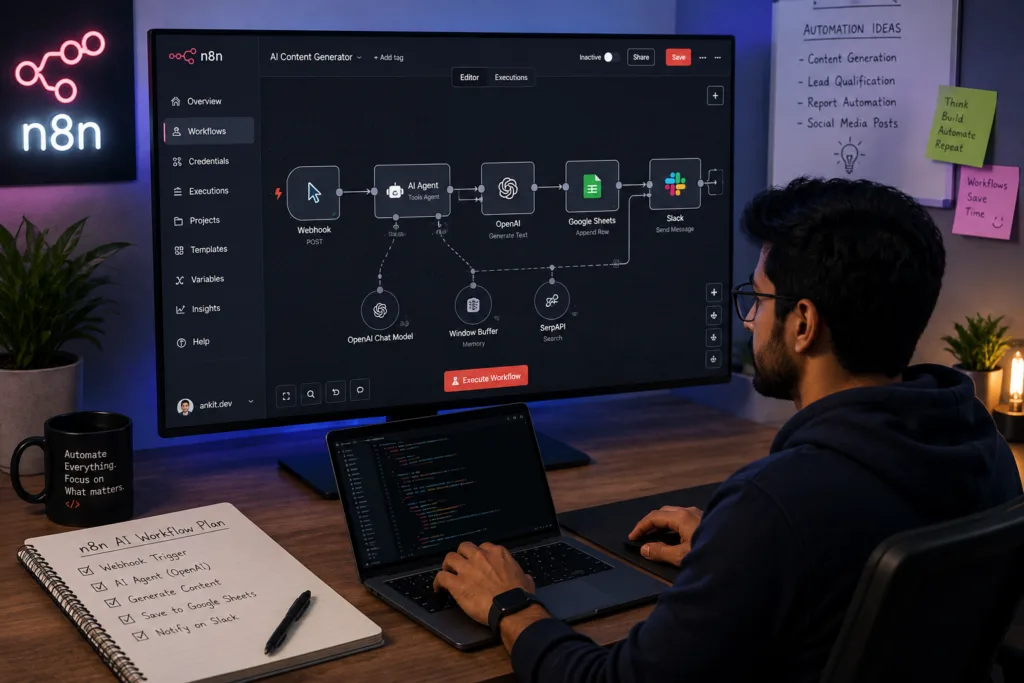
Marketing teams generate a huge amount of unstructured data: search queries, competitor pages, lead messages, campaign reports, social comments. n8n AI can transform that into briefs, scores, clusters and notifications without requiring the marketing team to understand the underlying workflow.
A practical n8n AI marketing workflow might start with a Google Search Console or Ahrefs export. The AI node clusters keywords by intent, suggests content angles, and produces a brief. That brief goes to a human editor for review, then to a CMS via API. You can connect this research layer with tools like AI in SEO practices, or use writing assistants such as Jasper AI and Notion AI for content production. The difference is that n8n AI stays in the orchestration layer, pulling data and pushing it to the right place.
n8n AI for customer support
Customer support is one of the highest-return n8n AI use cases because the input is almost always unstructured text. An incoming ticket can be classified, summarised, searched against a knowledge base, and routed to the correct team without a single human reading it first.
A production support workflow might include:
- AI intent classification node
- Sentiment analysis node
- Knowledge base vector search node
- Response drafting node
- Human approval node before sending
- CRM update node after resolution
Escalation rules still matter. A negative sentiment message mentioning cancellation should bypass the AI draft and go directly to a human. The AI is not the final decision maker for high-risk conversations.
n8n AI for research
Research workflows are where n8n AI agents shine. Instead of a single LLM call, an agent can search the web, fetch pages, extract relevant paragraphs, compare sources and return a structured brief with citations. This is similar to what Perplexity AI does at the product level, but inside n8n AI you control which sources are allowed, how many search iterations run, and what output schema is required.
For teams already exploring how AI tools work, the n8n AI approach is more transparent. You can see exactly which search query was run, which URL was fetched, and whether the final claim has a source attached. This matters when research feeds legal, financial or strategic decisions.
n8n AI for content teams
Content operations can be designed as a pipeline: research, brief, draft, review, publish, distribute, measure. n8n AI can connect each step to the next, with human checkpoints between them. For visual content, n8n AI can trigger image generation via tools like Midjourney AI, Flux AI or Canva AI. For video, it can call Runway AI or Synthesia AI. For voice, ElevenLabs AI can generate narration. The content team still reviews everything, but the production chain moves faster.
Data and security in n8n AI
Security in n8n AI depends almost entirely on how you deploy it. n8n itself is secure software, but a workflow that sends sensitive customer data to a third-party AI API has different risks than one that runs a local model on a self-hosted instance. There is no single answer.
Key security considerations:
- Store API keys in n8n credentials or environment variables, never in workflow JSON.
- Restrict which users can view and edit AI workflows, especially those with approval bypass logic.
- Log all prompts and responses for audit, but redact sensitive fields before logging.
- If using self-hosted n8n AI, keep the instance behind a VPN or private network.
- Validate model output against an expected schema before any write action.
- Consider prompt injection when untrusted inputs flow into prompts. Sanitise user input before concatenation.
- Use human approval for emails, refunds, deletions, public content and other irreversible actions.
Self-hosting n8n AI is not a magic security solution. It reduces third-party exposure but does not eliminate the need for access control, encrypted storage, and careful data retention policies. If you use external AI APIs, review their data retention and training policies before connecting production data.
7 n8n AI mistakes I would avoid
After building several n8n AI workflows, a few failure patterns appear again and again. They are easy to avoid if you know they exist.
1. Letting an LLM control everything. Use AI for judgement, not for deterministic tasks. Routing, arithmetic and date handling should use code nodes.
2. Not validating AI output. A model can return a string where you expect an integer. Use JSON schema validation or a Code node to enforce structure.
3. Putting API keys directly into workflow logic. Use n8n credentials. It is easier, safer and avoids accidental exposure in exports.
4. Ignoring failed executions. Every AI workflow will fail occasionally. Set up alerts, retries and a dead-letter handling pattern for unprocessable inputs.
5. Using AI where a simple rule works better. If a deterministic filter exists, use it. AI adds latency, cost and unpredictability.
6. Forgetting human approval for high-impact actions. Sending an external email or changing a CRM record should have a review step.
7. Building huge workflows before testing individual nodes. Test the AI node in isolation. Check the output shape. Then connect the rest.
Performance and reliability
Production n8n AI workflows need more than a working happy path. They need retries, timeouts, rate limit handling, batching where appropriate and fallback models. AI APIs can be slow. They can return malformed JSON. They can hit rate limits at the worst possible moment.
Set a timeout on every AI node. Use a retry node with exponential backoff for transient failures. If a model provider is down, fall back to a second model or a cached response. Validate before writing. Use idempotency keys when calling external APIs that might be retried. Log every prompt and response, but redact personal data.
For high-volume workflows, consider batching multiple inputs into a single AI call where the provider supports it. This reduces latency and cost. For long-running agent tasks, set a maximum iteration count to prevent runaway loops. Monitor execution time and failure rate. An AI workflow that silently produces wrong output is worse than one that fails loudly.
n8n AI workflow design checklist
| Requirement | Why It Matters | Example |
|---|---|---|
| Trigger | Starts the workflow reliably | Webhook, schedule, email listener |
| Input validation | Prevents bad data entering AI step | Check required fields, email format |
| AI model | Correct model for the task | Use a fast model for classification, larger for reasoning |
| Prompt | Clear, structured, output-focused | Return JSON only, specify schema |
| Structured output | Downstream nodes can consume response | JSON object with typed fields |
| Tool calls | Agent can take useful actions | CRM API, database, search |
| Error handling | Failures are caught and retried | Retry node, fallback model |
| Human approval | High-impact actions reviewed | Slack approval before sending email |
| Logging | Debugging and audit trail | Log prompt, response, execution time |
| Security | Credentials and PII protected | n8n credentials, redacted logs |
| Testing | Each node works before full run | Test AI node with sample input |
| Monitoring | Failures visible, not silent | Slack alert on failed execution |
Where n8n AI fits in your automation stack
n8n AI is not a replacement for your existing tools. It is the glue that lets those tools talk to each other intelligently. A typical stack looks like this:
User or System
↓
Trigger (Webhook, Schedule, CRM event)
↓
n8n Workflow (logic, branching, error handling)
↓
AI Model (LLM, agent, classification, extraction)
↓
Tools / APIs (CRM, database, Slack, email, search)
↓
Data Storage (Postgres, Supabase, S3, vector store)
↓
Business Application (Dashboard, CMS, internal tool)
This stack is powerful because you can replace any layer without rewriting the whole system. Swap OpenAI for a local model. Change Slack to Teams. Move from cloud to self-hosted. The n8n AI workflow remains the orchestrator.
Illustrative workflow complexity comparison
Illustrative scale, not benchmark data. Shows relative implementation complexity for different automation approaches.
Automation Complexity Increases With Intelligence
More capable workflows introduce more moving parts, decision points, validation requirements and potential failure modes.
n8n AI use cases by department
| Department | n8n AI Use Case | Example Workflow |
|---|---|---|
| Sales | Lead scoring, CRM enrichment, meeting briefs | Webhook → AI score → CRM create → Slack |
| Support | Ticket classification, response drafting, escalation | Email → AI classify → KB search → Draft → Approval |
| Marketing | Content research, SEO clustering, reporting | Search data → AI cluster → Brief → Notion |
| Finance | Invoice extraction, anomaly detection | PDF → AI extract → Validate → Accounting API |
| Engineering | Error triage, PR summaries, release notes | Webhook → AI summarise → GitHub issue |
| Operations | Document processing, vendor classification | Email attachment → AI extract → Database |
Where n8n AI goes next: from workflows to intelligent automation systems
The bigger shift in n8n AI has less to do with adding more models or faster nodes, and more with moving from single AI steps to systems that interpret inputs, choose tools, work with structured data and trigger business processes across multiple applications. That still falls short of an autonomous agent running a company: it is an orchestrated AI component with defined boundaries, validation checkpoints and a human approval step.
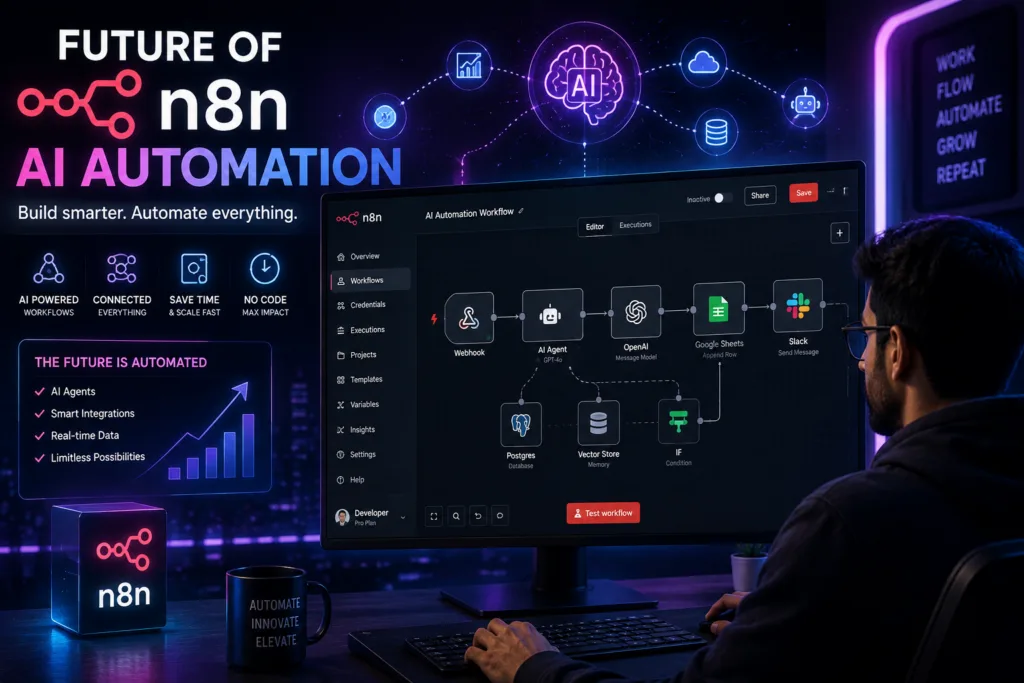
For teams willing to invest in validation, testing and monitoring, n8n AI is a practical way to get there. The workflows are visual enough for operations teams and deep enough for developers, the open-source core means you can inspect, self-host and modify it, and because the AI is just another node, you can scale it back or route around it when it is not needed.
If you are already exploring the wider AI tool landscape, this guide fits alongside resources on AI tools, ChatGPT, Google Gemini and Amazon Bedrock. For developers, n8n AI also connects well with coding assistants like Replit AI, Microsoft Copilot and the previously mentioned GitHub Copilot and Cursor AI. For visual and creative teams, the n8n AI layer can coordinate tools like Seedance 2.0, Continua AI, AI browser assistants, AI tools for students and Amazon AI tools where relevant. The point is not to collect tools but to orchestrate them cleanly.