

A practical look at browser-based AI video editing, what it’s good for, and how it fits into a modern content workflow.
You record a video. Then you need captions. Then you need to remove awkward pauses. Then someone asks for a vertical version for Reels. Then another person wants subtitles. Suddenly, one simple video turns into a collection of tasks. If you have ever tried to make a short clip for class, social media, or a client, you know exactly how this feels.
For a long time, the answer was to open a big editing suite, watch a few tutorials, and spend hours clicking around. That works for some people, but for a lot of modern creators it is overkill. A new wave of browser-based AI video tools is trying to reduce that friction, and VEED.io sits right in the middle of it.
What Is VEED.io?
VEED.io is an online video creation and editing platform that runs in your browser. It includes a mix of traditional editing tools and AI-powered features. You do not need to install heavy software or buy a high-end machine. The idea is to handle common tasks like trimming, captions, screen recording, and voice generation in one place.
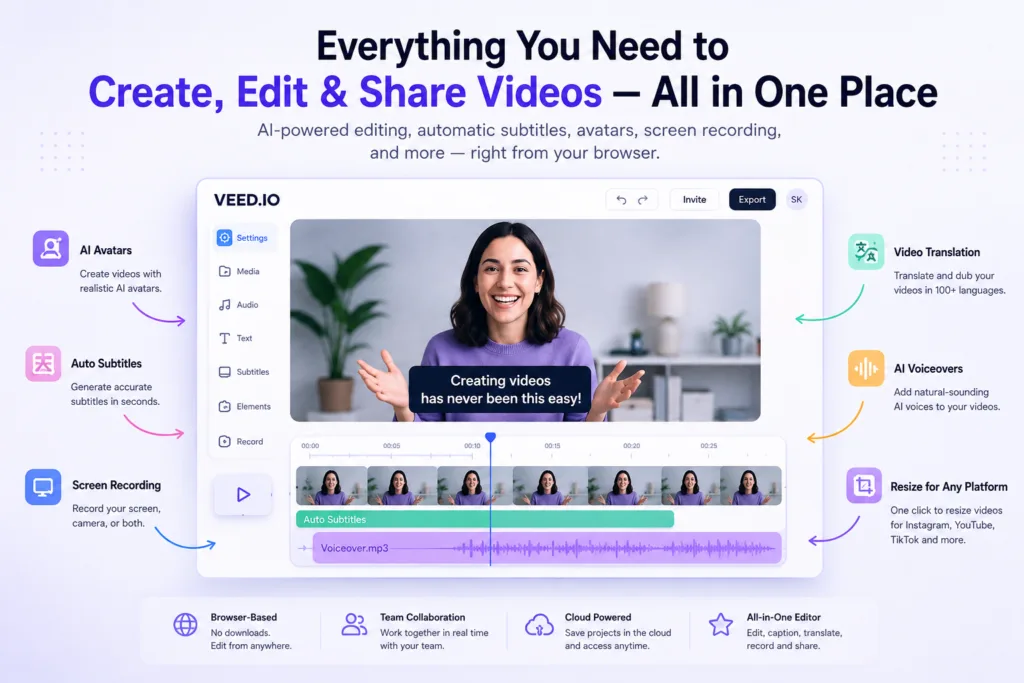
A modern video workflow can include editing, captions, screen recording, AI-assisted creation, voice generation, translation, resizing, and collaboration. VEED.io focuses on making these tasks accessible without requiring a video production background. It is not trying to be a full Hollywood editing suite. It is closer to a practical workspace for short-form content, tutorials, marketing clips, and team updates.
If you want to understand how AI tools fit into a larger creative stack, the Ultimate Guide to AI Tools (2026) is a good starting point. And if you have ever wondered what actually happens when an AI transcribes your audio or generates a caption, How AI Tools Work: What Actually Happens Behind the Screen breaks it down without the hype.
Why AI Video Tools Are Becoming Popular
There is a bigger shift happening. People want faster content production. They want easier editing. They want short-form video that works on TikTok, Reels, and YouTube Shorts. They want subtitles because so many people watch without sound. They want multilingual content without manually retyping everything. And they want browser-based tools because installing software feels like a chore.
Gen Z creators, students, marketers, and small teams are often working with limited time. Not everyone wants to become a professional editor. They just want to get a clear idea across. AI video tools are popular because they reduce repetitive work. That sounds simple, but it saves time. Automatic captions, silence removal, and one-click resizing solve real problems that used to take multiple apps.
AI does not do everything perfectly, but the tools are finally catching up to how people actually work. You need a laptop, a browser, and a decent idea, not a studio.
What Can You Actually Do With VEED.io?
Edit Videos Without a Traditional Editing Setup
VEED.io offers browser-based editing. You can trim clips, arrange them on a timeline, add text overlays, and make basic visual adjustments. It is useful for quick cuts, combining multiple clips, and adding simple branding or captions. Because it runs in the browser, you can work from almost any device with an internet connection.
That said, it is not a replacement for advanced professional editing software. Complex color grading, intricate motion graphics, and finely tuned audio mixing are still better in dedicated tools. But for a two-minute explainer or a social clip, a browser editor is often enough. The learning curve is much smaller.
Add Captions Without Typing Everything Manually
Automatic subtitles are one of the most practical AI features in any video tool. VEED.io can generate captions automatically from your audio. This is huge for accessibility, social media, and anyone watching without sound. You can edit the captions afterward, which matters because technical words, names, and acronyms often need manual fixes.
Instead of transcribing a five-minute video by hand, you generate captions in seconds and then spend a minute correcting the tricky parts. For students, teachers, and creators who publish consistently, this alone can save hours every week.
Turn Screen Recordings Into Useful Videos
Screen recording is built into many browser video tools, including VEED.io. This is perfect for software tutorials, coding walkthroughs, bug reports, product demos, and student presentations. Instead of sending a long, unedited screen capture, you can record, trim the boring parts, and add captions or annotations.
Developers often use coding assistants like Replit AI, GitHub Copilot AI, or Cursor AI to build software. But building the software is only half the story. You still need to explain what it does. A quick screen recording with captions can turn a code demo into something people actually understand. Coding tools help you build, while video tools help you demonstrate and communicate.
AI Voices, Avatars and Video Generation
VEED.io also includes AI-assisted features like text-to-speech voiceovers and AI avatars. The idea is to let you create a video from a script without recording your own voice or face. This can be helpful for internal training, product updates, or content where you do not want to be on camera.
But there is a catch. AI voices and avatars are not a replacement for human presence in every situation. They work well for straightforward, factual content. They can feel flat or awkward for emotional, opinionated, or highly personal videos. Human review is still important. You have to check the tone, pacing, and accuracy before publishing.
Different AI video tools solve different problems. ElevenLabs AI focuses on voice generation and cloning. Synthesia AI is known for AI avatar videos. Runway AI and Seedance 2.0 are more about generative video from text or images. VEED.io sits closer to the editing and production side. You might use an AI voice tool for narration, then bring that audio into VEED.io for captions and fine-tuning.
A Realistic AI Video Workflow
A practical AI-assisted video workflow in 2026 usually starts before you even open an editor.
- Start with an idea. What are you trying to explain or show?
- Write a rough script. It does not need to be perfect. AI writing tools can help here. A beginner-friendly guide like Complete ChatGPT Guide for Beginners shows how to use ChatGPT for drafting. Other options include Google Gemini and Microsoft Copilot. For marketing-focused scripts, Jasper AI is a common choice. And if you keep research and notes in one place, Notion AI can help summarize and structure your ideas.
- Record or upload footage. This could be a webcam clip, screen recording, or raw phone footage.
- Edit unnecessary sections. Remove long pauses, mistakes, and rambling.
- Generate captions. This is where AI saves the most time. Review and correct any errors.
- Improve audio. Reduce background noise and normalize volume if the tool offers it.
- Create different versions for different platforms. Resize for vertical, square, and horizontal formats.
- Review everything before publishing. Watch the final video once with sound and once without sound.
That might sound like a lot, but each step is much faster than doing it manually. The goal is not full automation. The goal is fewer repetitive tasks between you and a finished video.
Who Might Find VEED.io Useful?
| User | Possible Use | Example |
|---|---|---|
| Content creators | Short-form social clips with captions | Repurposing a YouTube video into three Reels |
| Students | Presentations and project summaries | Creating a video explainer for a class assignment |
| Developers | Software demos and bug reports | Recording a screen capture of a new feature |
| Marketers | Product teasers and social ads | Turning a blog post into a captioned video |
| Teachers | Lesson recaps and tutorial videos | Explaining a concept in under five minutes |
| Small businesses | Customer updates and simple promos | Announcing a new product without hiring a videographer |
| Remote teams | Async updates and internal training | Replacing a long meeting with a short video |
Students especially have a lot to gain from these tools. If you are looking for a broader set of study and productivity apps, Best AI Tools for Students: 18 Apps I Actually Use to Study Smarter covers more ground. And if you are creating content for search, understanding how AI fits into modern SEO is useful. AI in SEO: How to Build a Modern Content Strategy explains the connection.
VEED.io in a Bigger AI Workflow
VEED.io does not need to do everything. That is the key. In a realistic workflow, different AI tools handle different stages. A simple pipeline might look like this:
Research → AI writing → Visual creation → Voice → Video editing → Publishing
For research, Perplexity AI works well because it cites sources. For visuals, Midjourney AI and Flux AI are strong options for images. For layouts and thumbnails, Canva AI is a natural fit. And VEED.io handles the final editing and captions.
You do not have to use all of these tools at once. But knowing where each one fits helps you avoid trying to force one tool to do everything. That is where frustration comes from. A writing tool is not a video editor. A design tool is not an automation platform. Each has its own lane.
AI, Automation and Video Workflows
Automation tools can also plug into content workflows. For example, you could use n8n AI or Zapier AI to automatically save new video files to a specific folder, send a notification when captions are ready, or trigger a workflow when a new script is added to a document. This is not about fully automated video production. It is about removing small manual steps that slow you down.
Similarly, AI Browser Assistants are becoming the next step after chatbots. They can help summarize web content, extract information, or assist with research while you are working. These little conveniences add up.
What VEED.io Is Not Designed to Replace
Browser-based AI video tools like VEED.io are not designed to replace advanced film editing, professional color grading, complex motion graphics, or highly specialized production workflows. If you are working on a feature film, a high-end commercial, or a VFX-heavy project, you will still need professional software and experienced editors.
AI video editing is best for speed and accessibility. It is not a substitute for craft. There is a difference between “good enough for social media” and “broadcast quality.” Understanding that distinction will save you from unrealistic expectations.
Quick Comparison: Where Different AI Tools Fit
| Tool Category | Main Purpose | Example |
|---|---|---|
| AI Writing | Scripts and ideas | ChatGPT, Jasper |
| AI Research | Research assistance | Perplexity |
| AI Images | Visual creation | Midjourney, Flux |
| AI Voice | Voice generation | ElevenLabs |
| AI Video Generation | Generative video | Runway, Seedance |
| AI Video Editing | Editing workflows | VEED.io |
| Design | Visual layouts | Canva |
| Automation | Workflow automation | n8n, Zapier |
One more thing worth mentioning: if you are already using AWS for hosting or backend services, Amazon Bedrock provides access to generative AI models for building custom AI features. There is also a broader list of Amazon AI tools that can support cloud-based video processing or AI workflows. These are more infrastructure-level options, but they matter for teams building their own tools.
On the document side, AI is also getting better at understanding files and extracting meaning. Continua AI focuses on document intelligence, which can be useful if you are handling scripts, transcripts, or research notes alongside your video projects. It is not a video editor, but it fits into a workflow where information needs to be organized quickly.
Building a Smarter Video Creation Workflow
AI video tools are useful because they reduce repetitive work. They do not replace taste, timing, or storytelling. They simply make it easier to get from a raw recording to a shareable video without opening three different apps and manually typing every caption.
The best workflow depends on what you are trying to create. A student making a class presentation has different needs than a marketer producing weekly product updates. A developer recording a bug report has different needs than a small business owner making a local ad. The tools are flexible enough to serve all of those people, but only if you use them for the right tasks.
AI can already make a video. The better question is whether it helps you spend less time fighting the editing process and more time actually communicating the idea.